

AndrewTheGreat
Known Participant
October 2, 2024

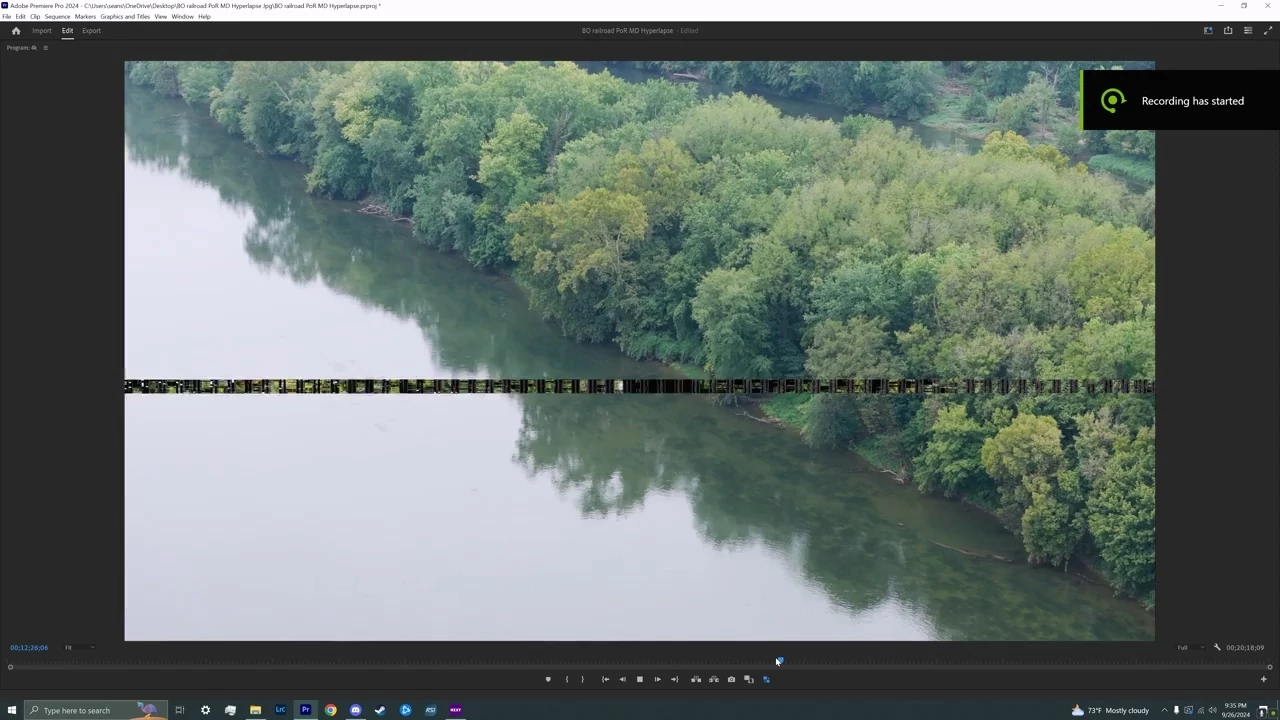
Still getting video artifacts in the Program monitor

  • October 2, 2024
  • 7 replies
  • 763 views

From time to time, practically with every project I'm still getting these video artifacts in the programm monitor. I know there was an issue with NVidia drivers, but so much time passed, and there were bugfixes confirmed in the drivers release notes, but I'm still having this issue in Premiere Pro 24.6.1 build 2.

With any footage at random moments. I'm on Nvidia Studio driver 561.09 from Sep 7.

Is that NVidia again or is it still Premiere Pro to blame? I know I can reset my video drivers with the Ctrl+Shift+Windows+B combination, but in the last project I had to use it 12 times, because the adtifacts reappeared.

Will this ever be fixed?


Look here, people are still having this issue: https://www.reddit.com/r/premiere/comments/1fre1mk/clip_thumbnail_preview_glitching_on_monitor/
7 replies

Known Participant
March 18, 2026

Hi there. Curious if you had found a definitive resolution to this issue? I’ve been having the same issues since about when you made this post, and the artifacting exists in my exports as well, however not on the raw footage files stored locally on my PC (so obviously it’s a Premiere problem). It’s becoming increasingly difficult to edit without some banding or green pixelated artifacts popping up in program monitor and exports.

AndrewTheGreat
Known Participant
March 11, 2025

Ok, I'll make it a quarter update then, since no one's paying attention.

Premiere Pro 25.1 (73), NV Studio Drivers 572.60. This bug is going nowhere, no matter what Drivers or Software versions I use. No matter what media it is. It just happens almost once every edit. I can fix it by ust changing the size of the Program monitor window. But it comes back in a while every time. Clean installs, windows reinstalls, Reddit guys having the same bug every other day... Everything here.

Stop trying to edit and EDIT!
Participant
February 4, 2025

I doubt it. Every time it goes away, then back it comes. 

AndrewTheGreat
Known Participant
January 28, 2025

I guess there will never be a fix for this one...

Stop trying to edit and EDIT!
AndrewTheGreat
Known Participant
October 16, 2024

Premiere Pro 25, Studio drivers 565.90 from 19 oct 2024. Clean install again.


My footage:

Stop trying to edit and EDIT!
AndrewTheGreat
Known Participant
October 3, 2024

Hi, @Kevin-Monahan 

I actually do the clean install every time

Stop trying to edit and EDIT!
Kevin-Monahan
Community Manager
Community Manager
October 3, 2024

Hey @AndrewTheGreat,

Have you tried a clean installation of the studio driver? Let the team know.


Thanks,
Kevin

Kevin Monahan - Sr. Community and Engagement Strategist – Adobe Pro Video and Audio