

NOBITAVFX
Known Participant
July 29, 2026

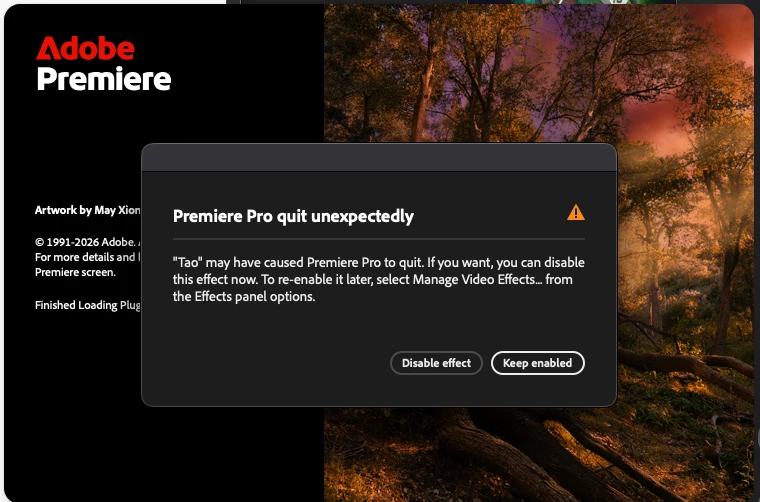
TAO PLUGIN ALWAYS CRASHING

  • July 29, 2026
  • 5 replies
  • 40 views

Hello, my render times are being so slow, even thought im always trying to render via GPU but it seems that my mac is always using CPU. 
Ive reseted the cache of everything but it seems that TAO is causing my premiere to crash.. I have no idea what TAO is 
 

    5 replies

    mattchristensen1
    Community Manager
    Community Manager
    July 30, 2026

    @NOBITAVFX Tao is a plugin from Maxon, as part of their RedGiant suite: https://www.maxon.net/en/product-detail/red-giant/particles-and-3d/tao


    Maxon is aware of this issue and I believe has put out an update to Tao, so you can either uninstall the plugin, or update it, and this should stop the crashing.

    NOBITAVFX
    NOBITAVFXAuthor
    Known Participant
    July 31, 2026

    Thank you! By disabling, my premiere is way better now! Thank you. Even the renders 

    Community Manager
    July 29, 2026

    Hi ​@NOBITAVFX,

    Welcome back to the Premiere Forums and thank you for reporting this occurrence with a screenshot. The team will need some more information to try to better assist you:

    • What is the exact version of Premiere you are using?
    • Please specify your macOS and the system chip version.
    • Do you have any After Effects media or projects connected to the Premiere project? 
      • There could be 3rd party plug-ins used in After Effects that is trying to open on launch with Premiere. We suggest trying to clear the cache and disable all plug-in for After Effects and Premiere.
    • When did this issue begin?
      • Was it related to an update or a specific version of Premiere?
    • Is this the first time this is occurring?

    Sorry for the frustration. I hope we can help you soon.

    Sincerely,

    Jonathan

    NOBITAVFX
    NOBITAVFXAuthor
    Known Participant
    July 31, 2026

    Got my problem fixed! Thanks