


Inspiring
May 31, 2026

Text is transcribing custom words into [...] and it's COMPLETELY DESTROYING the VIDEO

  • May 31, 2026
  • 1 reply
  • 30 views

This is happening on v. 26.2.2 (build 3) AND the BETA version. In fact, it’s been happening for a while and I’ve complained about the LLM on Premiere a few times. 


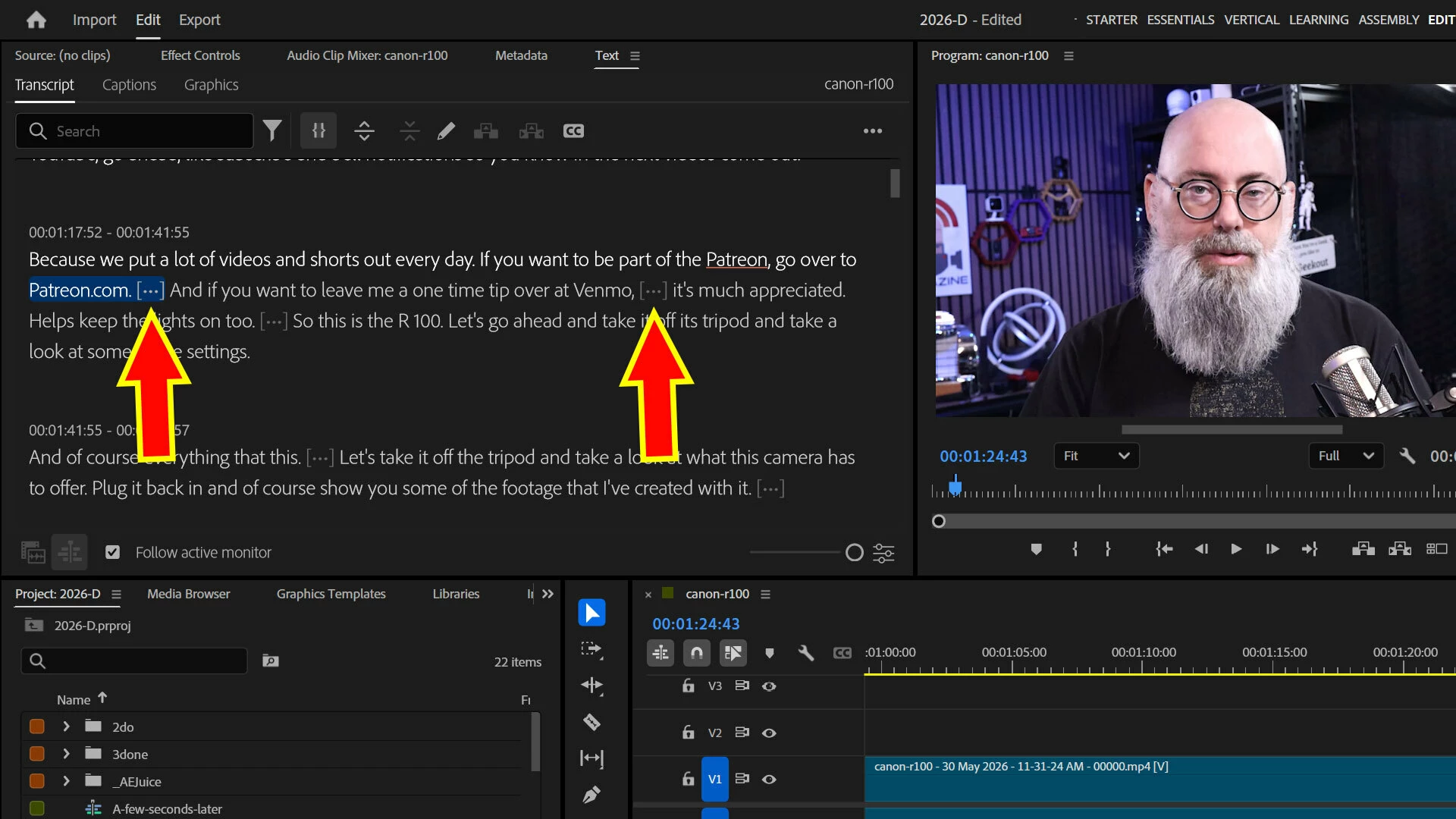
I have a very simple talking head script. And it includes saying words not in the LLM like GEEKAZINE or GEEKAZINE.COM. 


Since Premiere’s LLM doesn’t know the word, it replaces it with [...] in text. 


There is no custom add word option. There is no way to use another LLM. This is getting really frustrating!!!


The other day I went to edit a video. I went to filter out pauses. It KILLED the video because it would take out areas of clearly articulated text. 


If I correct the text in the transcript the ellipse still exists and cuts out clear text. 


I cannot trust AI text. All I use it for is editing. If I have to do anything such as transcribe for video, I go to other sites that can recognize GEEKAZINE and other words without a problem. 


    1 reply

    Amy the Stuv
    Community Manager
    Community Manager
    June 4, 2026

    Hi ​@geekazine,

    Thank you for reaching out. That sounds frustrating. It appears to be including those phrases in with the breath, but if you hover your mouse over those ellipsis, it should tell you the duration of the incorrect pauses.


    I would suggest the workaround of using the Transcript View Options in the bottom right corner of that panel and setting the minimum pause length to at least 1sec or however long you need for it to not categorize that as a pause to cut and then hit “Save.”


    Transcript View Options


    I will reach out and see if we could get the LLMs to allow some form of per project word recognition input by the user, but it is always advisable to doublecheck any action taken by AI as errors are always possible with any computation. AI integration is still a relatively new and developing field, and we thank you for your input.

    Best,

    Amy Stuvland