R._Mattar8773
Participant
September 28, 2026

Text panel: after starting playback with Spacebar, keyboard focus leaves the Transcript tab; arrow keys step the Timeline by frame and Return no longer edits the selected word

  • September 28, 2026
  • 11 replies
  • 58 views

In the Text panel > Transcript tab, keyboard navigation works until I start playback with the Spacebar. After that, keyboard focus leaves the Text panel and goes to the Timeline: Left/Right step the playhead one frame instead of navigating words, and Return no longer triggers Edit Segment (it moves the playhead to the start of the sequence). I have to click a word with the mouse to give focus back to the Text panel.

My previous workflow was fully keyboard-based: play the video, then correct the transcript word by word with Navigate to Previous/Next Word and Edit Segment, without touching the mouse. Before the update, focus stayed in the Text panel during and after playback.

Steps to Reproduce

  1. Open a sequence and generate a transcript (Text panel > Transcript tab).
  2. Click a word. Left/Right correctly select the previous/next word.
  3. Press Spacebar to play, then stop.
  4. Press Left/Right and Return.

Expected Result
Focus stays in the Text panel. Left/Right = Navigate to Previous/Next Word. Return = Edit Segment.

Actual Result
Focus moves to the Timeline. Left/Right = Step Back/Forward 1 Frame. Return does not edit the word.

Premiere Version
Premiere 26.5.1

Operating System
macOS 15.6.1 (Sequoia)

Chip (Mac only)
Apple M2 Pro, 16 GB RAM

Helpful Context

  • Started after a recent Premiere update.
  • Launching Premiere with Shift and resetting all four options did not fix it.
  • Reinstalling Premiere did not fix it.
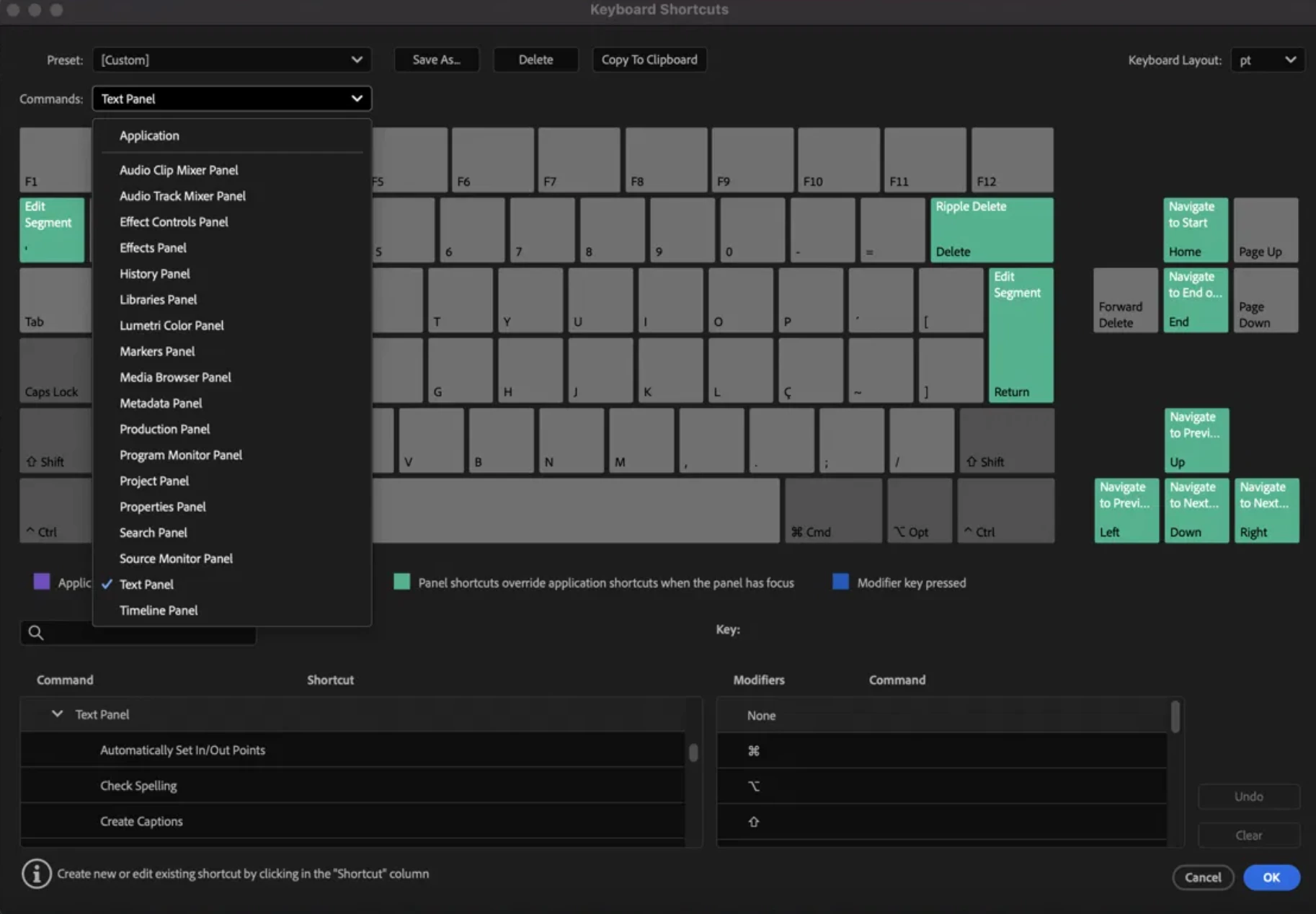
  • Keyboard Shortcuts > Text Panel: Left = Navigate to Previous Word, Right = Navigate to Next Word, Up/Down = Previous/Next Line, Return = Edit Segment. All correct (screenshot attached).
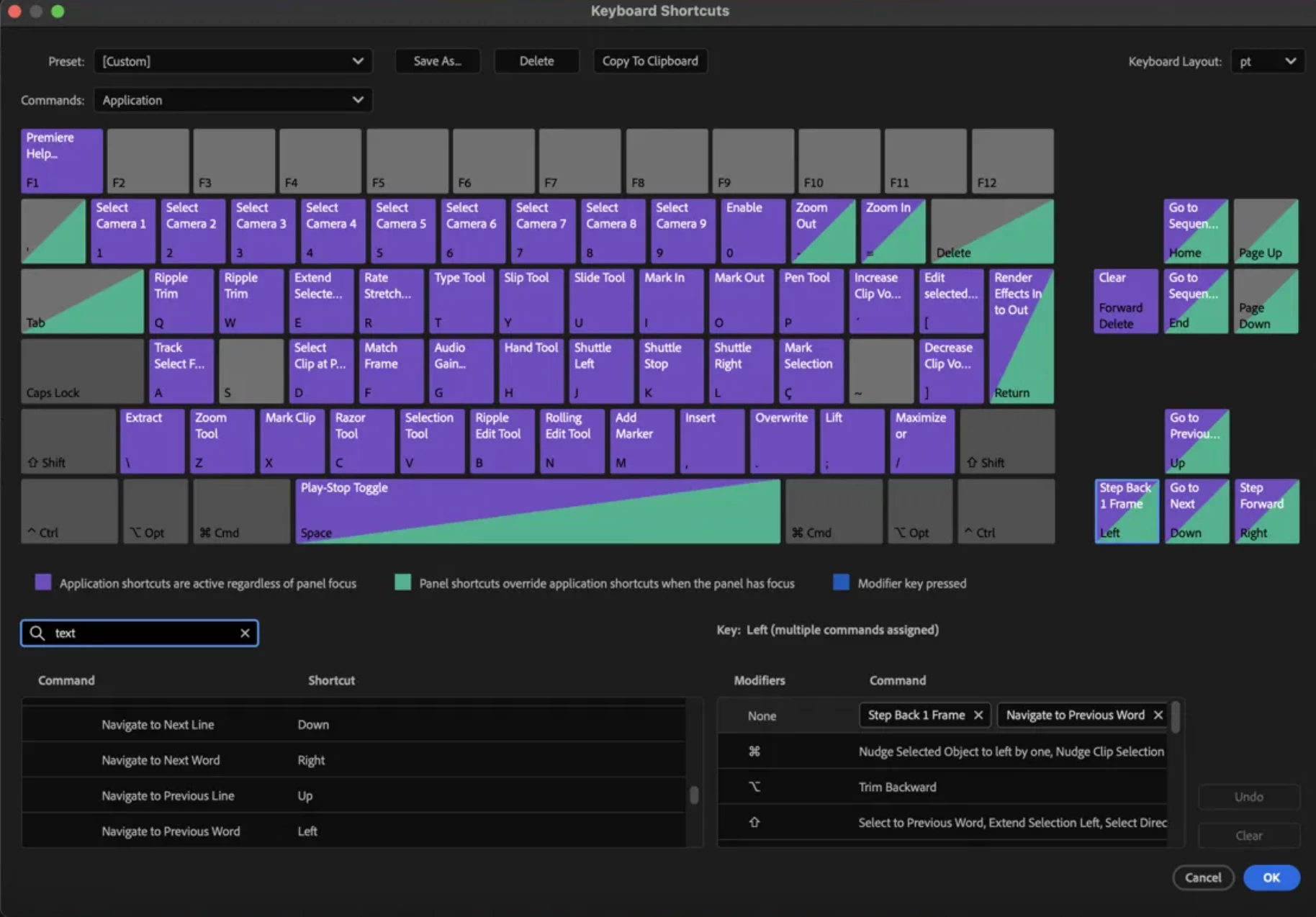
  • Keyboard Shortcuts > Application: the Left key shows "multiple commands assigned" (Step Back 1 Frame + Navigate to Previous Word) (screenshot attached).
  • Undocking the Text panel into a separate window does not fix it.
  • Remapping Return to an unused key does not fix it.
  • Related thread from 2023, marked unresolved: "Navigate to Next Word" Not Working in Text Panel (community.adobe.com/t5/premiere-pro-bugs/quot-navigate-to-next-word-quot-not-working-in-text-panel/idi-p/13754639)
  • Impact: keyboard-only transcript correction while watching the video is broken. This was a core part of my workflow.
     
  •  


    11 replies

    Stan Jones
    Community Expert
    Community Expert
    September 28, 2026

    ​@R._Mattar8773 

    Yes, confirmed in PR 26.5.1 on Win 11. 

    Works fine in 25.6.6 and, good news, Beta 27.0.0 Build 58. That increases the chances it will get into the next release.

    Stan


    Amy the Stuv
    Community Manager
    Community Manager
    September 28, 2026

    I just confirmed in Beta too. Unfortunately 26.5.2 will not have this fix, so please try Beta until the full release later this year or roll back to 26.3.2 until version 27 comes out.


    Thank you!

    R._Mattar8773
    Participant
    September 29, 2026

    Many thanks, Stan and Amy. Could I try Beta? Isn't available for me.

    Stan Jones
    Community Expert
    Community Expert
    September 28, 2026

    ​@jordant54670691 

    Your post will probably get moved to this bug report regarding this problem.

    Stan


    jordant54670691
    Participant
    September 28, 2026

    I've recently encountered an issue in Premiere Pro where the Text/Captions panel loses keyboard focus whenever I initiate playback using the Spacebar.

    My usual caption-editing workflow involves keeping the Text panel active while reviewing captions in real time. Previously, I could press Spacebar to play, press it again to pause, and immediately continue editing captions without needing to manually refocus the Text panel.

    Current behavior:

    1. I select the Text/Captions panel and begin reviewing captions.

    2. I press Spacebar to initiate playback.

    3. Keyboard focus automatically transfers from the Text panel to the Timeline (indicated by the blue active-panel outline).

    4. When I press Spacebar again to pause, focus remains on the Timeline rather than returning to the Text panel.

    5. To continue making caption corrections, I must manually click back into the Text panel.

    Expected behavior:

    Pressing Spacebar to control playback should not automatically transfer keyboard focus away from the Text/Captions panel. I should be able to play, pause, and continue working within the same panel without repeatedly having to reselect it.

    This is particularly disruptive when reviewing and correcting lengthy transcripts or caption sequences, as it introduces an unnecessary mouse interaction into what was previously a relatively seamless editing workflow.

    I don't recall this being the behavior in previous versions of Premiere Pro.

    Is this an intentional change to how panel focus is handled, a known regression, or something that can be corrected through preferences or keyboard shortcut settings?

    Amy the Stuv
    Community Manager
    Community Manager
    September 28, 2026

    Hello ​@R._Mattar8773 


    I have tested on Mac M4 Golden Gate 27 with Premiere 26.5.1 and see what you mean. 25.6.6 and 26.3.2 do not have this issue. 


    If you edit the Source transcript instead of cutting it into a sequence, then the focus stays on the Text Panel while playing and the Left and Right keys move from word to word and enter will allow you to edit that word. However, you may be best to revert to 26.3.2 until we resolve this issue so that you can edit the Timeline’s transcript, which will also edit the transcript for the corresponding Source Clip.


    Thank you for your report,

    Amy

    R._Mattar8773
    Participant
    September 28, 2026

    Hello ​@Amy the Stuv 

     Thanks a lot for your help. It helped me temporarily, but it's still a problem when the Source transcript is hours long and I need to edit some few sections of the raw video. I'd like to go back to version 25.6.6, but I need version 26.3.2.

    Do you know if this could be fixed in the next Premiere update?

    Amy the Stuv
    Community Manager
    Community Manager
    September 28, 2026

    Version 26.3.2 does not have this issue. You should be able to downgrade seamlessly from 26.5.1 without having to change project versions using Creative Cloud.

    Stan Jones
    Community Expert
    Community Expert
    September 28, 2026

    Not at home so I can’t check. Do you have selection follows play head set by any chance?

    Stan

    R._Mattar8773
    Participant
    September 28, 2026

    Selection Follows Playhead is already off (has been for a long time). The issue persists with it off: after pressing Spacebar to play, arrow keys step the Timeline by frame instead of navigating words in the Text panel.