
emrahaccar
November 25, 2025

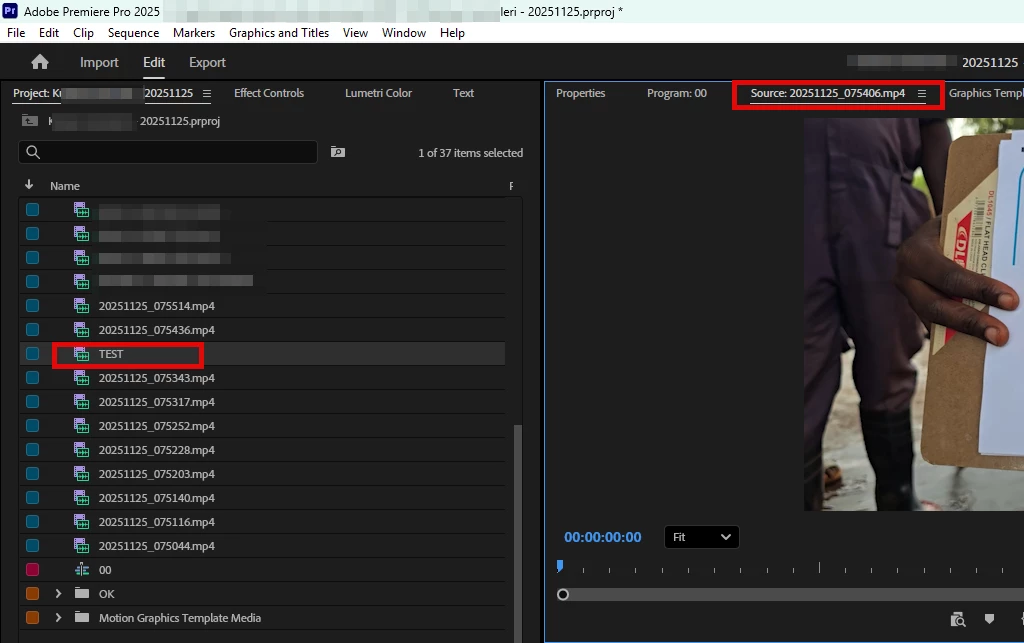
The file name change not appearing in the "source panel" heading

  • November 25, 2025
  • 3 replies
  • 232 views

In Premiere Pro version 25.6.2, when I rename my video files, the name changes in the Files section, but the original file name still appears in the header of the Source Panel.

This isn't a very new bug. I estimate this problem has been around for a few months.
866019i286206DBA68E9CC2.jpg


Pinned Reply By KatieToo

Hi all,
Thanks for taking the time to report this, and apologies for the long silence on the thread. Good news - the issue you reported here has been fixed, and the fix is available in the latest release of Premiere.

If you update and still see the problem, please reply here with your exact version (Help > About Premiere Pro) and your OS, and we will take another look.

Thanks again for flagging it - reports like yours are what get these fixed.
Katie

3 replies

KatieToo
Community Manager
KatieTooCommunity ManagerPinned
Community Manager
September 28, 2026

Hi all,
Thanks for taking the time to report this, and apologies for the long silence on the thread. Good news - the issue you reported here has been fixed, and the fix is available in the latest release of Premiere.

If you update and still see the problem, please reply here with your exact version (Help > About Premiere Pro) and your OS, and we will take another look.

Thanks again for flagging it - reports like yours are what get these fixed.
Katie

Ann Bens
Community Expert
Community Expert
November 25, 2025

Yes, I can reproduce in the beta as well.

mattchristensen
Legend
November 25, 2025

@emrahaccar Thanks for pointing this out – we're tracking this issue and hope to get it fixed soon.