FlyingFourFun
Inspiring
April 8, 2025

Timeline Performance Issues / Stalling in 25.2.1

  • April 8, 2025
  • 22 replies
  • 1822 views

I have been having issues with the timeline in PP, in version 25.2.1,  I have rendered proxy files for some h265 iPhone SDR footage.   the clips will plat for about 2 min or so, and then the program monitor starts to stutter and within a few seconds of that it stops playing completely.


I have been monitoring the Taskmanager, and when this happens the GPU resources got o zero.  There is no crash,  a wait a couple of seconds, hit play, and it will play the video fine again for another 2 min.


This happens with the proxy turned either on or off (its watermarked also).  This GPU utlization screen shot shows exactly the where the program monitor stops responding and freezes the video frame, this one is playing the H265 Iphone footage.
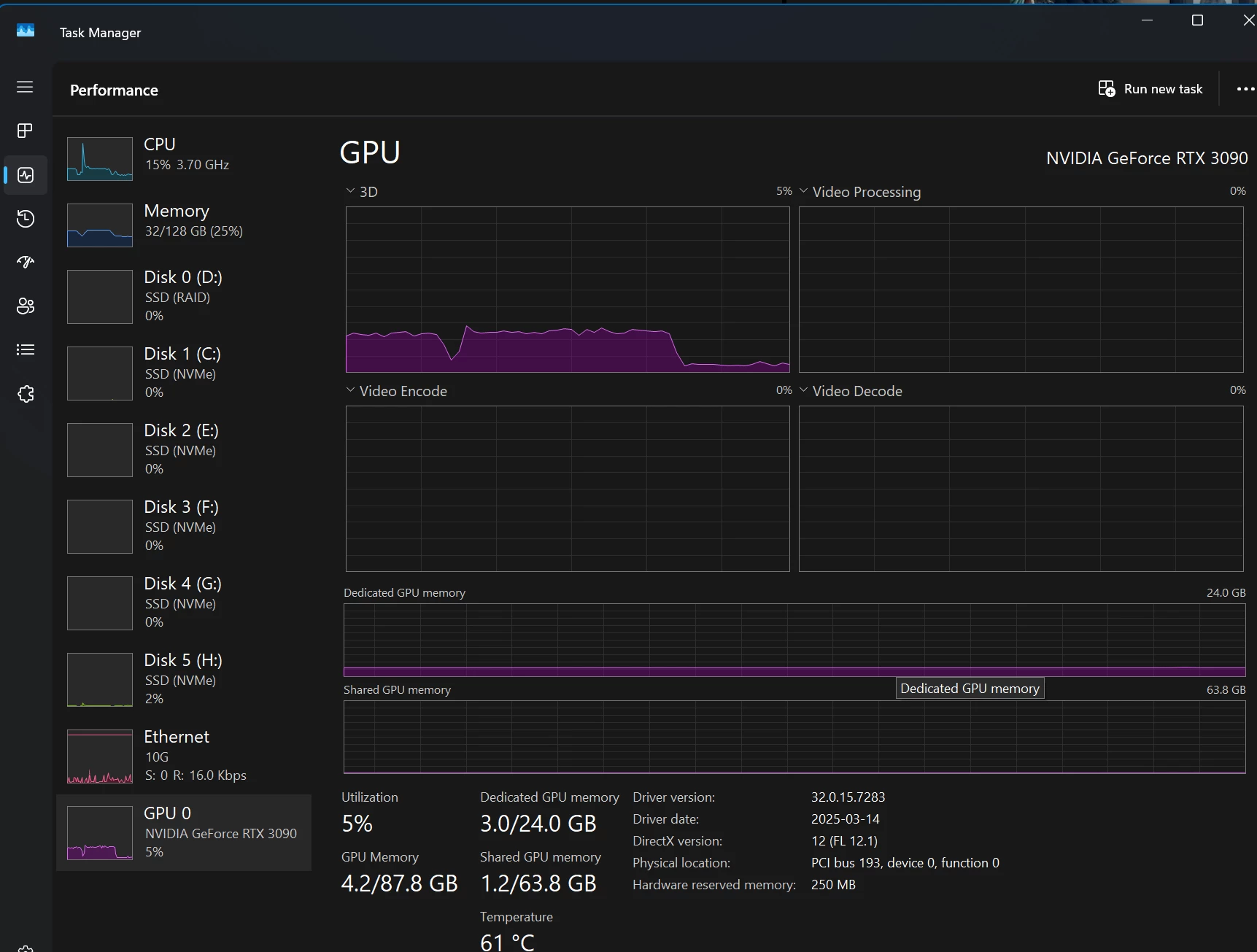


The drop off you see in the resource monitor on the GPU is exactly where the program monitor stops updating, and freezes on one of the video frames. (this is with Proxy ON)
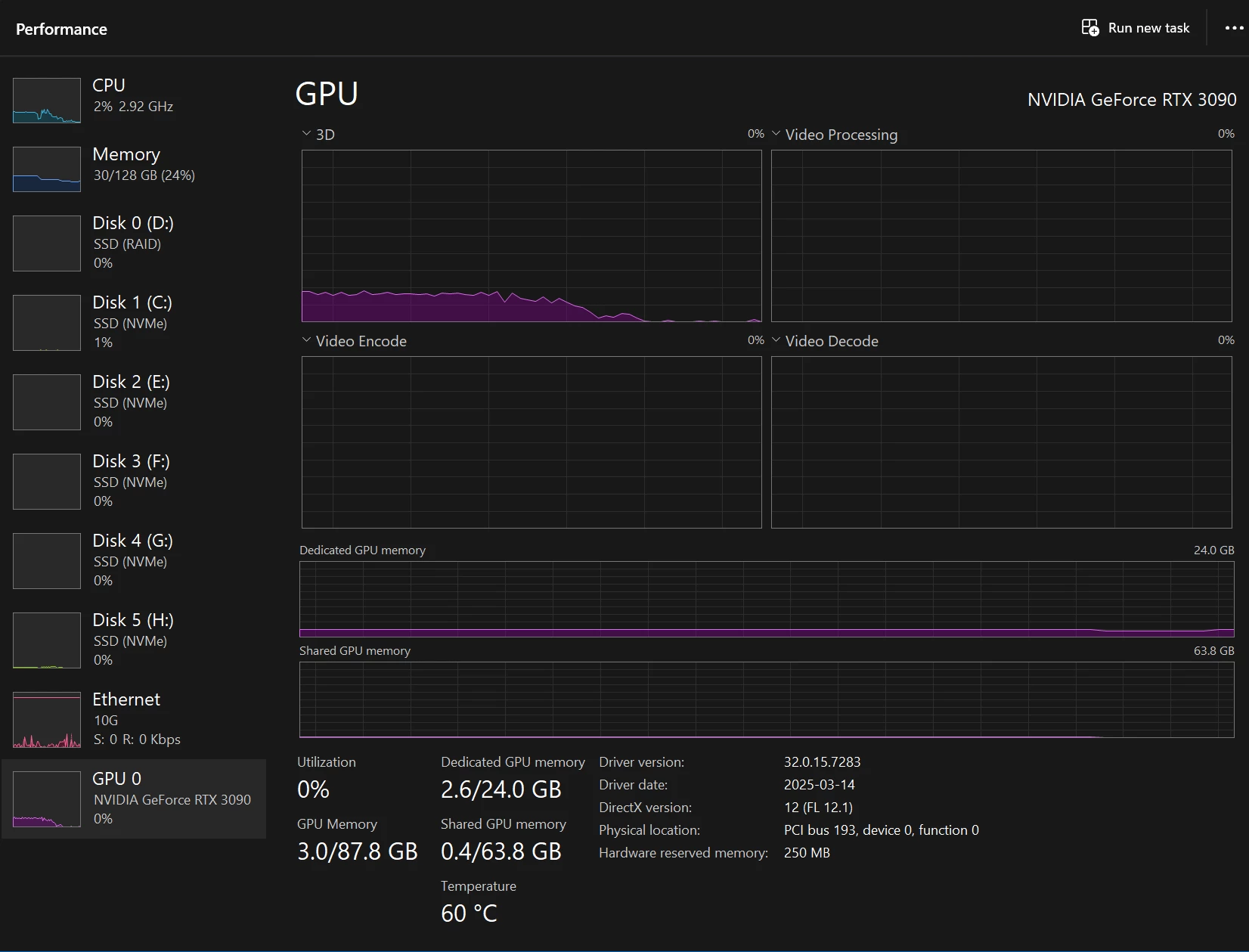

 

All the drives as Samsung NVMe.

Processor Intel(R) Core(TM) i9-10980XE CPU @ 3.00GHz 3.00 GHz
Installed RAM 128 GB (128 GB usable)
System type 64-bit operating system, x64-based processor

Operating system, is separate from all the adobe products and video files,  they are all loaded from local NVMe, NOT loading off a NAS.


This system has NEVER had an issues playing back proxy files, or any other video file I have ever used, and this is 100% new behavior with my first project after upgrading to 25.2.1


I have been letting it run when the video starts to stutter, and the utilization graph below shows whats been happening.  The Audio continues to play perfect, but the video stutters, and freezes, then starts up again,  just liek this utilization graph for the GPU shows


I have done the basics, like cache clearing etc.


Any thoughts or others experience this?

22 replies

FlyingFourFun
Inspiring
July 18, 2025

a quick update. I decided to take the plug and use download the beta tonight and retest my project file I was using - and the Beta versions of premier and media ecoder, apperently dont have this bug anymore.  Timeline playback to be honest seems very improved even as I switch back and forth between beta and non beta...


So far, it seems the next release may actualy solve this without the work arounds - fingers crossed.

FlyingFourFun
Inspiring
June 14, 2025

I have updated to Adobe Premier Pro 25.3, also reviewed the change log:

Premiere Pro feature summary (June 2025 release)


After retesting, my issue still persists, and the work around also still works and is required.  Any projection of when this might be addressed?


Community Manager
May 5, 2025

Glad to hear this worked for you @FlyingFourFun and sorry for the frustration caused. The team has logged this bug and will add it to the Known Issues documentation.

FlyingFourFun
Inspiring
May 3, 2025

@MyerPj I think this is a solid lead - hopefully the engineering team can figure out its cause and correct it....  I was almost starting to think I was crazy for thinking it was working fine before.  @Dani_V.  recommendation was the turning point for finding the cause and a work around for now...  but what a strange thing to even have happened - seems like it would be easy to avoid a frame rate mismatch.


I hope they can duplicate and debug it, as I cant imagine this one file type and workflow is the only one negatively effect.

MyerPj
Community Expert
Community Expert
May 3, 2025

Cool, well done @FlyingFourFun and @Dani_V. 

FlyingFourFun
Inspiring
May 3, 2025

@Dani_V. 

So, I think you just figured it out.....   

I checked with Media Info, and it reports both the source and proxy files as 60 FPS;


When I look at the interprete footage it shows the source as 59.9736 as the frame rate from file;


I forced the footage to be interpreted at 60 FPS in PP, created new proxy files from that interpreted at 60 FPS footage  to match what Media Info reported as the FPS;


THIS NOW PLAYS BACK FLAWLESS.


I checked with Media Info and both the source and the proxy also report as 60 FPS;


Interprete footage remains forced to 60 FPS, to match what media info displays;


Now it plays back flawless!


I watched the GPU and CPU utilization, there is NO drop to zero percent utilization in any way, not even a hickup.


It seems that PP is detecting this footage at the 59.9xxx FPS, and if it created a proxy based on that FPS it doesn't play proper.  Idon'tt know what other media types or special conditions need to occur for this to present, but with the foot filed with the iphone 16 pro, it for sure presents in this way, and the override corrects it to work proper.


I hope you can make sense of where the bug might be, or duplicate it yourself now.


FlyingFourFun
Inspiring
May 3, 2025

@MyerPj the proxy watermark is there for this test to make sure it was using the proxy file...  I use the ProRes HQ because I move tons of footage between things like Topaz etc, and it tends to keep the color shift etc very simular and easier correction.


I was very surpised to see the recomendation to use h.264 proxy - I was surpised to even see it in the list of options to be honest.


I was not having issues with the playback prior to this last upgrade,  3090 support for the codex aside,  what ever PP was doing was working, and playing back without issues.  I will be getting a 5090 as soon as its available,  but its impossible (I ony want a FE version, and in Canada only one place sells it, and it seems they are never available online or in store, but people are scalpign them for $2000 extra.  I'm not goign to play that extra for principle as I belive the scaricty / issue is the product is not making it to the shelf for normal people to buy before someone buys it to sell on ebay.


As for frame rate,  It might be lost in the wall of text in this thread but if I manual make the proxy with Media Encoder, and play it on the timeline the file plays fine on the time line.  Thats with the full 422HQ file!  If I attach it as a proxy, the file stops playing and gets jittery.  


So, to me, the system IS (and always was) capable of playign back a 422HQ file, without the 3090...  its only when its attached as a PROXY and proxy playback is enabled with litteral the same file that it gets jittery/stops playing back.


Second thign that I see is the GPU is modertly busy, but aftera  5 ish seconds, maybe a bit longer the GPU utilization drops to zero at the same time as the playback issues (which only present when in proxy playback mode) occur.


All the ways I have tested it, link back to proxy playback, the 3090 not decoding is a distraction as the file plays back perfectly fine when its not  playing in proxy mode enabled....


I belive, something has changed with how PP is manging proxy playback, or the latest windows 11 Pro for Workstation, or Nvidia Studio driver (Which has been more buggy recently) interactions have degarded playback in proxy mode - which doesnt even make sense because it should effect all playback of the same file in the same way...  which is why I come back to the software code to playback in proxy mode is degrading playback - and thats where there is a bug.


Hopefuly soon I find a 5090, and I can bypass this issue - but I suspect it will be 3 or 6 more months before stock is available, so I was hoping to get workable performance (like before) in the mean time.

MyerPj
Community Expert
Community Expert
May 1, 2025

First thing I was thinking of is the variable frame rate. Bummer on that. So, indeed, maybe that is affecting it. Also, wondering why you have ProRes HQ proxies. Since you have a watermark on them, you probably wont use them for rendering/exporting. So, can you / did you try ProRes proxy. HQ is producing 5ish times the bitrate of your actual files


Here on the forum, we are always warning people not to use h.264 proxies, so a recomendation for that came as a surprise, especially as it was simply for hardware decoding.


I'm just in the process of clean installing Window 24H2, I don't see any action on the igpu in any program. Running 4070 Nvidia currently with 12900K

Community Manager
May 1, 2025

Thank you for being thorough and providing all this information @FlyingFourFun.


Something you could try—if you go to your clips in the Project window, right-click to Modify > Interpret Footage, does the 'Frame Rate from File' match the proxy frame rate? So for example, if MediaInfo says the source and proxy file is 60.000 fps, and the 'Frame Rate from File' is reading 59.9736, or a non-standard fps with a different decimal, select 'Assume this frame rate' and write in the 60.00 fps. Does this change your playback with proxies at all? We might be able to narrow down the problem this way.

FlyingFourFun
Inspiring
April 22, 2025

@Dani_V.  I understand completely what you are saying about different sources etc.... 

What I hope you are taking away from my postings is:


1) The same media file (exact same I uploaded for you to test with) WILL NOT play smooth when you create a proxy by right clicking, and "create proxy" in the prores format.


2) When I take the exact same file, and create a proxy using the settings of 422HQ from MEDIA ENCODER manually, with a color space of HLG also, those files when attached as a proxy to the media on the timeline ALSO do not play back smooth.


3) When I put the proxy file created manually from media encoder 422HQ HLG on the timeline, it will play smooth as butter on the timeline when there is no proxy, or playback proxy is disabled.


4) When I take the manually created Proxy file, and attach the same file to it as a proxy, and turn on proxy playback, then then it will play smooth with the proxy playback disabled, but as soon as I turn on proxy playback, the file plays back jittery.


Basically, the same file in 422HQ (literally the same file) playback differently/jittery on the same timeline, same project, same sequence, depending on if its played as a proxy file proper or just a clip on the sequence.


When playing back in proxy playback mode, the GPU starts to show utilization on the 3D metric, when the play back starts to jitter and freeze, ALL GPU activity stops dead.  If I restart playback, GPU activity resumes, until it starts to jitter exactly in the same manner.  


While I fully understand the nature and formatting of media can exhibit the same symptoms, what I am seeing is the exact same media presents differently based on being played back as "proxy" or native on the time line.  When when you attach the same proxy encoded media file to itself, it doesn't play back smooth when played in proxy playback mode.


It is because of this behavior that I feel it points to the pipeline being used to preload/retrieve, and playback proxy media is somehow different.  Maybe the playback engine is not exactly the same,  maybe its actually reading and decoding both the proxy and the native clip on the time line, but only presenting to the viewer the proxy (double up the work but only show the proxy workload) as example.  I'm not 100% sure exactly why it is broken, I can only present on the symptoms, and speculate on the why.


This is why this issue is disturbing to me.  it should not be like this.