Known Participant
September 18, 2024

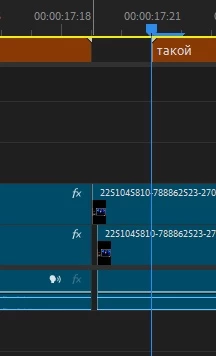
Trimming a video smaller than one frame

  • September 18, 2024
  • 11 replies
  • 1099 views

Trimming a video smaller than one frame. Pr v24.6.1.
 

11 replies

Stan Jones
Community Expert
Community Expert
September 19, 2024

Are you dragging the Ripple Edit Tool in the timeline? When I do this, it moves by full frames, and when released, it stays with the correct frame boundary.


If you do it with only one clip (no clip above it), does it do it incorrectly?


I'm assuming you don't see the problem without a caption track? Or do you?


Stan


Known Participant
September 19, 2024

@Stan Jones The problem occurs on the latest version, with a simple Ripple Trim operation, such a hole remains.
It's not clear how to reproduce it, but I also think it's related to subtitles and a remix.

R Neil Haugen
Legend
September 19, 2024

I'm with Stan ... I've never seen this, or heard of it, so knowing how it happened would be huge. Yea, this isn't right. But ... how?

Everyone's mileage always varies ...
Stan Jones
Community Expert
Community Expert
September 18, 2024

Alex,


Yes, very odd. I see that you have a caption track. Here is a thread where a user points out that the in/out set by the text-based editing appeared to be using something (audio units?) that set things in-between frames. And your screenshot certainly appears to show that the "trim" is not exactly ON a frame.

https://community.adobe.com/t5/premiere-pro-bugs/v24-6-0-transcript-using-audio-time-units-leaving-gaps-during-extract-edits/idc-p/14835543#M34634


I cannot find a way to create what you are seeing. Can you describe the steps to get there?


Stan


R Neil Haugen
Legend
September 18, 2024

But how do I know that the hole is what you're complaining about, OR how you got there?


You haven't said with any specificity.

Everyone's mileage always varies ...
Known Participant
September 18, 2024

@R Neil Haugen The screenshot shows that the video after trimming is smaller than the frame, look at the first track. And there is a hole in this place (on the timeline and in the program window).

R Neil Haugen
Legend
September 18, 2024

You apparently have hit something without saying one thing about how you did it. I've no clue whatever what you're talking about. 

So until you explain such that someone else understands, well ... we can't help, can we?

Everyone's mileage always varies ...
Known Participant
September 18, 2024

@RobShultz This is a bug, when using Ripple Trim this appears.
Post about how to cure it, not how to do it.

Known Participant
September 18, 2024

@R Neil Haugen It's a bug. And it works in Vegas Pro.

Community Expert
September 18, 2024

I'm curious what you're accomplish here. Do you realize that if this could be done that video would be shorter than 1/24th of a second?
