
AndrewTheGreat
Known Participant
December 3, 2025

Turning off transport controls bug

  • December 3, 2025
  • 6 replies
  • 228 views

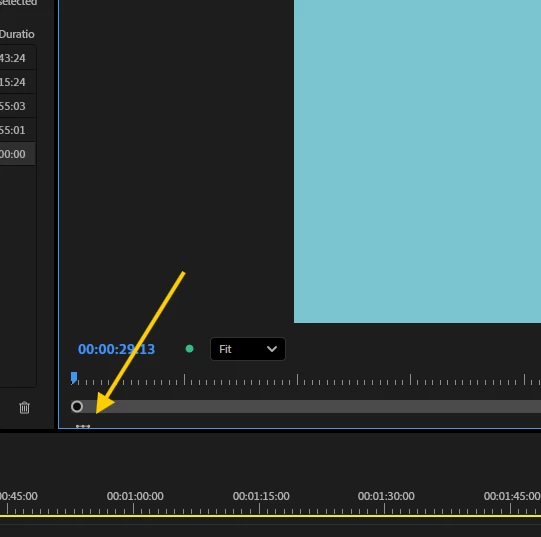
Pr 25.6.2, turning off the transport controls of the program monitor leaves this tiny guy sad and alone. Please, Adobe, bring him to his parents. I'm sure the newer versions have this bug too

AndrewTheGreat_0-1764785189642.png


6 replies

Ann Bens
Community Expert
Community Expert
January 9, 2026

Yes has been fixed.

Theresa Rostek
Community Manager
Community Manager
January 9, 2026

Hi @AndrewTheGreat,


Thank you for reporting this issue. This has been fixed in Premiere Pro beta 26.1.1 build 23. When you can, please give the fix a try and let us know if it is working as you expect.


Thanks,
Theresa

Motion Graphics, Premiere Pro
Community Manager
December 5, 2025

Thanks @AndrewTheGreat and @Ann Bens! Team has been notified now and will update thread accordingly. 

AndrewTheGreat
Known Participant
December 4, 2025

Hi, Dani, I have everything standard (i.e. recommended), so it's not the issue 100%. Plus, besides the dear Ann, I have it confirmed from a couple of colleagues too.


An addition, the behaviour is exactly this:

- Turn off the the transport controls - this bug appears, the crop\transform instrument icon remains on the interface cropped like I showed in the screenshot.

- Turn the transport controls back on - the icon remains cropped there plus the original full size icon appears in its place until you move the program monitor window. Then the remainder disappears.

Screenshot 2025-12-03 234320.png

-  Turn off the the transport controls for the third time - it's fixed and there's no crop\transform instrument icon on the interface! The happiness disappears should you move the program monitor again - the icon appears there cropped again. And it's active.


Stop trying to edit and EDIT!
Ann Bens
Community Expert
Community Expert
December 3, 2025

25.6.3 and the beta are showing this.

Guess this is a leftover from the direct manipulation icon.

Community Manager
December 3, 2025

Hi @AndrewTheGreat

Thank you for reporting a problem. I'll let the team know. 


Do you see this issue if your both your display scale and resolution are set to the 'Recommended' settings? 


Sorry for the frustration, 

Dani