Participant
August 22, 2025

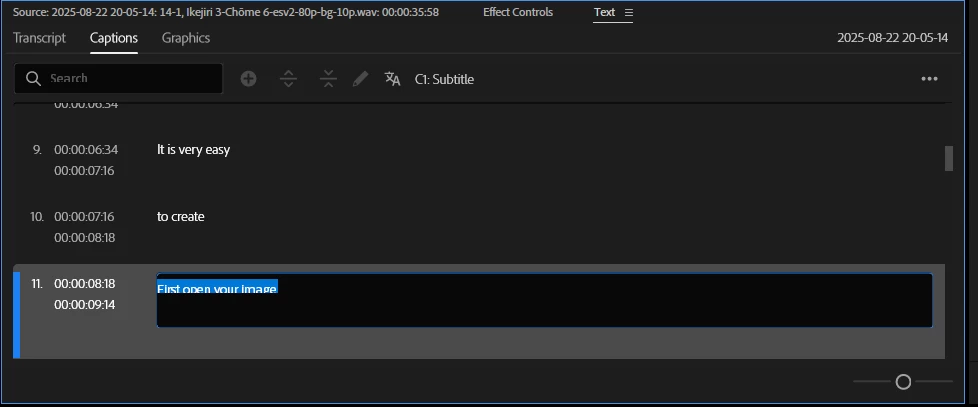
UI text is cut off in every text field.

  • August 22, 2025
  • 6 replies
  • 318 views

As you can see, the text in every field where you can write something is cut off. This makes it very annoying as sometimes I can not read what is written. Is there a fix to this?

 

6 replies

Stan Jones
Community Expert
Community Expert
August 23, 2025

The editing box is not resizable, and there was an issue in transcript editing regarding the size of the text in editing mode vs viewing when setting the slider to large font.


I am on Win 11 testing in 25.4.0, and no combination of font slider, single line vs double line made any difference for me.


@Kaze5E53,


I don't recall any other reports of this. I would first reset your workspace/try a different one. Then I'd rerest preferences, following the cautions here:

https://helpx.adobe.com/premiere-pro/using/reset-preferences.html


Stan


IanB_360
Community Manager
Community Manager
August 22, 2025

Hi @Kaze5E53 
Can you provide a screen capture of the panel you are using and let us see when you are typing to better understand how the text is being cut off? You have increased the size of the panel, correct, but it still cuts off the text.

Here to help

Ian

Kaze5E53Author
Participant
August 22, 2025

I am using Premiere Version 25.4

mattchristensen
Legend
August 22, 2025

@Kaze5E53 Hm, I'm not seeing it on my Windows system at 100%, though I don't have that resolution handy. Which version of Premiere Pro are you using?

Kaze5E53Author
Participant
August 22, 2025

Yes I am on Windows! My screen is 2560x1440 and the scaling is set to 100% (Recommended)

mattchristensen
Legend
August 22, 2025

@Kaze5E53 It looks like you're on Windows, is that right? If so I'm curious which display scaling you're set to. Go to the Settings app and I think it's under System > Display where Windows lists a percentage scale for each monitor. What is yours set to? Knowing that will help us narrow down the issue. Thanks!