
Legend
January 26, 2026

Unreadable text when editing transcript

  • January 26, 2026
  • 3 replies
  • 20 views

Some combinations of letters result in unreadable text when editing transcripts.

1. Create a Transcript form a source

2. Edit the text in the Text panel, and type a word with double Ts or double Fs - like Trainspotting or Scaffolding.

3. This creates unreadable text, with substituted letters. See images.
4. When you exit the editing mode for the text, it looks normal again. 

This makes it hard to know what you've been typing.
Adobe Premiere 26.0 and 25.x
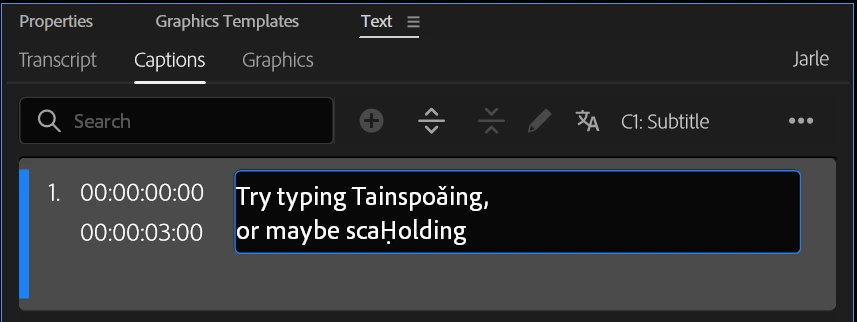
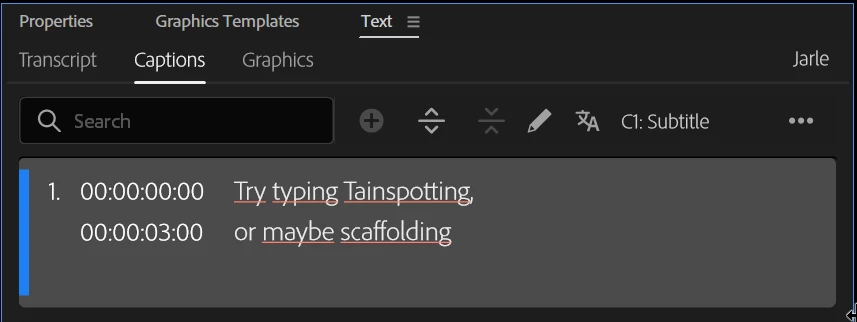
Typing.pngResult.png

3 replies

Stan Jones
Community Expert
Community Expert
January 26, 2026

@Jarle Leirpoll,


Sorry; not paying attention. I saw the captions tab. And, as you say, once you exit edit mode all is well. And I assume in the Program Monitor view.


They fixed a sizing issue a while back, but I don't recall any reports of this behavior.


Stan


Legend
January 26, 2026

This would be the UI font, right?

There's no font choices for a transcript.


But if I choose a font for Captions, it would mostly be Roboto Regular.

Stan Jones
Community Expert
Community Expert
January 26, 2026

@Jarle Leirpoll,


Weird. What font?


I can't replicate on Win11 PR 26.0.0 using Lucida Console with and without ligatures - but in that font, tt isn't a ligature anyway.


Stan