
December 26, 2025

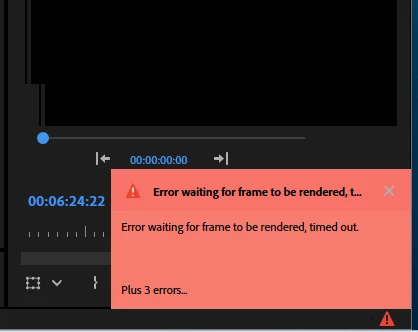
Warp Stabilizer: Error waiting for frame rendering
  • December 26, 2025
  • 3 replies
  • 259 views

Gigagoi_0-1766753416911.png

Hello. There is some weird staff goingo with warp stabilizer. I remember 2022-2023 - when I can put warp on the all my clips and my laptop "analized the background all night long and there was good. But now - if I try to analyze more than 5-10 clips in a row - I obtaining this bug reportes and analizing became aborted. So now I need to sit near my PC and every 15 mins creating the new warp tasks. THis making me sad. Could You make Warp stabilizer linear or single-thread or whatever just for more stability or tell me how the right pipeline looks like.
My old setup 2021-2025 (stabilizer works well):
Laptop hp:
Ryzen 5 5600h
16gb ddr4
laptop gpu nvidia 3050 4 gb
512 ssd
win 11

My new setup:
PC:
intel core i 5 12400
32gb ddr5
intel arc a380 6gb
1tb ssd
win11
Thank You

3 replies

GigagoiAuthor
December 26, 2025

Hello! I'm using the Adobe Premiere Pro 25. So I decided to stabilize all my 79 clips (my pipeline is always going thath way, maybe I do smth wrong)
Footages are 4k resoluton shot on sony zv-e10 mark II in sony codec (also earlier I didn't have any trouble with that -just drug and drob effect "warp stabilizer" on all my clips,  leave my stattion about few hours and all clip are stabilized. But now - there is some issue - only 10 clips at the same time can be analyzed. If for example I apply effect on 11th clip - the premiere starts to abort the any analyze processes. And I have the situation when I always linked to my workspace and check the progress every 15 min. So I tried to reduce/expand my RAM and shared memory up to 200gb, delete caches. But I can't find any solution. Next time i'll try to use Warp Stab in After Effects, but this not is enough smooth pipeline as it was earlier

Adobe Employee
December 26, 2025

Thanks for the details. Have you checked the amount of RAM utilized by Premiere Pro when this happens? Is it approaching the maximum allocated RAM for Adobe apps (Edit > Preferences > Memory)?


-Sumeet

GigagoiAuthor
December 26, 2025
Yes, Exactly! I also tried the different amounts between the minimum and
max values
Adobe Employee
December 26, 2025

Hi there,

Sorry about the poor experience. Please let us know which version of Premiere Pro you are using. Does the analysis for Warp Stabilizer get completed if it is performed one clip at a time? Also, what are the duration and resolution of these clips? We're here to help, just need more info.


Thanks,

Sumeet

Peru Bob
Community Expert
Community Expert
December 26, 2025