

Participant
October 15, 2026
Needs More Info

when i do the grade layering and copy and paste it to another shot the layers pasted in reverse
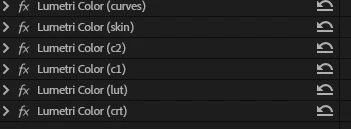
i do it from crt, lut , c1, c2 , skin , curves but it will get reversed when i copy from top side

​​​​​​1 more the keyframes are not automatically marking in when i use masking tool

 

    1 reply

    KatieToo
    Community Manager
    Community Manager
    October 15, 2026

    Hi ​@Dreamy_hoped5e8 

    Thanks for stopping by the Premiere forums and giving us a little information about your Lumetri copy/paste order issue. From what I understand, you’re expecting it to show “crt” at the top and “curves” at the bottom. 

    Can you try to copy and paste it by selecting the bottom layer first?

    Also it might help to show us how that order originally looked, as far as in what order, before you copy/paste on the other clip? 

    To better help troubleshoot further, can you answer the following:

    • Premiere Version: What is the exact Premiere version and build you’re using? Help > About Premiere or Premiere > About Premiere.
    • Setup: Please specify Windows 11/10 or Mac, plus what macOS, along with driver version/build.
      • GPU Driver (Windows only): Please let us know your video card driver version. We recommend updating to the most recent version; for NVIDIA users, we strongly recommend the Studio version of the driver.
    • Media Files: video, images, etc. and what types (can check under Media Properties)
    • Media Storage: Are your Scratch Disks set to your Documents folder or the same as project, and is this the same as the Media drive?


    Also, if you could please let us know the following, this is also helpful to know:

    • Does it affect all projects or only some? What about new projects with a few sample clips?
    • Do you recall which Premiere this was last working in, and what might have changed? Any plugins, update to computer, etc.
    • When did the problem first begin?


    As for more context, when you say it reverses when you copy “from the top side,” do you mean you copy the effects from the top of the Effect Controls stack, or from a clip on an upper video track?

    Let us know how you are selecting for that copy/paste. Is it from the effects in Effect Controls and copying, using Paste Attributes, copying the whole clip, or using a command in the Color workspace?

    • Does the order actually change in Effect Controls on the destination clip, or does the order stay the same while the image looks differently graded?
    • Does it happen every time? If possible, could you show the source and destination effect stacks before and after copying, or describe a short set of steps to reproduce it?


    Trying to understand what you mean about the mask issue, can you provide more details about what’s happening there?

    A short screen recording could be pretty helpful to show us exactly what’s happening.
    Hope we can help!
    Katie

    Translate