

rachelcenter
Legend
January 20, 2024

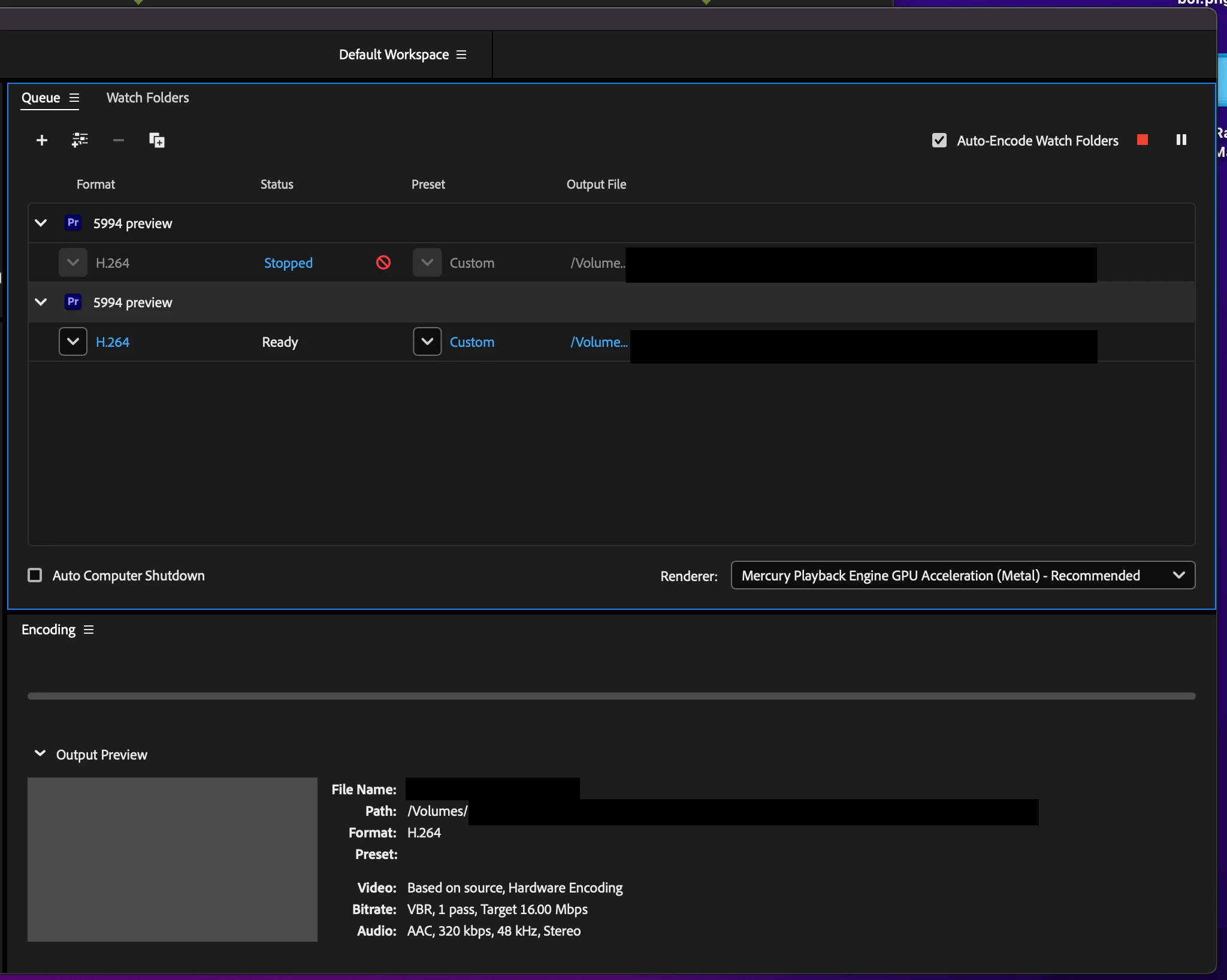
When I queue something in media encoder it just sits there forever and doesnt do anything

  • January 20, 2024
  • 22 replies
  • 2381 views

When I'm in Premiere and I queue something in media encoder it just sits there forever and doesnt do anything. I wrote to Adobe months ago about this. They told me: "Open media encoder, and go to settings or preferences and uncheck 'import sequence natively'.  Quit encoder and re open it. Now go back to premiere, hit export and press queue in encoder and it should work." It's not working.  in the time that I'm waiting for it to do anything or make any movement I could've already been 5 to 10 minutes deep into my export. It's a 16 minute sequence. I'm trying to have media encoder use the vimeo 1080 preset (which I change to 720). if I want to export the normal way without media encoder, premiere is saying the export will be 44 minutes long. I dont want to sit here for 44 minutes while premiere is locked up in an export. I could be color correcting shots while it runs throug encoder, if encoder would work. This is an ongoing reoccuring issue.

Update: I tried a different experiment. This time with a totally different project, totally different external hard drive. This project I'm testing is only 30 seconds long and its on a Sandisk 4TB Extreme Portable SSD. It took about 2-3 minutes but after that it started encoding in Media Encoder. Which tells me that the issue might have to do with Premiere Encoder struggling to encode 13 minutes worth of 4k footage on a non ssd drive.


Media Encoder Version 24.1.1 (Build 2)
Mac OS Sonoma 14.12

Memory 64gb 2667 MHz DDR4
This topic has been closed for replies.

22 replies

Bruce Bullis
Community Manager
Community Manager
January 22, 2024

Bizarre. Yes, restarting the system for luck sounds appropriate. 🙂

rachelcenter
Legend
January 22, 2024

I am going to restart my computer and re-try this experiment.

rachelcenter
Legend
January 22, 2024

That is correct. I did those steps and my project continues to sit in the queue in media encoder, with ZERO movement from the progress bar.

Bruce Bullis
Community Manager
Community Manager
January 22, 2024

Sorry, I cannot video chat. A screenie (screen movie) showing what you're seeing might be helpful; I've just confirmed correct AME behavior (i.e., "start the render job immediately"), on two different systems.

Bruce Bullis
Community Manager
Community Manager
January 22, 2024

Confirming: You've set AME's prefs to "start queue after waiting 0.0 minutes", restarted AME, cleared the queue, added new output jobs to the queue, and still nothing happens?

rachelcenter
Legend
January 22, 2024

can we videochat so i can show you whats going on?

rachelcenter
Legend
January 22, 2024

the same time delay that you told me to do from your screenshot.

Bruce Bullis
Community Manager
Community Manager
January 22, 2024

What time delay are you specifying, in the pref? 0.0 minutes?

rachelcenter
Legend
January 22, 2024

I'm testing it right now. I went to media encoder and check marked the box from your screenshot. then I quit out of encoder just for good measure. Then I reopened media encoder. then I opened premiere. and hit export at 10:42am, and chose queue in AME. And its just sitting there. Its not moving at all.  It's now 10:44am. still no movement. Timeline is 13 mins 29 seconds. I'm working off a "5tb sandisk professional g-drive armorATD" external hard drive. It's now 10:45am. still no movement from media encoder. I'm going to let it sit for 15 minutes to see if there is any movement at all.

rachelcenter
Legend
January 22, 2024

please dont mark that as correct answer. i havent even tested it yet.