
Inspiring
September 4, 2026

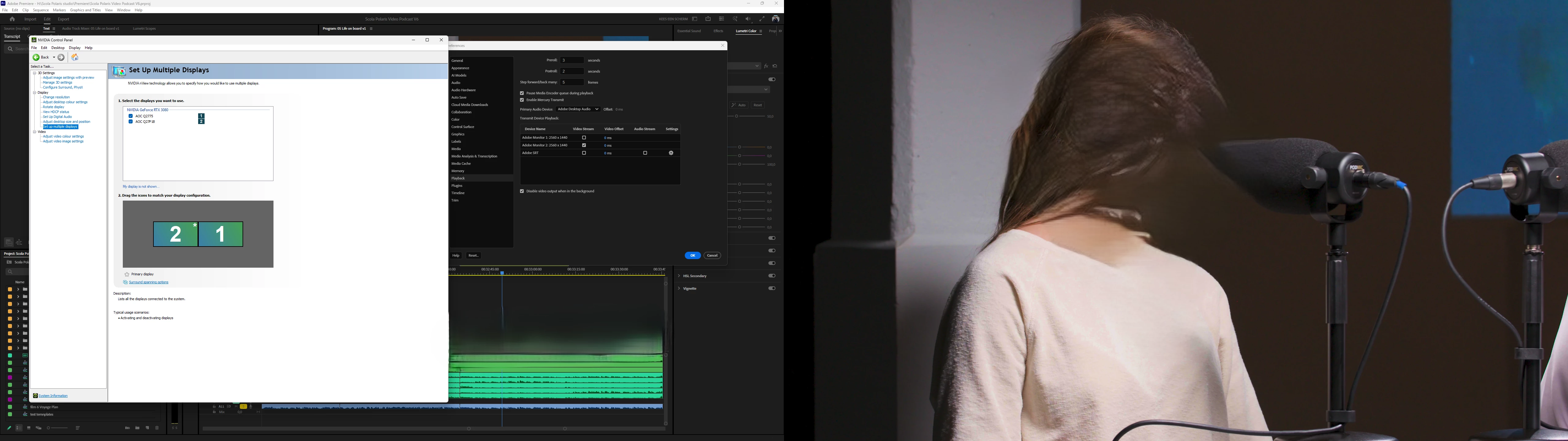
Win 11 adobe screen numbering stopped corresponding with windows screen numbering in mercury transmit
  • September 4, 2026
  • 4 replies
  • 15 views

As you can see from the attached screenshot you can see that mercury transmit has a different numbering for screens than the adobe transmit panel does.

I am reporting this as a bug as it is the first time since the introduction of mercury transmit 12 years ago that i have seen this behaviour and it is very confusing. 


Processor    12th Gen Intel(R) Core(TM) i9-12900 (2.40 GHz)
Installed RAM    64,0 GB (63,8 GB usable)
Graphics card    NVIDIA GeForce RTX 3080 (10 GB)
Intel(R) UHD Graphics 770 (128 MB)
Edition    Windows 11 Pro
Version    25H2
OS build    26200.9168
Experience    Windows Feature Experience Pack 1000.26100.344.0

Premiere 26.3.2 B2
NVIDIA Studio Driver616.56

    4 replies

    Inspiring
    September 4, 2026

    Same thing happens after switching primary  to screen 1.

    Adobe after effects has the screens switched as well.

    I have an oculus perhaps it is the meta software confusing things

    [Video] Meta Virtual Monitor - 
        device_id : 0
        driver_date : Thu Apr 23 02:00:00 2026

        revision_id : 0
        subsystem_id : 0
        subsystem_vendor_id : 0
        vendor_id : 0
        version : 15.52.32.370


    Amy the Stuv
    Community Manager
    Community Manager
    September 4, 2026

    Hello ​@Kees Veling 

    Welcome back and thank you for your bug report. This is strange indeed, as is the fun frame you included. Would you mind giving us a little information about the Monitors themselves and how they are hooked up? This could help us identify where the signals are getting crossed. 

    Monitor Info:

    • What brand of monitors are they?
    • How are they hooked up (HDMI, USBC, Thunderbolt, etc?)
    • Is there a Dock involved and if so, what brand?
    • What Resolutions are the monitors each set to?

    Hopefully we can figure out why Premiere is mixing them up. 

    Thank you,

    Amy

    Inspiring
    September 4, 2026

    Thanks for the Reply, another screenshot with the “window Identify” feature on so you see monitor numbers displayed. Also attached a SystemCompatibilityReport.txt

    Monitors are Displayport 2560x1440 @100% scaling Left AOC Q27P1B Right AOC Q2775 No dock Connected to RTX 3080 In ports 1 and 3

    Amy the Stuv
    Community Manager
    Community Manager
    September 4, 2026

    Thank you for this information to include in the report.


    I’m wondering, if you change your Primary Display to Display 1, does this change the mapping when you restart Premiere? I’m wondering if Premiere is designating your primary display as 1, and ignoring the Windows screen numbering designations.