
Zomming in timeline doesn't work in program monitor after shortcut change
Issue
When I change the default keys for zooming in the timeline to someone else, the program monitor will not follow that change.
Steps to reproduce
Change the keyboard shortcut for zoom in/out timeline from +/- to arrow up/down
Expected result vs actual result
I press up in the timeline and the the timeline zooms in, I press up in the source monitor and the timeline/time bar zooms in, I press up in the effect controls and it zooms in… all as expected
I press up in the program monitor and the playhead jumps to the previous edit point.
This is the expected behavior for the default shortcuts where up is used for the navigation between edit points but I changed that shortcut to something else:
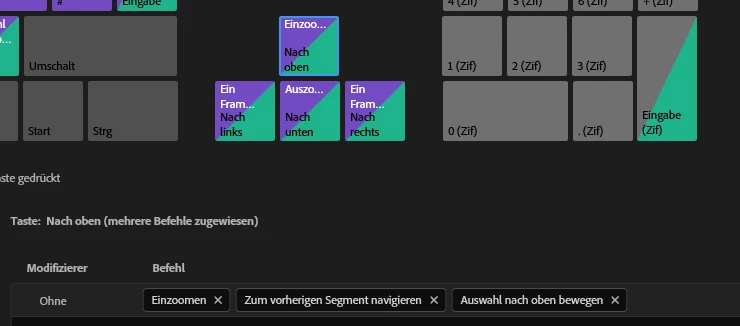
“+” is not set to any zooming, so it doesn’t zoom in the program monitor as expected.
I call this a bug because the behavior is inconsistent between the different panels and the panel itself (one key follows the new setting, the other one doesn’t/is “hard coded”). It doesn’t follow any logic.
Adobe Premiere Pro version
Had this issue for multiple versions until now v26.2.2 (Build 3)
Operating system
Had this problem both on Win10 and Win11


 AdChoices