


Participant
January 5, 2024

Adobe Substance 3D Stager Unable to Load Files above 65MB

  • January 5, 2024
  • 7 replies
  • 1531 views

Here's a screenshot of my computer specs: 
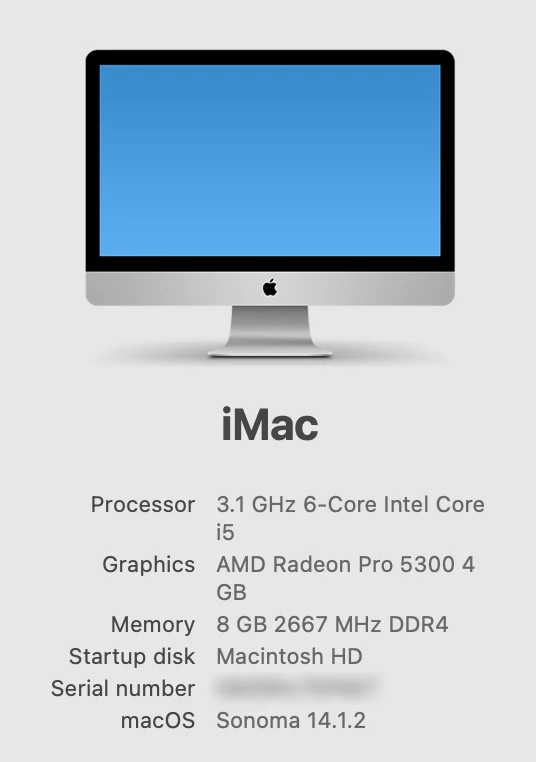
To elaborate on the title, I'm able to open existing .ssg files of any size just fine, but when I try to import  any 3D file (I've tried .stl, .obj, .mtl, .glb, and .usdc) above 65MB into Stager it won't open—the "Loading" window appears and will run indefinitely (I've had it run for more than 24 hours to see if it was just and extended loading time)

I've tried troubleshooting measures such as restarting the computer and uninstalling/reinstalling the app but nothing's working. 

7 replies

Participant
January 16, 2024

I think I may have found a solution—open the 3D file you're wanting to use in Photoshop, then go to 3D > Export 3D Layer. Change the 3D File Format dropdown to Wavefront|OBJ, click OK, close Photoshop, and open the newly exported .obj file in Stager. So far I haven't had any issues opening any files in Stager using this method.

Known Participant
January 16, 2024

This is the SAME issue many have written about....   (Me too! FYI)

Something is definitely up with IMPORT...       It just sits with LOADING...X%
(It may be files that exceed Xmb, but it's definitely not working)...
Since the update, cannot import into Stager and I use it all day, every day.

It's appearing in multiple conversations and posts, so it's unlikely that it's coincidence.....

Hopefully, they will address the issue!

-E-

Ares Hovhannesyan
Community Expert
Community Expert
January 14, 2024

I am able to open all 4 "No Open" files and get object with one basic material. The same result I have when open them in Microsoft 3D Viewer. During importing I switch off "Generate UV" and "Import Unused Materials" option and was able to shorten loading period into Stage.

Participant
January 12, 2024

Tried this same technique and, although the menu bar is responsive and I can go through the steps of saving the file, the file doesn't actually save to the computer.

DavidLloydImageworks
Inspiring
January 12, 2024

Interesting. I occassionally have these issues so I though it would be a good experiment to see if I could open one of the "no-openers". I downloaded the bear_cabin.stl and tried to open it. all I got was a totally grey viewport. I waited 10 minutes and nothing changed. I was suprised that the menu bar was responsive and so I attempted to save the file and it was sucessfully saved as a stager file. I closed out stager and opened the new stager file with teh bear cabin in it. It opened fine. see screenshot. this doesnt say anything other than this was able to be opened on a mac (m1) in a round-about way. hopefully the stager team can use this info to troubleshoot.

Participant
January 12, 2024

Further troubleshooting has revealed that the issue doesn't correlate to file size or type—I've used a computer with higher processing power and will get this issue with some files as low as 75MB. All necessary permissions have been granted as well, so that's not the issue either.

Here's a folder with some of the files in question. I've seperated them by whether or not I've been able to get them to open. 
https://shared-assets.adobe.com/link/3f7f7582-9173-4c94-6bc1-94a7258b852f

Ares Hovhannesyan
Community Expert
Community Expert
January 8, 2024

There isn't any limitation for file size for Stager but it can be result of complexity of the object. Is it possible to share file for testing? Thx