



Unable to render.
Hello,
When i try to render a scene, and whatever output setting i use (I have not tested without CPU cause of the render time ), i always get a restart message :
"The app needs to restart"
I've been on it for 4 days now, and I've tried all types of configurations without ever having success.
My configuration is :
NVIDIA Quadro P5000 12G
Intel(R) Xeon(R) CPU E5-2678 v3 @ 2.50GHz 2.50 GHz
I've tried looking at the logs bellow but can't find anything significant and the error massage are always different.
Any idea ?
THank You 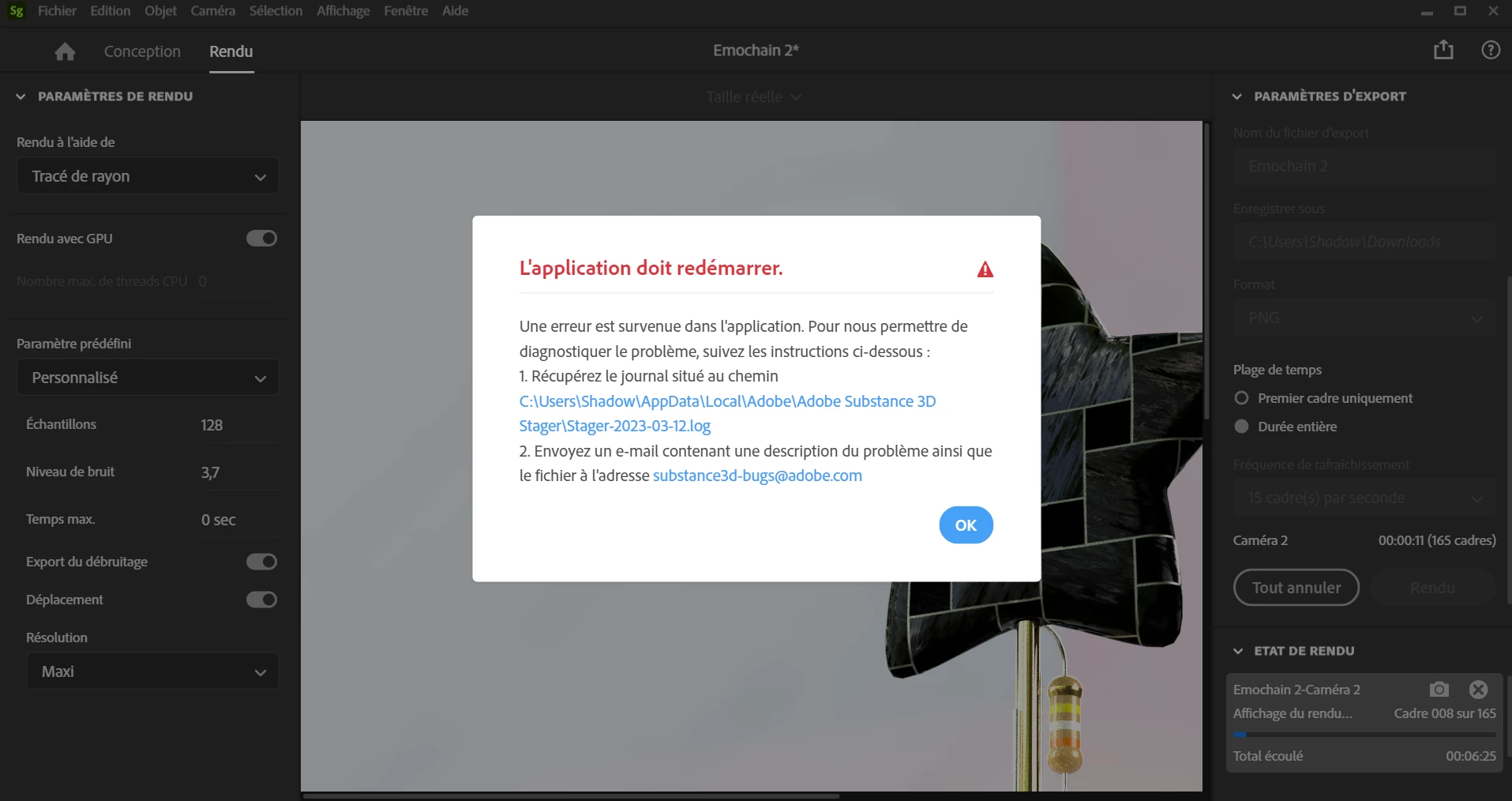
****************************************************************
* Session begin: Sun, 12 Mar 2023 07:45:53 GMT
****************************************************************
[app] load euclid-core
[app] done loading euclid-core
[app] listener attached
[app] app ready
[app] create main window
[app] app creating
Loaded module
Port loaded
Attaching logger
[core] gbl Info 1356ms>Pepper PID: 14064
[core] gbl Info 1357ms>Build Info: git_commit_hash: d63691e12070f919eb11abb7a84416615380acdc
[core] gbl Info 1357ms>Build Info: compilation_timestamp: 2023-03-06 21:10:53.297843
[core] gbl Info 1357ms>Build Info: build_version: 2.0.1-20230306.r.5479-d63691e
[core] gbl Info 1357ms>System Info: CPU Brand: Intel(R) Xeon(R) CPU E5-2678 v3 @ 2.50GHz
[core] gbl Info 1357ms>System Info: CPU Speed: 2500 MHz
[core] gbl Info 1357ms>System Info: CPU Physical Core Count: 4
[core] gbl Info 1357ms>System Info: CPU Logical Core Count: 8
[core] gbl Info 1357ms>System Info: CPU SSE4.2/AVX/AVX2 Capability: 1/1/1
[core] gbl Info 1357ms>System Info: RAM: 11 GB, (12,286 MB, 12,883,824,640 bytes)
[core] gbl Info 1357ms>System Info: OS: Windows 0.0.0
Logger attached
Initializing Aero...
Adobe Aero Plugins Path: C:\Program Files\Adobe\Adobe Substance 3D Stager\Resources\common\aero
[core] gbl Info 1408ms>D3D11: Enumerated Adapter Count: 2
[core] gbl Info 1409ms>D3D11: Adapter Description: NVIDIA Quadro P5000
[core] gbl Info 1409ms>D3D11: Adapter Vendor ID: NVIDIA
[core] gbl Info 1409ms>D3D11: Adapter Dedicated VRAM: 17037262848
[core] gbl Info 1409ms>D3D11: --------------------------------------------
[core] gbl Info 1409ms>D3D11: Adapter Description: Microsoft Basic Render Driver
[core] gbl Info 1409ms>D3D11: Adapter Vendor ID: Microsoft Basic Software Rasterizer
[core] gbl Info 1409ms>D3D11: Adapter Dedicated VRAM: 0
[core] gbl Info 1409ms>D3D11: --------------------------------------------
[core] gbl Info 1756ms>D3D11: D3D11CreateDevice created successfully with adapter `NVIDIA Quadro P5000`
[core] gbl Info 1756ms>D3D11: D3D11CreateDevice device reported VRAM size = 17,037,262,848 bytes
[core] gbl Info 1759ms>RTE Base Path Set to C:/Program Files\Adobe\Adobe Substance 3D Stager\Resources\common\aero
Aero initialized
Initializing Adobe PIE...
Adobe PIE Plugins Path: C:\Program Files\Adobe\Adobe Substance 3D Stager\Resources\common\pie
[core] pie_api Info 1791ms>Setting PIE Plugins Path to C:\Program Files\Adobe\Adobe Substance 3D Stager\Resources\common\pie\plugins
[core] pie_api Info 1793ms>Setting PIE "typesupport" Path to C:/Program Files/Adobe/Adobe Substance 3D Stager/Resources/common/pie/resources/typesupport
[core] pie_api Info 1793ms>Setting PIE CSF File to C:\Program Files\Adobe\Adobe Substance 3D Stager\Resources\common\color_profiles\dimension_default_color_profiles.csf
[core] pie_api Info 1793ms>Initializing PIE, Searching for Plugins at C:\Program Files\Adobe\Adobe Substance 3D Stager\Resources\common\pie\plugins
[core] gbl Info 6659ms>PIE Initialized with serial_executor thread of ID:20280
[core] gbl Info 6660ms>PIE Serial Executor is running in a SEPARATE thread
[core] pie_api Info 6660ms>Initializing the Default Color Spaces from a CSF File...
[core] pie_api Info 6690ms>Initialized Default Color Spaces from file `C:/Program Files\Adobe\Adobe Substance 3D Stager\Resources\common\color_profiles\dimension_default_color_profiles.csf`
[core] pie_api Info 6690ms>PIE Initialized
[core] pie_api Info 6690ms>Initializing PDFL...
[core] pie_api Info 6842ms>PDFL Initialized
[core] pie_api Info 6843ms>STUB: Setting PIE Temp Path to C:\Users\Shadow\AppData\Local\Temp (doesn't actually set anything right now)
[core] gbl Info 6843ms>Font Scan: Initializing...
[core] gbl Info 6848ms>Font Scan: Initializing...333 font families detected
[core] gbl Warn 6852ms>Font Scan: Font `Bahnschrift` detected by CoolType, but PIE says it's not available, skipping...
[core] gbl Warn 6852ms>Font Scan: Family Bahnschrift did not have any valid fonts, will not be added.
[core] gbl Warn 6878ms>Font Scan: Font `Courier` detected by CoolType, but PIE says it's not available, skipping...
[core] gbl Warn 6879ms>Font Scan: Family Courier did not have any valid fonts, will not be added.
[core] gbl Warn 6891ms>Font Scan: Font `Fixedsys` detected by CoolType, but PIE says it's not available, skipping...
[core] gbl Warn 6891ms>Font Scan: Family Fixedsys did not have any valid fonts, will not be added.
[core] gbl Warn 6976ms>Font Scan: Font `MS Sans Serif` detected by CoolType, but PIE says it's not available, skipping...
[core] gbl Warn 6976ms>Font Scan: Family MS Sans Serif did not have any valid fonts, will not be added.
[core] gbl Warn 6977ms>Font Scan: Font `MS Serif` detected by CoolType, but PIE says it's not available, skipping...
[core] gbl Warn 6977ms>Font Scan: Family MS Serif did not have any valid fonts, will not be added.
[core] gbl Warn 7070ms>Font Scan: Font `Small Fonts` detected by CoolType, but PIE says it's not available, skipping...
[core] gbl Warn 7070ms>Font Scan: Family Small Fonts did not have any valid fonts, will not be added.
[core] gbl Warn 7086ms>Font Scan: Font `System` detected by CoolType, but PIE says it's not available, skipping...
[core] gbl Warn 7086ms>Font Scan: Family System did not have any valid fonts, will not be added.
[core] gbl Warn 7090ms>Font Scan: Font `Terminal` detected by CoolType, but PIE says it's not available, skipping...
[core] gbl Warn 7090ms>Font Scan: Family Terminal did not have any valid fonts, will not be added.
[core] gbl Info 7165ms>Font Scan: Complete (325 families, 658 fonts)
PIE initialized
............
[core] gbl Info 1853351ms>(4/324) Denoising 128x128 tile at col x row (2 x 0) of the input 1920x1920 image.
[core] gbl Error1877141ms>EUSurface::Draw Exception: bad allocation
coreErrorMessageHandler: TOAST_INTERNAL_DRAWING_ERROR
showDialog: ERROR_GPU_DRAWING_ERROR
[core] gbl Error2009031ms>EUSurface::Draw Exception: bad allocation
coreErrorMessageHandler: TOAST_INTERNAL_DRAWING_ERROR
showDialog: ERROR_GPU_DRAWING_ERROR
[core] gbl Error2009502ms>EUSurface::Draw Exception: bad allocation
coreErrorMessageHandler: TOAST_INTERNAL_DRAWING_ERROR
showDialog: ERROR_GPU_DRAWING_ERROR
[core] gbl Error2010002ms>EUSurface::Draw Exception: bad allocation
coreErrorMessageHandler: TOAST_INTERNAL_DRAWING_ERROR
showDialog: ERROR_GPU_DRAWING_ERROR
[core] gbl Error2010502ms>EUSurface::Draw Exception: bad allocation
coreErrorMessageHandler: TOAST_INTERNAL_DRAWING_ERROR
showDialog: ERROR_GPU_DRAWING_ERROR
[core] gbl Error2011012ms>EUSurface::Draw Exception: bad allocation
coreErrorMessageHandler: TOAST_INTERNAL_DRAWING_ERROR
showDialog: ERROR_GPU_DRAWING_ERROR
[core] gbl Error2011502ms>EUSurface::Draw Exception: bad allocation
coreErrorMessageHandler: TOAST_INTERNAL_DRAWING_ERROR
 AdChoices