
Participant
June 25, 2024

All the effects applied to the clips have disappeared. This issue is occurring in all Premiere files

  • June 25, 2024
  • 11 replies
  • 1881 views

This issue is occurring in all Premiere files on my PC.

All the effects applied to the clips in my project files have disappeared.

Every file is experiencing the same problem, and this is extremely urgent for me.


The only thing I did before this issue occurred was 1. checking for updates and then,

2. selecting [Window > Workspaces > Reset to Saved Layout].
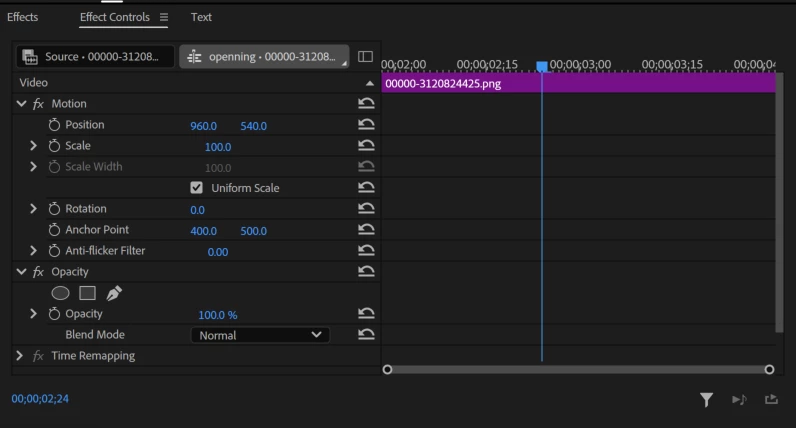
As you can see in the above picture, I had applied keyframes for size and position to the clip, but they are now missing. This is the same for all clips in all files.

Additionally, the same issue is occurring on both my Windows and Mac computers.

Even the auto-save files are same problem!!!

Please help me resolve this urgently.


Because this problem is happening in all my files, I am unable to continue working.

Please help me resolve this issue.

This topic has been closed for replies.

11 replies

Ann Bens
Community Expert
Community Expert
June 28, 2024

We are nowon build 41, so yes.

Participating Frequently
June 28, 2024

Is Beta 40 released yet? 

Ron Rigler
Community Manager
Community Manager
June 28, 2024

This issue should be resolved as of 24.6 beta 40. Please let us know if the issue persists for you.

Participant
June 27, 2024

Version 24.6.0 BETA Build 38

OPerating in Windows 10


When loading pre-existing projects, the SCALE of every clip in the project has been reset to 100.


My project has several hundred individual clips in it, and each now has to be individually resized. Really irritated with this bug.


Expected result would be for the saved file to keep the scale things were saved at.

Participating Frequently
June 27, 2024

Are they good in Beta too? 

Participant
June 27, 2024

I need your help.

Today I updated my Premier Pro Beta to the newest version 24.6, and after launching my project all of my clips lost their attributes in effect controls. For example, if I had a clip at 120% scale, and moved to the left, it is now defaulted to 100% scale, and in the center. The new update just reset all of my clips to the original attributes.


Is there any way I can have back my entire project with applied attributes? I am missing tons of work.

Loading the older saves doesn't work.


I work on Apple M3 Pro, Mac Sonoma v 14.2

Please help

Ann Bens
Community Expert
Community Expert
June 27, 2024

Moved to beta forum.

Ron Rigler
Community Manager
Community Manager
June 26, 2024

@영민38220271qomj sorry for the inconvenience. We are working on the issue and I will share with you when a fix is available in beta.

Ann Bens
Community Expert
Community Expert
June 25, 2024

Moved to beta forum.

Participant
June 25, 2024

Due to a beta version error, when I save files with all effects missing, the effects are still missing when I reopen them in Premiere Pro 2024. Instead, I found past files with effects in the auto-save and opened them in Premiere Pro 2024 to save them again. I managed to recover the files.

When will the beta version issue be resolved?

Participant
June 25, 2024

Thank you. I checked in the Premiere 2024 version, and everything seems fine.

However, I am concerned that if I open files in the beta version and save them without the effects, will the effects remain missing even after the beta version error is resolved?