
Ann Bens
Community Expert
Community Expert
July 14, 2024

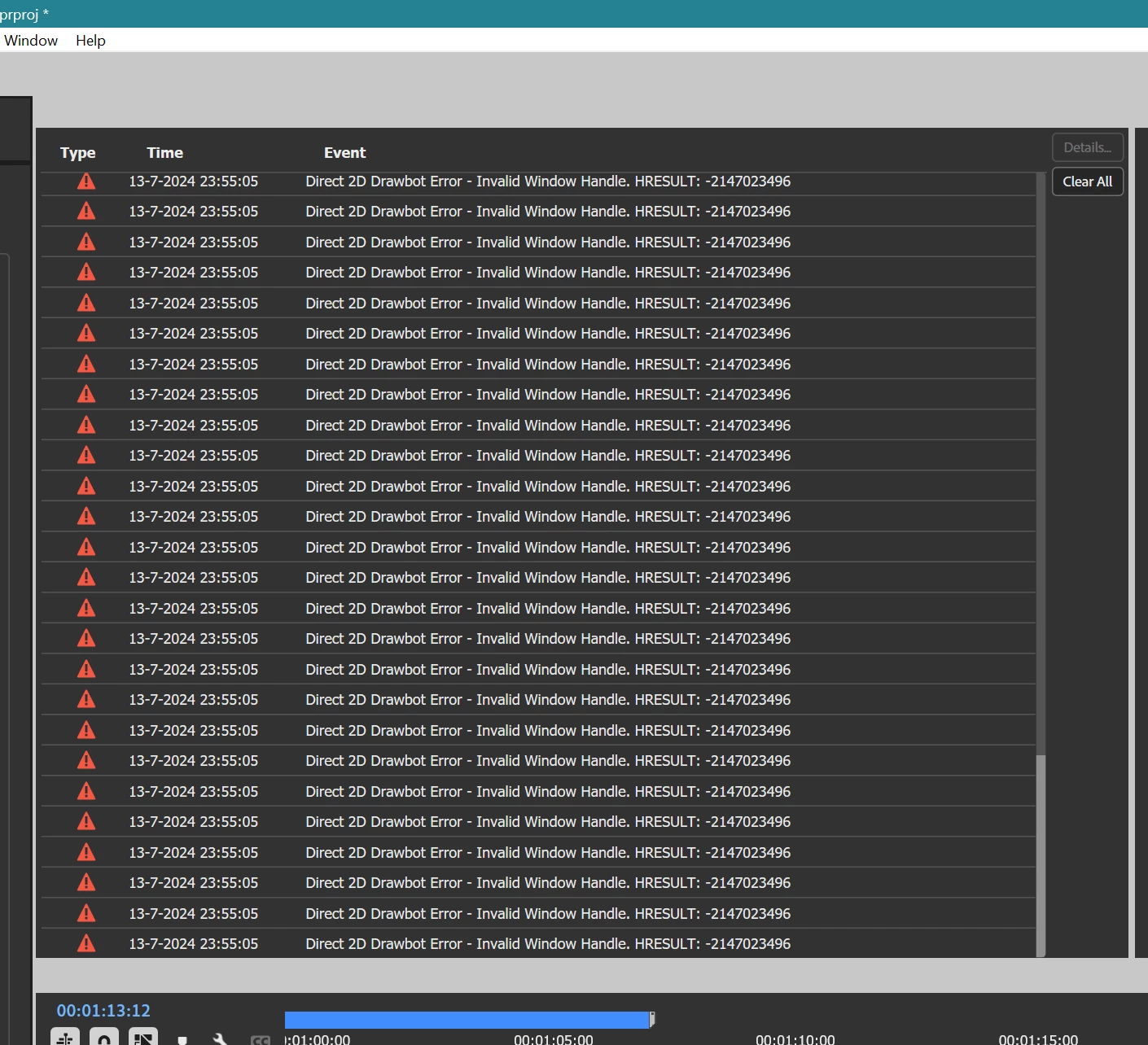
Drawing error

  • July 14, 2024
  • 24 replies
  • 2081 views

Getting massive drawing errors for a while now.

W11 last couple of builds

Rolled back nvidia driver


    24 replies

    Ann Bens
    Community Expert
    Ann BensCommunity ExpertAuthor
    Community Expert
    August 22, 2024

    Don't know if this is relevant but when opening an audio file from the timeline with the cti over the clip, in the source monitor, the cti is always at the beginning of the source monitor. Never over the clip. One needs to double-click again on the clip in the timeline to get the correct cti position.

    Adobe Employee
    August 19, 2024

    Hi Ann - 


    With latest, are the freeze scenarios you mention involving Direct2D errors from the original postings?

    To follow up, there was a fix for tooltips on the progress panel a couple of weeks back, which was affecting a bunch of audio processing scenarios, as well as a fix for errors with cases of UI resizing leading to errors reported with Direct2D Drawbot in particular which went into the beta builds starting Aug 14th.


    If any folks still observe D2D drawbot errors like in Ann's original post in other situations, or with new builds that would be good context for any remaining cases of that. 


    Where you still encounter some problems independent of those D2D errors which seem to center on particular audio scenarios, I'd recommend a conversation to focus on that, so other affected users and specialists can more readily recognize context and weigh in on that part. Feel free to email me a link and I can mention it to some audio specialists to give a closer look at that part.


    Peter

    Ann Bens
    Community Expert
    Ann BensCommunity ExpertAuthor
    Community Expert
    August 12, 2024

    @Peter_Antal 

    Same issue in 2025.

    Mucking too much about with audio files makes the UI freeze.

    Ann Bens
    Community Expert
    Ann BensCommunity ExpertAuthor
    Community Expert
    August 8, 2024

    At the time it happened the progress dashboard showed the 3 lines, not a circle.

    At present I went back to 24.5 as I need to finish this project which the last step is the audio.

    Adobe Employee
    August 8, 2024

    Hi Ann,


    Did you say progress view was inactive with that MP3 scenario? And to confirm, that case was also hitting the D2D errors?

    If more particulars for that repro emerge, I'll try to review with specialists around the audio scenarios to narrow down. On the active progress button scenario, a fix for tooltips was prepared earlier this week to start going into the beta builds.


    Peter

    Ann Bens
    Community Expert
    Ann BensCommunity ExpertAuthor
    Community Expert
    August 2, 2024

    Happened on mp3 to so guessing audio in general.

    As far as i can tell the Dashboard was in active at the time of the UI getting stuck.

    Known Participant
    August 2, 2024

    Im glad to hear yall have found a solution. Unfortantly, I have not noticed my error being connected to the progress dashboard as I never use that feature. I also have not noticed the D2D error since I first reported on it (not to say I still dont get a ton of crashes but that is a probably a different topic). 

    Ann Bens
    Community Expert
    Ann BensCommunity ExpertAuthor
    Community Expert
    August 2, 2024

    Wow @Peter_Antal  this is good news you were able to reproduce the bug.

    Will be keeping an eye on the dashboard.


    Adobe Employee
    August 1, 2024

    Hi Folks,


    We've isolated a repro for this error, and we're sorting out a mitigation.


    When performing operations like enhancing sound, the Progress dashboard starts tracking progress of the audio operations. The button for progress view creates tooltips with current progress percentage. It looks like those UI tooltips were being generated very agressively in relation to progress, which was causing available Windows OS resource pool to get temporarily exhausted(which causes UI operations to start failing), as well as broader UI slugishness.


    Until a fix is available for that, a workaround for above would be to avoid leaving the mouse hovering over the progress dashboard button while progress is occurring.


    It is possible there are other scenarios for a generic error of this sort - Do let me know if the progress dashboard button when using audio operations does not seem related to the cases you have been hitting.


    For the above scenario, switching off drawbot would indeed only change when symptoms of this problem were first detected, as the optional D2D drawbot was only the first component to detect the windows OS resource errors.


    Thanks,
    Peter

    Known Participant
    July 31, 2024

    The drawing error keeps happening, even after updating the Premiere Pro beta to the latest version. It seems to happen when Premiere freezes while I'm editing, and then it never recovers. The menus are blank, but the program registers when I click on things. I've had to memorize where the "save" button is located in the file dropdown menu because no other methods of saving work.

    This is a major bug that is making it very difficult to use Premiere Pro. I have been editing video files of mixed formats, including MXF, H.264/5, MP3, and WAV audio. The bug happens with all of these formats.
