



Extract Leaves Gaps If Setting In/Out Manually From Transcript or with Audio Time Units
Transcripts use precise timing of words, and you can see the sub-frame timing in display of the Playhead in the timeline. Zoom in to the frame level and use Left/Right in the Transcript tab. Most operations work as if the playhead is on a frame, for example, Ctl+K cuts at the end of that current frame.
However, if “automatically set in/out points” is OFF in the Transcript tab (so you can manually set in/out), you can see in the timeline that the in/out points are actually set between frames. And Extract leaves a one-frame video gap, and less than one frame audio gap. (See screenshot.) A black frame is observed on playback and in export.
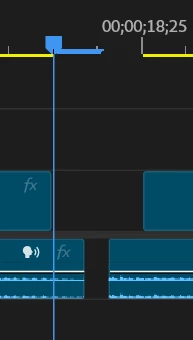
I used Extract, but Lift shows the same results when using Ripple Delete or Close Gap.
Regular Text-based editing with “automatically set in/out points” ON, sets in/out only on frames. If you use regular Text-based editing with the timeline displaying Audio Time Units, it will leave the gaps.
Workarounds: do not use Text-based editing with timeline showing Audio Time Units. Do not use transcript tab navigation to set in/out points.
See these related posts and bug report:
Steps to reproduce:
1 - Create a sequence from a clip with a transcription.
2 - Turn OFF “automatically set in/out points.”
3 – Navigate in the transcript tab using keyboard or shortcuts and set in point and then out point.
4 – Click Extract button.
5 – Zoom fully in on timeline.
Result: There is a one-frame gap in the video; less than one frame gap in audio.
Expected: No gap.
System info
Application: Premiere Pro (Beta) v25.6.0.102 AND Release 25.5.0
OS: Windows v10.0.26100, RAM: 63.80 GB GB, CPUs (logical): 16
 AdChoices