
Participant
November 6, 2024

problem with the captions section and the properties panel

  • November 6, 2024
  • 9 replies
  • 1267 views

Hi, I'm requesting help with troubleshooting an issue I'm having with the captions section and the properties panel.


I'm using Premiere Pro version 25.2.0 (build 😎.


After importing captions, the properties panel in the caption section is unresponsive. It's completely dead.

I can't click on anything, import anything, or create a new caption style.
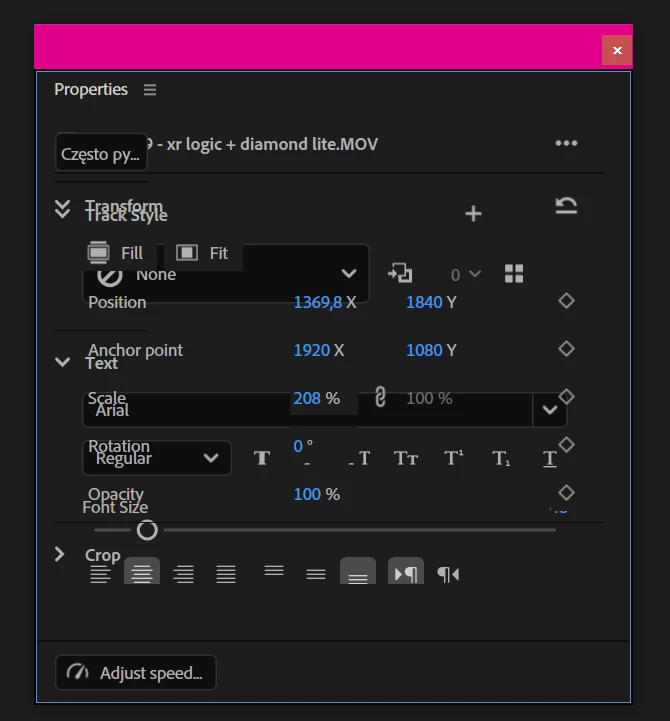
I would really appreciate any information on what to do. I've already tried resetting the system and turning the computer off and on, but nothing has worked.


Thank you in advance for your help.

Best regards,
Krystian

This topic has been closed for replies.

9 replies

Participant
November 15, 2024

When I select multiple Title clips to change their font sizes all at once, this is how the Properties panel looks like:


It does work, but it shouldn't overlay like this.

jamieclarke
Community Manager
Community Manager
November 13, 2024

Fixed in 25.2.0.10

Participant
November 11, 2024

There are two issues running effect controls and selecting source on a project created in the new Beta Version running on a MacBook Air, Apple M2, 24 GB running Sonoma 14.4.1. Generated captions are not recognized as source clips, and the only Properties options are Track Style None, and Text only offers font selection and size slider (with no numbers). Captions are not recognized (Source: (no clip) to use the Effect Controls panel. 
Beta also fails to recognize still photos in the project panel. Preview (no clip selected) is not available  (notes 'no clip selected') until the image is pulled into the timeline, but video clips do show up.

Ann Bens
Community Expert
Community Expert
November 8, 2024

Fixed in build 10.

jamieclarke
Community Manager
Community Manager
November 7, 2024

Hi @Krystian27764386pfdd - This is a known issue Updating Status

Participant
November 7, 2024

The captions are not working properly. Whenever I write, it goes to the opposite site. It happened after a new update was installed today with adobe premier beta. Please fix soon! thanks

Ann Bens
Community Expert
Community Expert
November 7, 2024

Known issue!

Participant
November 7, 2024

I will describe step by step the bug with the Properties panel that appears after double-clicking on .SRT subtitles imported into the project.

I am including all the information about the files, the Premiere Pro Beta version, the system, and the project settings.


Adobe Premiere Pro version 25.2.0 (build 😎


Processor AMD Ryzen 9 3900X 12-Core Processor 4.00 GHz

Installed RAM 64.0 GB

System type 64-bit operating system, x64-based processor

Version Windows 10 Pro

Version 22H2

OS build 19045.5073

Windows Feature Experience Pack 1000.19060.1000.0  

NVIDIA GeForce RTX 2060 SUPER 8GB GDDR6


4K UHD files in .MOV format (recorded with Sony A7R III + Atomos Ninja)


Sequence Settings


  1. After importing the file with SRT subtitles into the project and double-clicking on the first of the subtitles, the Properties window appears.


2. The Properties window is completely inactive - there is no possibility to create new subtitles, load old styles and styles.

3. Nothing works in this window; you cannot edit or customize captions.

4. In the Captions tab, you can jump between captions - they are visible above the timeline in the main editing window and in the project preview window (monitor) - as always. 


5. Although the subtitles appear at the bottom of the clip, they cannot be edited - you cannot change the font, its size, etc. You also cannot move or raise the subtitles higher from the Properties panel, so that they are, for example, at 1/3 of the clip's height. I can move the subtitles up manually, but I still have no chance to see the XY position in the Properties panel - because this also does not work in this configuration. Manually selecting the subtitles also did nothing - because the Properties panel is still completely dead.


5. However, the Properties window in the settings mode called from the "Panel Group Settings" - "Small Tabs" or "Stacked Panel Group" sub-menu does not work from the very beginning


None of the functions visible in the panel work:

  • track style + icons + adding a new subtitle style + loading saved subtitle styles
  • text + editing font style, size
  • formatting icons do not work (cannot be clicked)
  • In the Properties panel, the options for selecting text color, setting the background color under the text and its opacity have DISSAPPERAED, there is no option to set the rounding of the corners of the background under the text.


Best Regards,

Krystian


Ann Bens
Community Expert
Community Expert
November 7, 2024

Moved from regular to beta forum.

Participating Frequently
November 7, 2024

Yep. Got the same. Off to write a bug report.


Community Manager
November 6, 2024

Hi @Krystian27764386pfdd ,

Welcome to the Premiere Pro forums! We are glad to see you here. We need a few more details to try to help with the issue. Please see, How do I write a bug report?

Thanks for submitting your bug report. I hope we can help you soon. Sorry for the frustration! 

Thanks,
Rach