

dublove
Legend
June 14, 2026

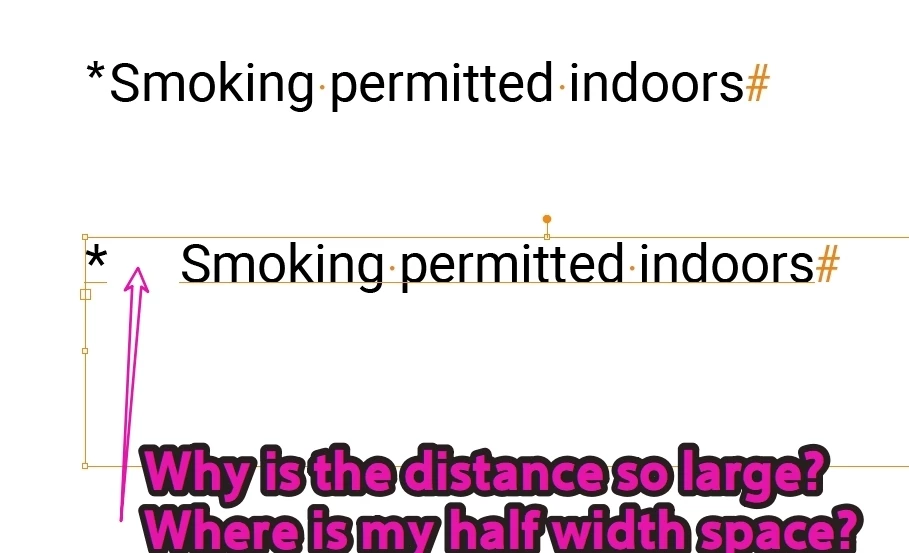
Why does the half-width space after the * disappear, and why is the spacing so wide?

  • June 14, 2026
  • 4 replies
  • 50 views

I typed a space after the *, but the spacing became really wide and hard to control.
The space also disappeared.
I copied a half-width space and pasted it after the *, and now it looks normal.
 

    4 replies

    jane-e
    Community Expert
    Community Expert
    June 14, 2026

    @dublove 


    I was out of my office before, and just now was able to open your file. Here’s what I saw:

    • The upper text frame is large and covers the lower frame, so I moved them away from each other
    • The upper frame uses a space character after the asterisk  
    • The lower frame uses a tab, which I was able to remove using the Bullet feature


    Here’s the Help page for Bullets:

    https://helpx.adobe.com/illustrator/desktop/design-with-text/edit-format-text/create-bulleted-or-numbered-lists.html


    We can’t move posts (yet), but if you want to repost to the Illustrator forum, here’s the direct link:

    https://community.adobe.com/p/illustrator


    Jane


    jane-e
    Community Expert
    Community Expert
    June 14, 2026


    @dublove 


    Also:

    I have never heard of a half space character on a keyboard, but I do know that keyboards vary according to the language.


    Illustrator has five types of spaces in addition to the spacebar. You might try an Em or En space. Both are fixed width, if you need to line up other items. Spaces have a variable width and may not line up.


    Jane


    jane-e
    Community Expert
    Community Expert
    June 14, 2026

    @dublove 


    Go to the Type menu and enable Show Hidden Characters.


    I’m not sure what you are calling a “half space”. Are you using a keyboard shortcut or a menu item?


    Jane


    dublove
    dubloveAuthor
    Legend
    June 14, 2026

    How do I move this post to the Illustrator section?
    I just manually pressed the half-width space bar on my keyboard.

    dublove
    dubloveAuthor
    Legend
    June 14, 2026

    Illustrator 2026

    jane-e
    Community Expert
    Community Expert
    June 14, 2026

    @dublove 


    Which Adobe application are you using?


    Jane