Community Expert
December 29, 2024
Open for Voting

Firefly Video 'Shot size' and 'Camera angle' with reference image

  • December 29, 2024
  • 3 replies
  • 529 views

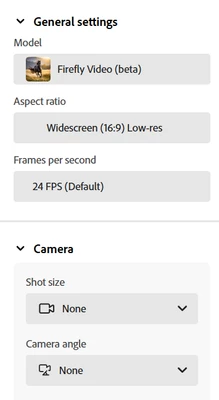
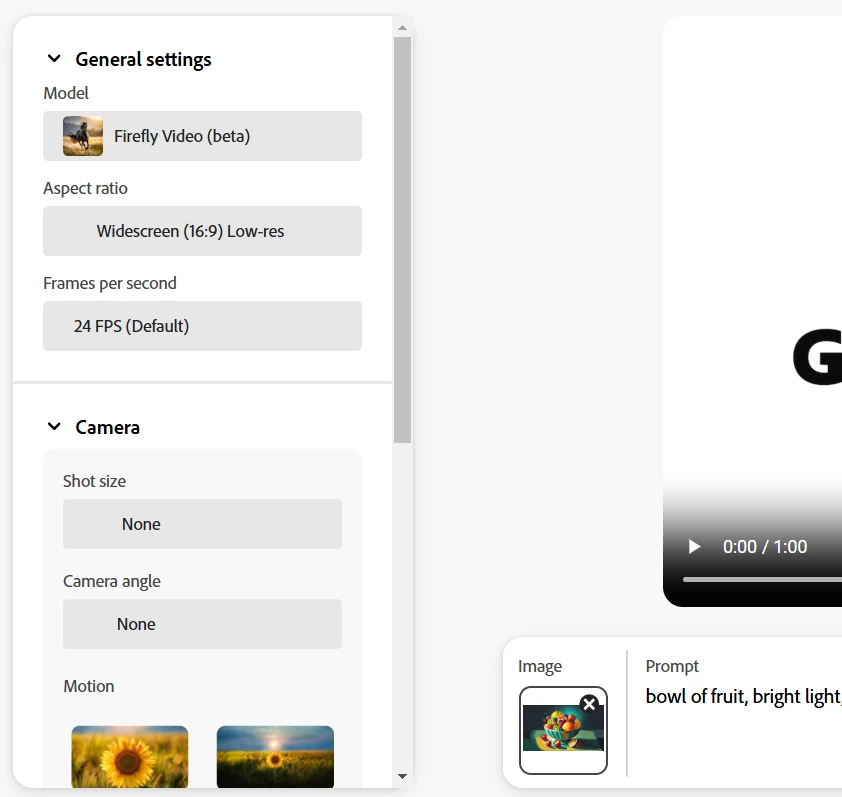
As a fortunate participant in the Firefly Generate Video (beta),  I have noticed the 'Shot size' and 'Camera angle' settings become disabled if you upload a reference image. This may be an initial limitation as the text-video generation is in its early stages. I see the use of these settings as extremely valuable in terms of what this tool can offer. In my case, I have been experimenting with creating videos based on static images created with Firefly. While I can make the static images come alive through the conversion to video, it would be useful to change the camera angle or shot type. For example, I may want a long shot or a midshot with a low angle. This would allow a user to influence the story, which is very much linked to camera angles and shot types.

Screenshots without reference image


Screenshot with reference image:


3 replies

droopydog500
Community Manager
Community Manager
December 29, 2024

It would be interesting maybe to be able to select whether you want the image provided to be used for composition and/or style...


I have told it to move to an aerial shot when the start image was at ground level and that worked.


    droopy

Adobe Community Expert (not an Adobe employee)
DeanUtianCommunity ExpertAuthor
Community Expert
December 29, 2024

Hi @droopydog500 
Thanks for sharing your thoughts. I can understand that Firefly video is trying to match the camera position to the reference image. I was thinking that the reference image could be a style and content guide but then could change the angle, even if that means looking down at the subject when the image reference image is looking up. I have tried adding the shot type to the prompt without success. 

droopydog500
Community Manager
Community Manager
December 29, 2024

Hello @DeanUtian,


Yeah, I just assumed it was because by providing an image you are already telling it the camera information. It might not know how to resolve you telling it you want an aerial shot when the image is ground level. If you want the camera angle to change in the video, you can describe that in the prompt.

My best,
    droopy

Adobe Community Expert (not an Adobe employee)