



Add a “Footage Use #” Project Panel Column
Currently the only way to see if some footage/asset is used, is to select it in the Project panel where it says “footageName, used # times”.
To check many assets, the fastest way is to click on the first one and bash the arrow key on your keyboard. Not very efficient when I hear computers are pretty good at counting quickly (unless the AI is hallucinating—but that’s another story 😬)
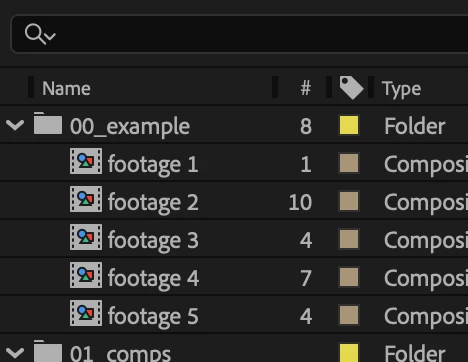
Adding an additional panel column that says how many times an asset is used would be much faster. I attached a quick mockup of how it could look—being able to shrink the column very narrow would be key since—for most uses—it’ll be single or double digit number.
This would be very handy when you have a collection of assets to somewhat randomly use throughout a project, like a graphics package with several variants of a kind, or building a collage with random shapes, precomped pieces of text, etc. and you don’t want to use some assets too much or too little. Or simply to get a sense of how much stuff is actually used in your project without blowing it all away with the Remove Unused Footage command.
Premiere has something similar, but breaks it out into separate Video and Audio Usage columns; though I don’t think splitting A/V use counts applies much to AE.
Thanks!
 AdChoices