



Open for Voting
Make text fields in Timeline Panel expand properly
I suppose this could be classed as a bug, but I'm being nice and saying "I have an idea":
If I click on a number in a layer's Transform properties, and that number is large or has many decimal places, the text field is really tiny and does not expand into all that available, unused space to the right, so the number is truncated and I can only see a tiny portion of it. Why can't those text fields expand to fill all that empty space to the right?
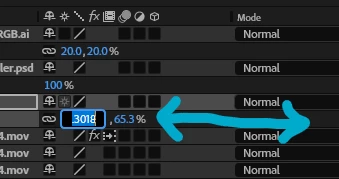
In this example, the x and y scale values are the same: 65.3018%, but you wouldn't know it from clicking on the x value!
 AdChoices