



Todd_Morgan
Legend
November 27, 2025
Open for Voting

Render to ME - folder structure

  • November 27, 2025
  • 5 replies
  • 319 views

I have a plethora of animations already in folders in my Project bin, and what would be great is to be able to select the folders and render them out to same. For example:
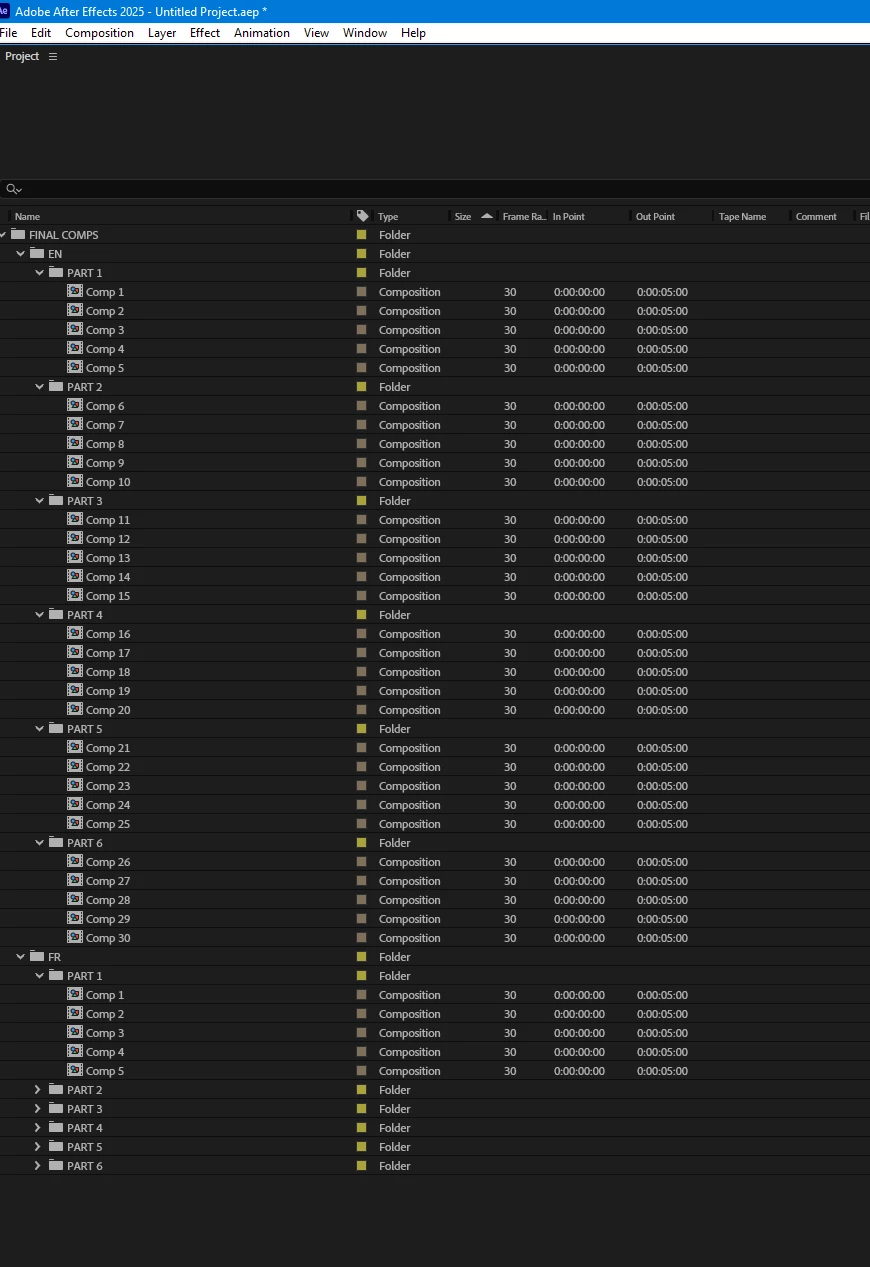
So you can see how many files are in play. So the idea is to select FINAL COMPS and send that to ME, and ME renders them all out to same folder structure. Is that doable?

5 replies

Warren Heaton
Community Expert
Community Expert
December 1, 2025

I hope it gets some votes!

Todd_Morgan
Legend
December 1, 2025

Yes, which is why I posted here in the IDEAS section. And with the numerious clients in my work, naming conventions always differ. And having those filenames already set and in AE is what is needed... I already have several workarounds, but to enhance productivity and workflow, this idea would be a nice update from AE/ME/ADOBE!!!

Warren Heaton
Community Expert
Community Expert
November 28, 2025

@Todd_Morgan 


Yes, I work in broadcast television.


I have found that the best naming convention allows for identifying exactly which project that an asset goes with simply by the filename.  If a file is ever found by itself, everyone knows exactly where it's supposed to be.  Even in organized folders "Comp 1", "Comp 2", "Comp 7" doesn't come close to facilitating that.  When it comes to naming conventions, that's as least helpful as it gets.  


Being able to automate mirroring the project folder structure during a batch render could be submitted as a feature request.


- Warren


Todd_Morgan
Legend
November 28, 2025

Sorry but no.That's not what I asked. And not sure if you work in the creative industry, but naming conventions usually are predetermined for end use by client or for broadcast etc... 

Warren Heaton
Community Expert
Community Expert
November 27, 2025

Extend the orginzation to your naming convention for your Comps and then use filename to sort the files outside of After Effects.

For example, instead of a "Comp 1" in a folder named "Part 1" in a folder named "EN", name the Comp "EN Part 1 Comp 01".

In Expolorer, you'll have the following:

EN Part 1 Comp 01

EN Part 1 Comp 02

EN Part 1 Comp 03

EN Part 1 Comp 04

EN Part 1 Comp 05

EN Part 2 Comp 06

EN Part 2 Comp 07

Etc.


And


FR Part 1 Comp 01

FR Part 1 Comp 02

FR Part 1 Comp 03

FR Part 1 Comp 04

FR Part 1 Comp 05

FR Part 2 Comp 06

FR Part 2 Comp 07

Etc.


And yes, I would pad the numbers for 01 through 09 to ensure proper sorting regardless of where you're viewing a list of files by their filename.