
Scale Composition script should scale Layer Styles
I use the built-in Scale Composition script all the time and it works great. There's just one gap:
The built-in Scale Composition script scales the composition, layers, and camera, but does not scale Layer Styles.
Layer Style values are fixed pixel values that don't follow the layer's scale. So when you change a comp's resolution with the script, every layer with a style looks different from the original.
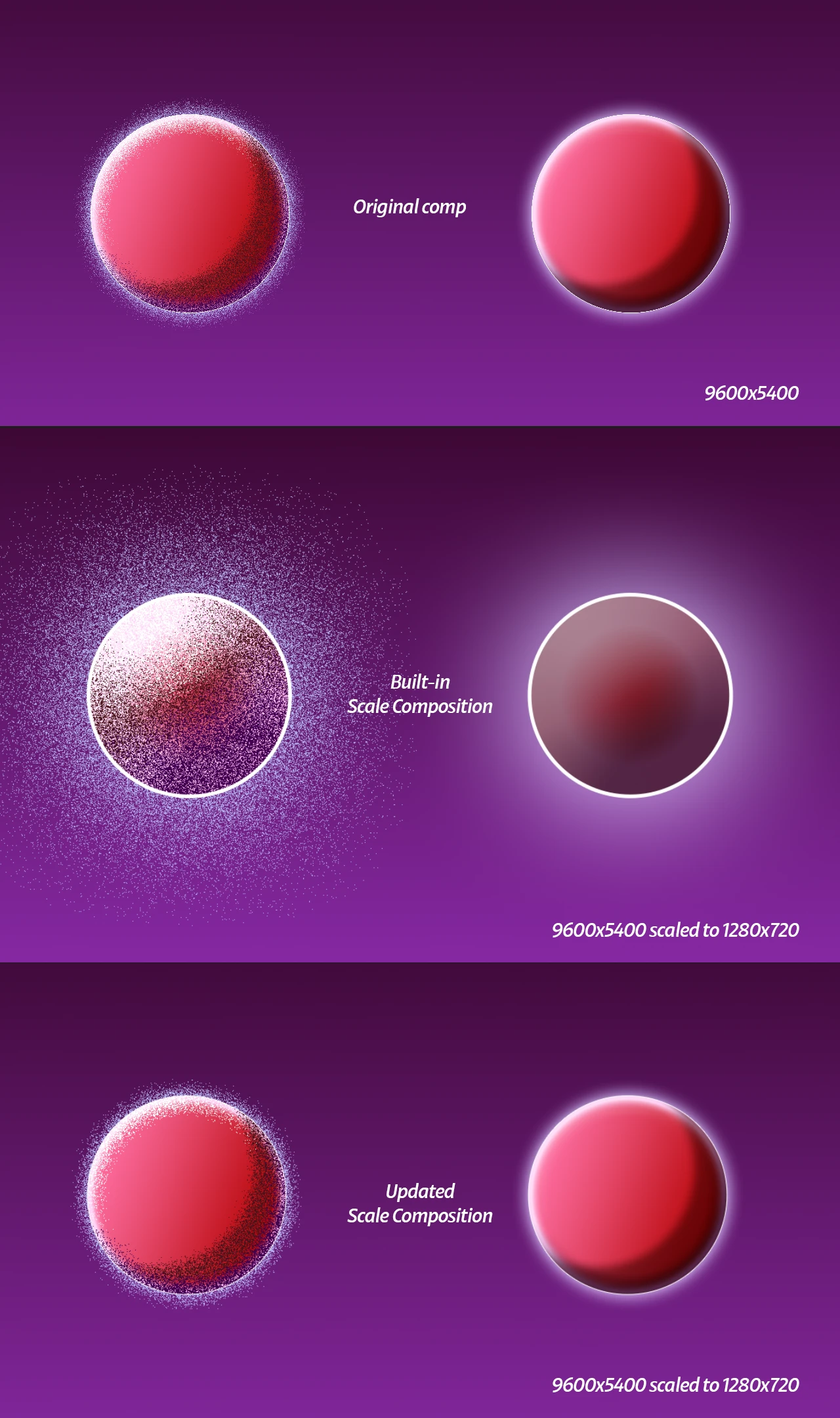
Example: scaling a 9600×5400 comp down to 1280×720, a 5 px Stroke stays 5 px, which makes it 7.5× thicker relative to the frame. Glows and shadows blow up the same way. (Image attached: original comp, built-in script result, and the expected result.)
Proposed behavior
After scaling, multiply the pixel-based Layer Style properties by the same scale factor:
- Stroke: Size
- Drop Shadow / Inner Shadow: Distance, Size
- Outer Glow / Inner Glow: Size
- Bevel and Emboss: Size, Soften
- Satin: Distance, Size
- Pattern Overlay: Scale, Offset
Percentages, angles, colors and opacity stay as they are, since they don't depend on resolution.
Edge cases
- Keyframed values: scale every keyframe.
- Properties with expressions: leave them alone (the expression controls the value).
- AE's own limits: if the result goes past a property's min/max (e.g. Stroke Size min 1 px, Glow Size max 250), clamp it to the limit.
Related
Other users have hit this too discussion from 2022. Photoshop already has Layer Style > Scale Effects for this; After Effects has no equivalent.
Working implementation
I took Adobe's original Scale Composition script and added this step on top of it. Everything else is Adobe's code, unchanged. It's free here:
GitHub - Scale Composition Modified (click Download raw file on the GitHub page)
Happy if any part of it is useful for the official version.
Thanks for considering it!
 AdChoices