


Visual indicator for timeline layers
Wouldn't it be cool if you add a function that lets you see which layer is visible and which is not? It would make selecting/deselecting layers so much easier. Right now you have to look left/right to see which layers you need to select. And some of the time you get them wrong because you might have 2-3-4-5 layers the same color and you have no idea which one is which. Right now the bottom layer that has the same color (but its darker) is the layer that has its eye turned off (therefore it won't be seen on the preview because the layer is turned off).
The other suggestion I have is for layers to have an indicator that they are using the layer above (or other layer) as a track matte. Again you can look to the left for the track matte window, but you can again select the wrong layer. Right now in the example everything is tidy and clean, but imagine you have 100+ layers that have random colors, different/overlapping durations... Its going to be a mess and such function will allow quick and accurate navigating without wasting time. Not to mention sometime your eye can't properly track which layer you need.
Obviously my design is poorly done on the screen shot, it was for better explaining my idea. 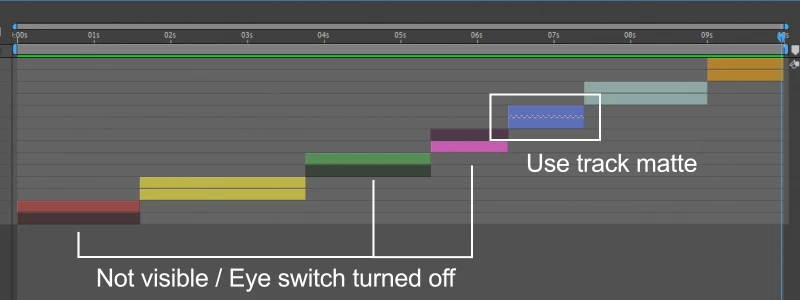
 AdChoices