Legend
October 21, 2022
Open for Voting

Just a little comparison

  • October 21, 2022
  • 6 replies
  • 473 views

Since the cloud client is the "mother" of them all, I post it here.

This is just a little comparison of how the UI, specifically the menu bars, of the Adobe tools are different at a point where you actually don't see the need for them to be different. Sure, there are many Adobe apps and those like Acrobat are total outsiders, but comparing Photoshop, Indesign and Illustrator reveals quite a lot.

"What do you want to tell us?" you might ask now and I actually cannot say. My basic thought is that I wonder how and why the UI are not just the same.

Menu bars:
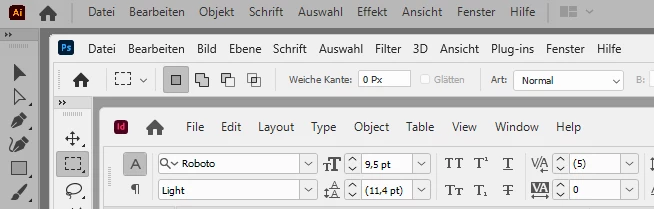
What do we see here?

  • The home button isn't always next to the icon
  • The AI logo icon looks weird
  • The ID icon is smaller than the others
  • The home symbol of PS is smaller
  • The top bar of ID is bigger in height than the others
  • The menus are vertically centered in the top bar with PS and ID, but not with AI


Next, menu:
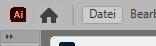
What do we see here?

  • The bezel around the menu items isn't vertically centered with AI, perhaps that goes with the other topic above
  • The bezel of ID is higher than with the others


Next, the right side:
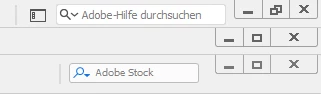
  Upper is AI, then comes PS, then ID

What do we see here?

  • Smaller close button with AI
  • No Adobe Stock search field in PS, though it would make more sense there than in ID
  • No "Search help" field for PS and ID
  • Different approach to switch work spaces -> in AI it's a button, in ID it's a dropdown with name, while PS has none


The weirdest is how PS reacts to menu switching. See video. It has this irregular interruptions where it blanks the menu items.  

6 replies

Doc MaikAuthor
Legend
November 8, 2022

Thanks to all for the attention.

jane-e
Community Expert
Community Expert
November 7, 2022

Thank you @Tarun Saini ! The OP had originally posted to the Ideas section and was directed in this thread to go to Wishform or UserVoice, which made no sense. Thank you for checking with your team and straightening this all out. It's very helpful and appreciated!


Jane


Tarun Saini
Community Manager
Community Manager
November 7, 2022

Hi @jane-e,

I have shared the above link as @Doc Maik has multiple feedback for Adobe Apps, and that link has the individual links for all Adobe apps where he can submit the feedback. Still, later on, I checked with my team and moved this conversation to the ideas section as this section is monitored directly by our engineering team.


If anyone has any feature request they would like to have, they can post under the ideas section in this Creative Cloud Desktop Application.


Let us know if you have any questions.


Regards,

Tarun

jane-e
Community Expert
Community Expert
October 29, 2022


@Tarun Saini wrote:

Please share your feedback here:- https://helpx.adobe.com/ie/x-productkb/global/how-to-user-voice.html , as this forum is monitored directly by our engineering team. They can review your post & may share some more insights.


Hi Tarun,


This reply has left me confused, and I hope you will clarify a few things for me:


  • I looked for a blurb as to the purpose of the Creative Cloud Desktop forum and I don't see one. I also looked for posts marked Announcements and Featured thinking they would explain, but only saw one announcement for Adobe MAX. What kind of questions are appropriate here and which are not?


  • I followed your link to the landing page for user-voice. Which UserVoice platform would you have @Doc Maik post his request for user interface parity between the applications? I'm not seeing one that would be appropriate — which one do you think fits his question?


  • Also, what kind of posts should be made to the "Ideas" section of the Creative Cloud Desktop forum if not this one?


Thank you for clarifying the purpose of this new Creative Cloud Desktop forum.


Jane


jane-e
Community Expert
Community Expert
October 29, 2022
@Doc Maik wrote:
"...there is no actual user voice for Photoshop. ... If you have one in PS, you would do what?"


Hi

The Photoshop team merged their feedback site with the user-to-user forum a little over a year ago. Employees are now active on the Photoshop forum and they do read the Ideas and Bugs. Look for the Adobe badge and the "Adobe Employee" tag. It's worked out very well and I hope the other apps follow suit.


Jane

kglad
Community Expert
Community Expert
October 21, 2022

if you want to make a suggestion to adobe, post here https://www.adobe.com/products/wishform.html

Doc MaikAuthor
Legend
October 21, 2022

Don't wake the devil...

kglad
Community Expert
Community Expert
October 21, 2022

well, if it's good enough as is, don't post.