km71906051
Inspiring
August 30, 2023
Open for Voting

Open or delete multiple Recent files at once

  • August 30, 2023
  • 6 replies
  • 563 views

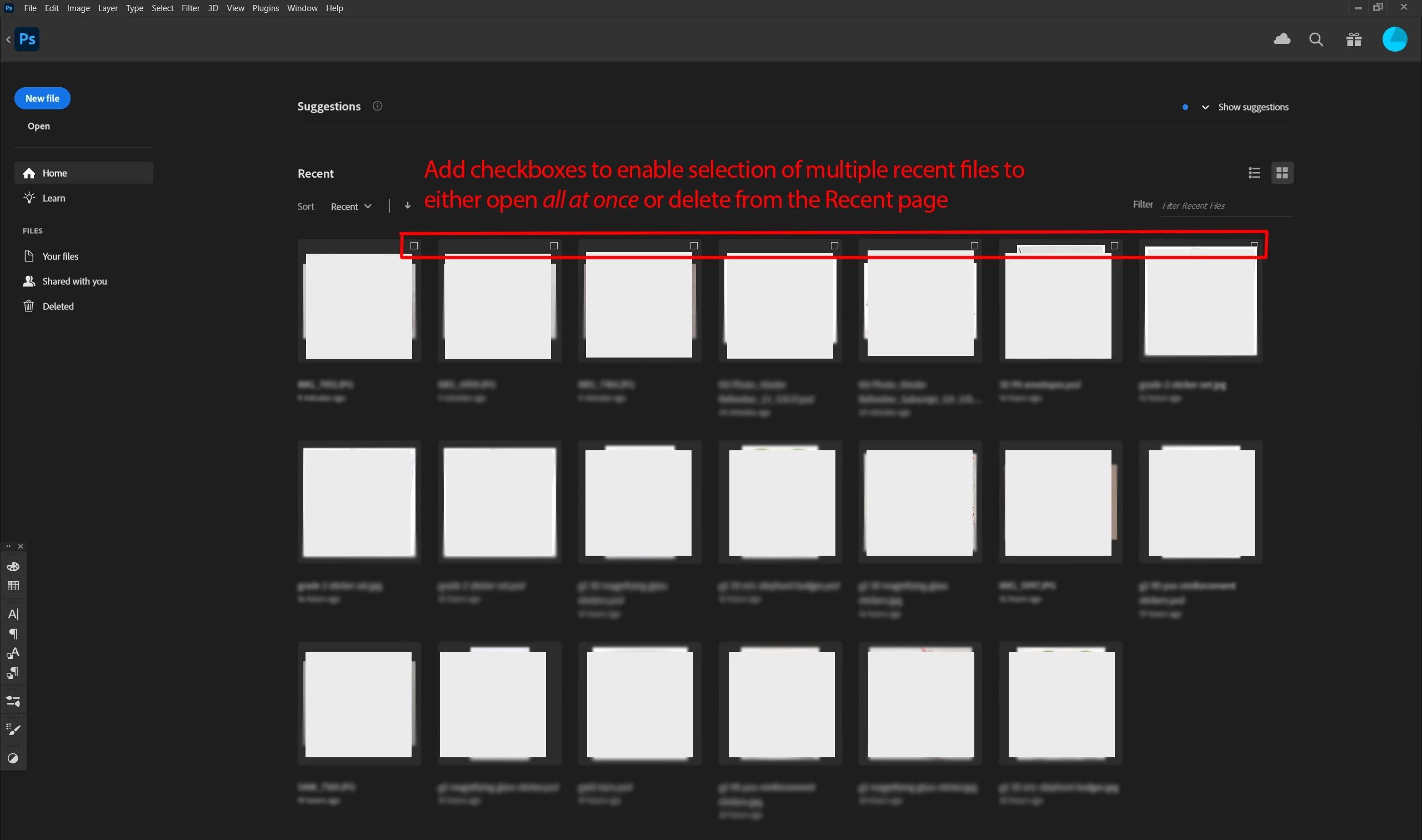
Not sure if this has been requested before, but it would be really nice if, upon opening a CC app, I could open multiple recent files all at once instead of having to go back and forth to the Home page to open one at a time. Every morning I pick up where I left off the day before when I was working in several files and if I could select all of those at once and click "Open" that would be great! As it stands now, I don't see any way of doing that.


Would also be really nice to be able to delete certain recent files from the Home page.


So my request is to add a checkbox to each "Recent" tile, as I have illustrated in the top row.


Thanks!


6 replies

km71906051
Inspiring
January 3, 2024

@jane-e 

I meant simply to clear them from the Recent section. 

jane-e
Community Expert
Community Expert
January 3, 2024

@km71906051 


When you use the word "delete", do you mean:

  • Delete the selected files
    or
  • Clear the selected files from Recents?


PECourtejoie
Community Expert
Community Expert
December 15, 2023

I think the request is also valid, it is what one expects in a modern program.

IMHO the experience should be the same across the entire Adobe software range.

Kalvyn Rasquinha
Community Manager
Community Manager
December 14, 2023

@PECourtejoie ah! The individual app's home screens are separate and are each different teams. Looks like I misunderstood the original post - I assumed it was opening multiple files from the Recent section in the Creative Cloud app.

PECourtejoie
Community Expert
Community Expert
December 14, 2023

@Kalvyn Rasquinha To make things clear: are the individual apps' HomePages handled by the team you are working with?

If yes, I second this request, and the one to selectively delete files, or favorite others.

Kalvyn Rasquinha
Community Manager
Community Manager
August 30, 2023

Thanks for this suggestion, @km71906051 . I've added an item to the backlog.


Tangentially, I'd love to better understand your workflow as it pertains to the Creative Cloud desktop app - happy to do it in this thread or in DM. Could you share more about what in the Creative Cloud desktop app helps your workflows, what's missing, what's not really helpful, etc.