


Participating Frequently
June 7, 2023
Open for Voting

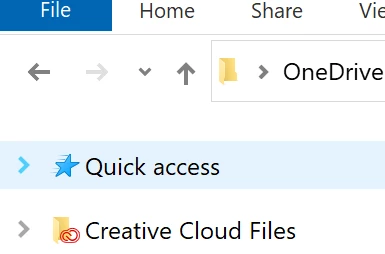
Stop Creative Cloud From Showing Up On Windows Explorer Bar

  • June 7, 2023
  • 6 replies
  • 285 views

I do not want, nor have I ever consented to, having the Creative Cloud Files being on the windows explorer sidebar. I have disabled it in the Registry Editor, but within a day it puts itself back there. This is how a virus behaves, not how trusted software behaves. How do I permanently remove the Creative Cloud Files from Explorer sidebar? 

Stop trying to force Creative Cloud on people. It's more than obnoxious. 


6 replies

501CGAuthor
Participating Frequently
June 8, 2023

I've never altered a registry key and had the program change back the key. Other than viruses. That means someone actually took the time to write into the software that it needs check daily that the link is on the navigation pane. If we were on reddit, that would get a post to r/assholedesign. There's no reason to check the registry key other than Adobe wanting to force this on people. 


And are we  absolutely certain that's how Adobe intends? 


I do think I resolved the issue by removing all inherited permissions to the key. Should I have to do that? No. 


FWIW, I got a top fan badge from Adobe on facebook after making one offhand comment on how ridiculous it is that Adobe keeps trying to force creative cloud storage down people's throats. I'm not the only one that thinks this is terrible. 

kglad
Community Expert
Community Expert
June 8, 2023

it's working the way adobe intends. and every program (adobe or otherwise) you install on a windows computer alters the registry.

501CGAuthor
Participating Frequently
June 8, 2023

How is that "working the way it was intended"? Are we saying the intent of Adobe is to edit the windows registry without permission and waste space in the OS against the wishes of the user? Adobe shouldn't get to jack with operating systems. I get what they want; they want people to use creative cloud, fill it up, and then upgrade cloud storage. That's also why every couple weeks the legacy save settings are being overwritten during an "update" and defaulting the save to the cloud. 


If Adobe wants to advertise to people, they go buy google ads. Don't try to integrate the adds into windows. 


This is a bug, bordering on a virus. Put it where ever bugs go. 

kglad
Community Expert
Community Expert
June 8, 2023

where do you want it moved?  it's working the way it's intended.  ie, it's not a bug.  and if you leave it in discussions, it won't come to the attention of the people that could make a change.

501CGAuthor
Participating Frequently
June 7, 2023

@kglad is there a way to move this out of ideas and into a more appropriate forum? Having software not edit the windows registry without permission shouldn't be an idea. This is a significant issue that needs to be addressed by Adobe. 

kglad
Community Expert
Community Expert
June 7, 2023

what app are you showing?

501CGAuthor
Participating Frequently
June 7, 2023

Windows Explorer

kglad
Community Expert
Community Expert
June 7, 2023

and you're looking at your navigation pane?