

johnrellis
Genius
April 25, 2024
Released

P: Export hangs indefinitely with corrupt files rather than producing an error message

  • April 25, 2024
  • 18 replies
  • 3465 views

When LR tries to export a photo that's corrupt, the export hangs and never completes. It should produce an error message instead.


Worse, there isn't a way for a plugin to detect and recover gracefully. The call to rendition:waitForRender() will never return, even after the user cancels the corresponding task in the progress bar. Several of my plugins rely on exporting photos, e.g. Any Vision.


To reproduce on LR 13.2 / Mac OS 14.4.1:


1. Download this tiny catalog:

https://www.dropbox.com/scl/fi/48dtex70opjseeyhsm0hn/corrupt-bug.2024.04.25.zip?rlkey=hrf6fsoogaklqw77so3n723a0&dl=0


2. Copy the script "corrupt-bug.lua" from the catalog folder into the Scripts subfolder of the Lightroom settings folder.


3. Start LR.


4. Select the one photo and do File > Export, exporting it as a JPEG.  Observe that the export never completes, with the progress bar showing:
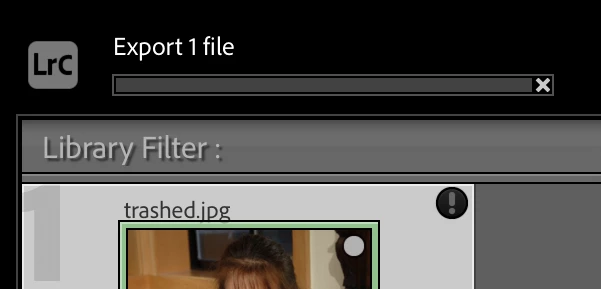
 

Also observe that the following error appears when LR is run from Terminal with the -traceback switch:


2024-04-25 18:36:11.364 Adobe Lightroom Classic[91358:6685632] openNegative: <AgErrorID>dng_error_bad_format</AgErrorID>


5. Restart LR.


6. Select the one photo and do Scripts > corrupt-bug. Observe that the export initiated by the script never completes (it should display a message when it does):
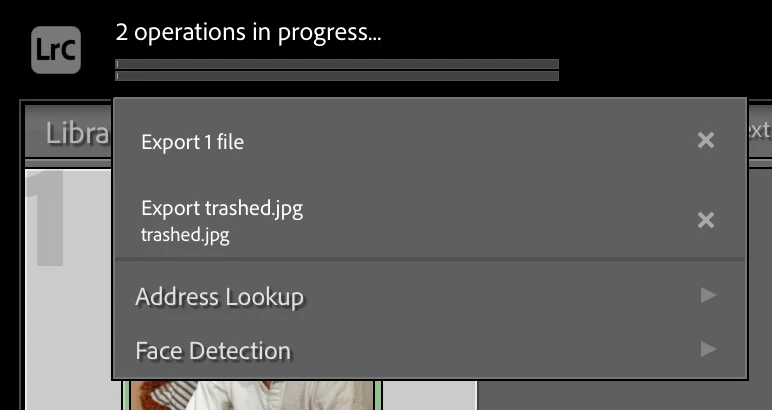
 

7. Cancel both export tasks in the progress bar by clicking their "x".  Observe that no dialog is displayed by the script, indicating that the call to rendition:waitForRender() has never returned, even though the export has been cancelled.


18 replies

johnrellis
Genius
December 12, 2024

Yay, the bug recipe now works correctly. This will help lots of users who have been getting confused by this.

Rikk Flohr_Photography
Community Manager
Community Manager
December 12, 2024

Greetings all,


Updates for Adobe Photography products are released.   The December updates have implemented this feature request.


If you do not see the update in your Creative Cloud Application, you can refresh it by hitting [Ctrl/Cmd]+[Alt/Opt]+[ R ].

Note: It may take up to 24 hours for your update to be available in your Creative Cloud app.


Thank you for being so patient.

Rikk Flohr: Adobe Photography Org
johnrellis
Genius
November 15, 2024

This bug, introduced in LR 13, still isn't fixed in LR 14.0.1.

johnrellis
Genius
September 25, 2024

@emiova, your screenshot shows that LR has crashed, not frozen. That's probably unrelated to this bug report, in which LR export hangs, though the rest of LR keeps operating normally.


When asked, did  you submit the crash report to Adobe, using the email address associated with your Creative Cloud account?

Participant
September 25, 2024
Participant
September 5, 2024

I'm experiencing an issue with Lightroom Classic 2024 where photo exports stop prematurely. The process starts normally, but after exporting a few images, Lightroom either freezes or the export process fails without completing.

I posted a video to see the problem.

johnrellis
Genius
September 6, 2024

Prior to LR 13, when Export encountered an error exporting a file (e.g. the file had been corrupted due to hardware failure), LR would export the remaining files and then show an error dialog listing the files that encountered errors.  But LR 13 broke that, and now the Export will just hang.  Inexplicably, Adobe doesn't consider this a bug .


Looking at your screen recording, this may be happening to you. You'll have to do trial and error, selecting small numbers of files at a time, to see if there is a particular file or files that consistently fails to export. Once you've identified that file, select it and do Metadata > Save Metadata To File. If you get an error, post a full-resolution screenshot (not a cellphone pic) of the error message.


johnrellis
Genius
September 8, 2024
Participating Frequently
August 26, 2024

Also tried all solutions here no help. I took every pic sepertlatly to photoshop and exported from there. All the really darkparts had some problems. Otherwise thats the only thing I was able to do

Participant
August 26, 2024

I found one more workaround: If you apply Denoise with AI to your photo, Lightroom creates a new file for that enhanced photo. You should then be able to export this enhanced photo without issue. This should save you from needing to move your files around and you can also keep your previous edits.


This workaround just won't work on JPG since the Denoise feature isn't available for that format.

Participant
August 26, 2024

I'm seeing this issue as well. It hangs indefinitely when trying to export, and when trying to export metadata I get "Could not write metadata. Unknown file I/O error".


I'm on Lightroom Classic v 13.5


Another piece of info is it only happened with 38 out of 89 photos that I have in a collection, which collects photos from three different directories. It's happening to photos in both JPG and ARW format.


I've tried all of the solutions in this thread to no avail. The photos were located on an external SSD, but I moved them to a different SSD and pointed Lightroom to the new location and tried again, which didn't work. I also moved them to my Macbook's HD and tried from there, and that didn't work either.


The one thing that has partially worked is to copy the files to a new directory and import that new directory into Lightroom. These photos can be successfully exported. Since these will be new photos to Lightroom, you'll need to redo all of your edits on them.


Hope this info helps folks and devs.

Participating Frequently
August 23, 2024

I'm having a MAJOR problem!! I'm Trying to export 219 photos thayt I originallu moved to my hardrive(desktop folder) on my pc then i imported photos to lightroom. then I edited photos and tried to export them the same way I allways do. it wont export photos. it just stays put. loading on the left up corner stops after 2 exports.  if i choose all of the photos seperatly theres like 12 photos that can be exported, but other 207 wont export. loading just stays put. 

My pc specs are not the problem, i can assure that

I have read every possibility of not being online and original images location that might have changed, but that is not the case. Also existing file. is not on skip mode.  some one please help me. theres like 40hours of work on these pics. And i have a lot of more pictures in line to work with.  

dj_paige
Legend
August 23, 2024

Some basic information would help:


What software and version NUMBER you talking about?

What operating system version NUMBER?

We need version NUMBERs and not words like "latest" or "up-to-date"


Try resetting Lrc preferences

Try exporting to a different disk

Participating Frequently
August 25, 2024

13.5 version I dont need an attidude I need HELP. Unless youre unable to give it without attitude like that. Dont mind giving it at all.


also reseted prefrences. No help