Participating Frequently
January 18, 2012
Released

P: Make curves bigger

  • January 18, 2012
  • 44 replies
  • 3053 views

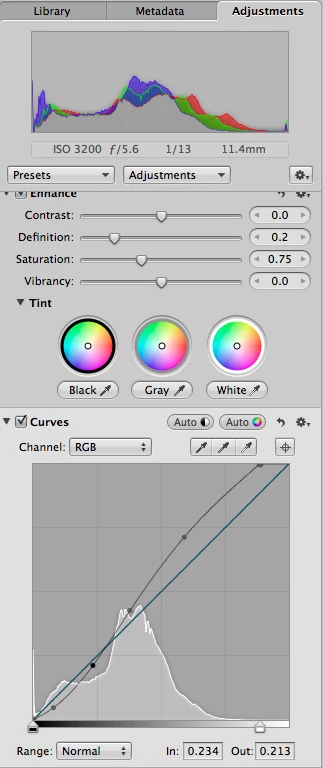
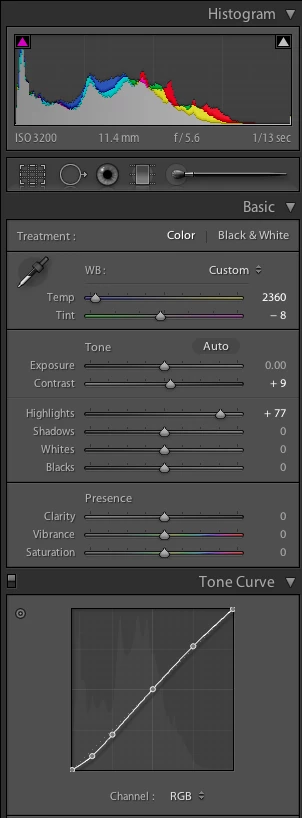
It would be great if the curves panel in Lightroom was physically bigger. The current panel is too small. While it's easy to make big adjustments, fine tuning is difficult and imprecise. I've attached two screenshots showing the curves panel for Lightroom (LR 4 beta) and Aperture (3.2.2) for the same image. In Lightroom, I've selected a medium contrast curve; in Aperture, I've used the "auto" curve option. Physically, the Lightroom curve panel itself measures 160 pixels per side. The Aperture one is 260 pixels per side, 60% bigger linearly, and three times the area! (67,500 pixels versus 25,600.)Aperture's bigger curves panel gives three big advantages:-- it's easier to see the changes, particularly in relation to the linear slope;-- it's easier to make changes, particularly precise ones; and-- it's easier to either select a current point or make a new one without accidentally doing the opposite.I'd also say a bigger panel encourages you to use it: just grab a point and yank it, without worrying that you have to be pixel precise.
44 replies

Known Participant
February 7, 2025

@Giacomo Brescacin It's not AI or cloud based, so doubt this is on the list of improvements...

Participating Frequently
January 2, 2025

For some reason curves dialog is so much more powerful in Photoshop. I wish LR curves tool was similar.

~~ LR user since 2006, PS since 1991 ~~
Participant
December 15, 2024

12 years later...still waiting


Inspiring
June 16, 2024

I still want a bigger curve display - and the fact that you almost inevitably add another point instead of immediately dragging the edge when using the rgb parts of the curve is very unnerving. Any news on this?


Curves are dead someone wrote - I think curves are the hottest thing for developing!

Participating Frequently
May 24, 2024
quote

I agree, Curves is a delicate tool to deal with and deserve more precision.


LR Curves has always been clumsy tool. In PS Curves is much more flexible and you can bend it ways not possible on LR.

~~ LR user since 2006, PS since 1991 ~~
Known Participant
May 23, 2024

This is no longer a question of curves in Adobe Lightroom/ACR, but of user demand for something. There is a great demand for the product - then what's the point in changing anything? After all, they still make a choice on a thing where nothing has changed)
In truth, there are no competitors. Which exist - that's just the way it is. I used both Darktable and rawtherapee and 3dlut creator. ACR/Lightromm - there is “the steering wheel! positioned correctly.”
Enlarging the coordinate grid is not very necessary. There are alt/opt etc keys.

ralphlouzon
Inspiring
November 6, 2023

I agree, Curves is a delicate tool to deal with and deserve more precision.
In Capture One we can extract the curve of the adjustments panel and to make it larger as long as necessary. Clever.

Participant
November 5, 2023

Hello,


I would like to add to this thread also. I've come to rely on the tone curve as one of most powerful tools for accurate colour grading as well as tone adjustments of images within Lightroom, but the size of the panel makes small accurate adjustments quite difficult. 


You can drag the develop panel to the left to give it more space on the screen, but the tone curve remains the same size. I understand that because it needs to remain square in shape this would require the tone curve section to scale vertically, but I dont see this being an issue? You can see how it currently looks from the screenshots.


I think this would massively improve the functionality of the tone curve.


Thank you!

Participant
January 6, 2022

Yes, 10 years after the original post requested a bigger tone panel I would also like to ask for this feature. A pop out panel would be awesome! Look how much space I have and I have this tiny little graph:

Inspiring
January 27, 2020
YESSSS   please make curves panel bigger it is currently too small and inaccurate, would love to have more control when clicking. >>>> you can make it pop out of the panel so we can make it as big as we want.