Participating Frequently
January 18, 2012
Released

P: Make curves bigger

  • January 18, 2012
  • 44 replies
  • 3053 views

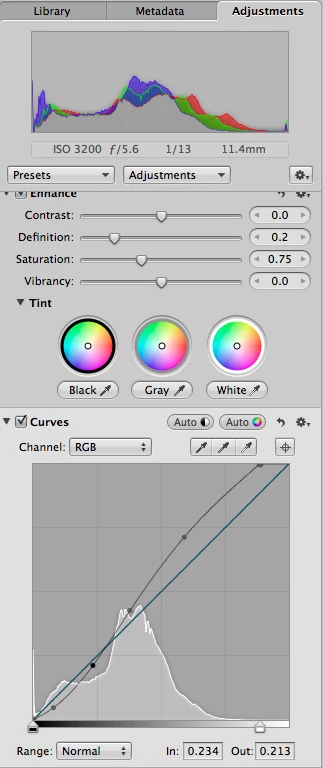
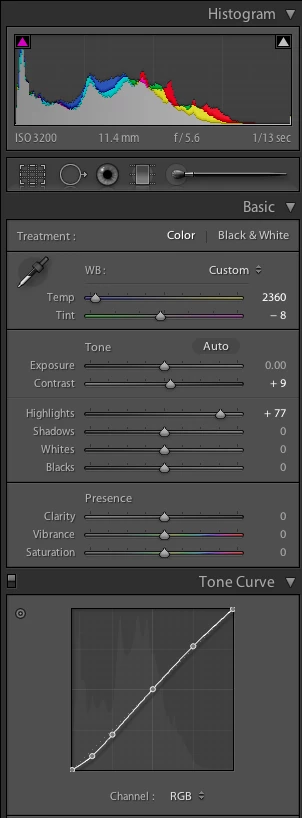
It would be great if the curves panel in Lightroom was physically bigger. The current panel is too small. While it's easy to make big adjustments, fine tuning is difficult and imprecise. I've attached two screenshots showing the curves panel for Lightroom (LR 4 beta) and Aperture (3.2.2) for the same image. In Lightroom, I've selected a medium contrast curve; in Aperture, I've used the "auto" curve option. Physically, the Lightroom curve panel itself measures 160 pixels per side. The Aperture one is 260 pixels per side, 60% bigger linearly, and three times the area! (67,500 pixels versus 25,600.)Aperture's bigger curves panel gives three big advantages:-- it's easier to see the changes, particularly in relation to the linear slope;-- it's easier to make changes, particularly precise ones; and-- it's easier to either select a current point or make a new one without accidentally doing the opposite.I'd also say a bigger panel encourages you to use it: just grab a point and yank it, without worrying that you have to be pixel precise.
44 replies

Flawless_Star15D5
Participating Frequently
May 6, 2012
Yes, I misunderstood; the curves control has not changed, just the histogram box.

To err is human they say...

Anthony.
RikkFlohr: Inactive
Inspiring
May 5, 2012
You guys didn't hear Kelby on the Grid this week? Curves are dead!

Back to the problem: while not what you are asking for, you know that you can get greater precision by holding down the [Alt/Opt] key while dragging and reduce curve movement to 1/10th strength? It is no substitute for a larger interface but it might help.
Participating Frequently
May 5, 2012
Anthony, maybe you're thinking of the fix in Lightroom 4.1 RC1 that allows point curves from Lightroom 3 to migrate over properly? If so, that's very different from the request here, which is to enlarge the curve box itself.

FYI, here are the release notes for LR 4.1 RC1: http://blogs.adobe.com/lightroomjourn...
Participant
May 5, 2012
We're not talking about the histogram at the top, we mean the curves "input box" in the Tone Curve panel, which does not scale with the sidebar (even in 4.1 RC2), rather it stays as a small square floating in the middle of the panel

Inspiring
May 5, 2012
We're talking about the curves control, not the histogram.
Flawless_Star15D5
Participating Frequently
May 5, 2012
When you drag the right-hand panel in LR4.1RC2, the histogram elongates left-to-right, panorama-like. This is different to the behaviour, in earlier versions where the actual histogram box stayed unaltered, even though the panel widened. I appreciate it doesn't get any taller, but that isn't as critical is it?

Anthony.
Inspiring
May 5, 2012
Where? Mine doesn't scale with panel width.
Flawless_Star15D5
Participating Frequently
May 5, 2012
This has been answered in LR4.1RC2

Anthony.
Participant
May 5, 2012
I would definitely like to see this, much more fine control of the curve would be great
Participating Frequently
January 27, 2012
Yes!