Participating Frequently
January 18, 2012
Released

P: Make curves bigger

  • January 18, 2012
  • 44 replies
  • 3053 views

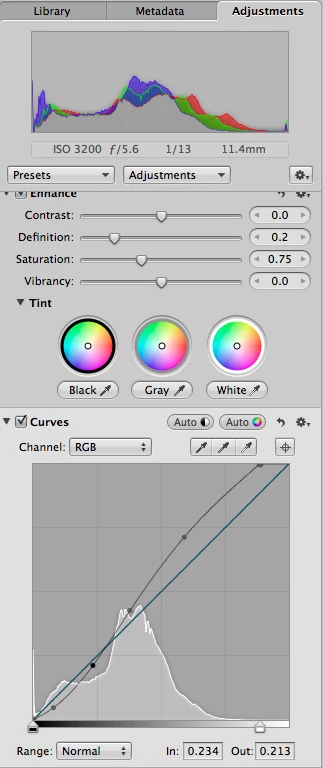
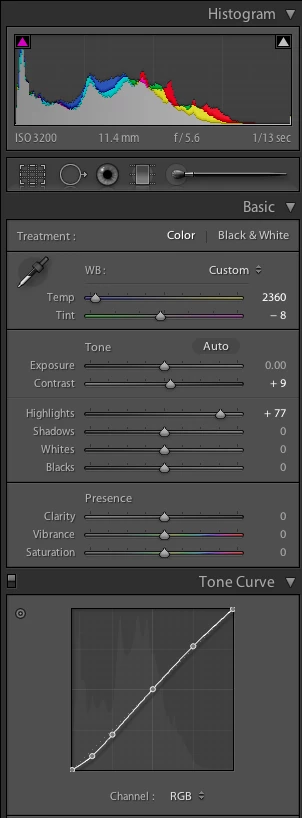
It would be great if the curves panel in Lightroom was physically bigger. The current panel is too small. While it's easy to make big adjustments, fine tuning is difficult and imprecise. I've attached two screenshots showing the curves panel for Lightroom (LR 4 beta) and Aperture (3.2.2) for the same image. In Lightroom, I've selected a medium contrast curve; in Aperture, I've used the "auto" curve option. Physically, the Lightroom curve panel itself measures 160 pixels per side. The Aperture one is 260 pixels per side, 60% bigger linearly, and three times the area! (67,500 pixels versus 25,600.)Aperture's bigger curves panel gives three big advantages:-- it's easier to see the changes, particularly in relation to the linear slope;-- it's easier to make changes, particularly precise ones; and-- it's easier to either select a current point or make a new one without accidentally doing the opposite.I'd also say a bigger panel encourages you to use it: just grab a point and yank it, without worrying that you have to be pixel precise.
44 replies

Participant
October 1, 2015
Wow,

This topic dates 4 years back!

How hard can it be to make a panel larger.

Seriously Adobe!
Participant
September 27, 2015


Please make the Point Curve window in the Tone Curve Panel larger or give us the option to make it larger. As trying to make incremental adjustments in that little window is very hard.

peace
areohbee
Legend
November 20, 2014
Bigger would be better, but alt key makes fine tuning more possible.
Inspiring
November 19, 2014
Another vote for this! I don't see any reason why the box shouldn't go to the edge of the panel.
Since there is no opacity, it makes fine tuning in curves next to impossible
Participating Frequently
November 10, 2014
Just want to add my vote for this. Working with camera-scanned negatives, the curves panel is very important in getting the colours right. A larger box would go a long way.
Inspiring
April 13, 2014
LR 5.4 now and still the curves panel is too small. I just don't understand it: Camera Raw can do it, Photoshop can do it, Aperture can do it. This must annoy many professionals as well. The panel is already wide enough, even when dragged all to the right to make it as small as possible. All that needs to be done is to make the curve display larger in height as well. Totally uncritical form a design point of view as the panel is already quite lengthy vertically...This is probably two lines of code.. Please!

Thanks,
Daniel
areohbee
Legend
February 18, 2013
There may be a plugin for this, but it looks not yet finished:

http://www.capturemonkey.com/curvemon...
Participant
February 17, 2013
I ́m very satisfied with Lightroom 4.3.
One feature I ́d like to see changed: please make the tone curve paneel bigger or better scalable for mor precision.

Thank you
Stefan

Participant
February 17, 2013
Would be helpful to hav eit bigger!. I know it scalable from e. g. GIMP - much easier to work with.
Steve Gandy
Inspiring
October 3, 2012
"...holding down the [Alt/Opt] key while dragging and reduce curve movement to 1/10th strength..."

Well, that helps but I want a bigger curve as well! I thought LR was tested with photographers...how did this little tiny curve make it thru to the gold master? I don't get it.
Steve GandyPhotographer - Instructorstevegandy.com