


Known Participant
October 28, 2021
Released

P:(Masking) Invert/Flip Mask Group

  • October 28, 2021
  • 28 replies
  • 9560 views

Description:

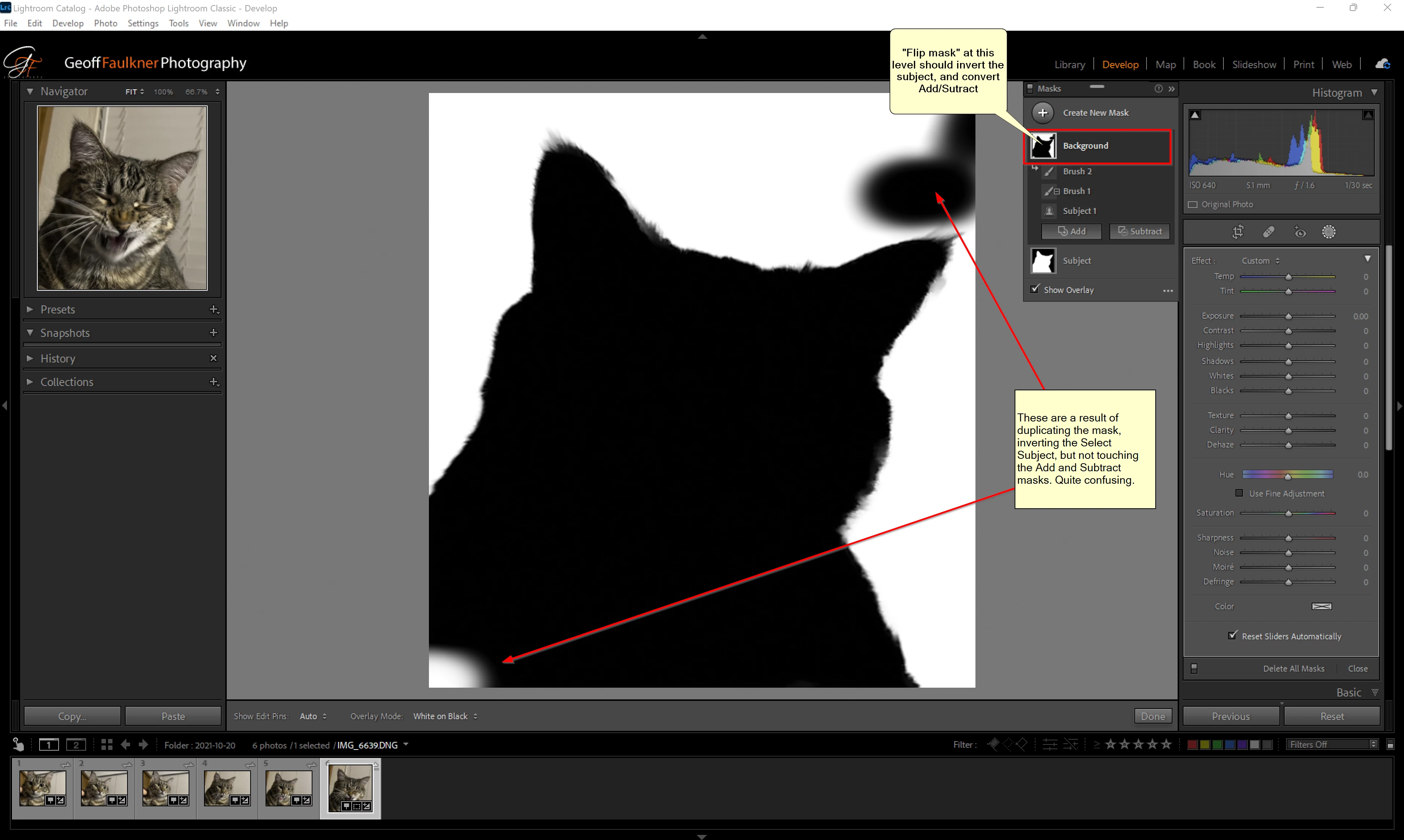
Selecting subject in the new Lightroom release is great...but no automatic tool is perfect. After creating a subject selection mask, I often Add or Subtract with a brush to clean it up (There is currently no "Refine edge" function, which would be awesome, by the way).  My problem is this--Now that I have the Subject selected, I duplicate the mask so I can select the background. But the Add/Remove brushes don't work properly and must be converted.

Proposed improvement:

Instead of duplicating the mask and going to each element to invert, convert to add, convert to subtract, I would like to see an option on the mask itself to "Flip" it. The Flip at the top level would invert the select subject mask, and convert the Add to Subtract, and convert the Subtract to Add. Then the mask would be a perfect inversion in one step. 

You would have to consider how it would behave with the other mask elements--I was only considering the select subject/Add/Subtract.
28 replies

Rikk Flohr_Photography
Community Manager
June 14, 2022

Greetings,


Updates to the Adobe Photography Products were released on June 13. This feature request is now implemented. Thanks to all who participated in the is thread. 


If you do not see the update (Mac and Win) you can refresh your Creative Cloud App with the keyboard shortcut [Ctrl/Cmd]+[Alt/Opt]+[ R ]. 

Rikk Flohr: Adobe Photography Org
Known Participant
March 15, 2022

I am definitely looking forward to this feature ... and the eventual stopping of the email notifications for people who are upvoting my suggestion! 🤣😂🤣


In the meantime -- Please vote this up!

Earth Oliver
Legend
March 15, 2022

Five months later and we're all still hoping for this feature to be implemented. Hopefully when it's finally updated, we'll also see on option to refine the mask edges to help us deal with the all the transition area issues too.

Ken Nielsen
Legend
February 18, 2022
Excellently expressed. Many would agree!

Sent from my iPhone
leesalei
Participant
February 18, 2022
yes, i see that it’s ‘planned’ but i also see this thread complaining about the issue (not including other threads) is from october and now we’re half way through february. it’s pretty ridiculous that adobe waited for enough ‘complaints’ before even ‘planning’ to address the issue; it sure makes it seem like the people designing the software aren’t actually using the software or even testing it with people who use it because how; how was the feature missed. it is a super basic function that (obviously) a lot of us use.
Michael J. Hoffman
Community Expert
Community Expert
February 18, 2022

@leesalei , as you can see from the answer at the top of this topic, this was updated to "planned" by Adobe's team at the beginning of January. While we can't expect to see any kind of date commitment here in this forum, the fact that it is "planned" is a good indicator that we might see it soon.

johnrellis
Legend
February 18, 2022

While waiting for Adobe to implement this very popular feature request, see here for two methods for inverting masks:

https://community.adobe.com/t5/lightroom-classic-ideas/p-masking-invert-flip-mask-group/idc-p/12724437#M14585


leesalei
Participant
February 18, 2022

oh my god... is there seriously not an answer for this yet? i thought i was crazy and just missing something because no way would they 'improve' this masking selection tool only to make it completely useless. the select subject AI is great, except when it misses part of the image that should or should not have been selected, which is no problem because i can clean up the selection with the brush tool..... oh wait, no i cant because the 'cleaned up' section with the brush tool made its own layer instead of simply adding or subtracting to the already selected subject mask. so... i cant do what i needed to do and this rendered the 'select subject' tool useless beccause if i want the correct area i now have to use the brush selection tool ONLY or else my mask is in pieces (layers) and for WHATEVER reason you cannot edit the layers together as a single mask. i literally want to rip my hair out,.

johnrellis
Legend
February 2, 2022

"I simply want to invert my adjustment layer."


While waiting for Adobe to implement invert for entire masks (rather than mask components), see this post for a simple method for inverting an entire mask comprised of multiple mask components:

https://community.adobe.com/t5/lightroom-classic-ideas/p-masking-invert-flip-mask-group/idc-p/12490945#M13146


Or use the Copy Settings plugin's Invert Mask command.

Participating Frequently
February 2, 2022

Hello, 

I simply want to invert my adjustment layer. From what I can see this is a new function, which I suddenly and luckily need for the first time after the fact. 

But annoyingly I can only invert one brush at a time. Ever since the new adjustment brush system, which lets you select subject, that of course I try to use as much as possible since it 's great, you add and subtract changes in separate brushes. 

In my screenshot you see I cannot invert the entire "mask-group" at the same time. Therefore, invert is not working in this case, as inverting one brush at a time overwrites what the other invert did.

So... this must have a solution, right? can I not merge my brushes and then invert? 

Also.. while I am at it.. before you could simply hold shift or alt to add and subtract. This is also a very annoying new issue which is disrupting my workflow.. So if anyone answering my other more pressing issue knows this aswell, I will be very happy!

Thank you!