


Inspiring
October 17, 2016
Open for Voting

P: Option to stop syncing photos in a Collection when that Collection is stopped from syncing

  • October 17, 2016
  • 68 replies
  • 2803 views

Bring back the possibility to stop a Collection from being synced AND stop photos in that Collection from being synced as well, in one-step.

Since LR CC 2015.7 this happens when you stop syncing a Collection (clicking the little sync icon or deselecting Sync with Lightroom Mobile via mouse contextual menu):
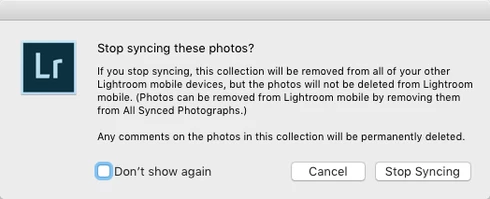


(Now you have to go and find those photos in that Collection from All Synced Photographs and remove them from there. Too many steps, too cumbersome and too easy to make a user error.)

There still is the requested option to remove photos at the same time when you delete a Synced Collection instead of just stopping it from syncing:
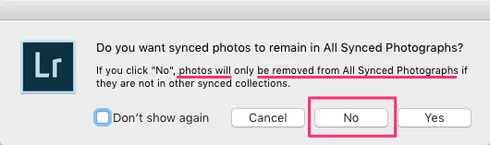


That same option should appear for just stopping the Collection being synced as well.

The first dialog for stopping a Collection from being synced is messy altogether as it asks if the user wants to "Stop syncing these photos?" but the button for doesn't actually stop syncing the photos and instead keeps those photos synced to LR Mobile and Web and just stops syncing the Collection name.

So at least more correct title could be "Stop syncing this Collection?" and that's not enough as there needs to be a way to stop syncing a Collection AND stop syncing photos in that Collection, in one step (unless they are part of another Synced Collection).

68 replies

Inspiring
November 21, 2016
This really needs to change already. Two months should be enough to bring back the obvious function of stop syncing photos in a Collection that's no more synced.

When a photo is not part of any Synced Collection it should not be synced. At least there should be the same option as when deleting a Synced Collection – stop syncing the photos and do not keep them in All Synced Photographs. In stead, from LR CC 2015.7 onwards, when unsyncing a Collection all photos have to remain synced. What?!

I'm getting very frustrated with organizing synced photos.

For example, I have a project where I initially made all photos (3.500 of them) available on the go and shared via a Synced Collection. Then the photos were reviewed and refined and in the end there's three different collections with 14, 139 and 245 photos in each Synced Collection. All other photos in various Synced Collections should now get unsynced as all those other Collections get archived in Lightroom catalog without being synced. But, there's no way to do that! If I would delete those Synced Collections I would get an option to stop the photos from being synced. Why is this, why isn't there that same option when just unsycing?
Inspiring
November 7, 2016
Sorry Arjun, I've missed your reply.

Yes, I want an option to remove photos from being synced when I unsync a collection.

Yes, the behavior would be the same as deleting photos from a synced collection (and choosing the option to remove them from being synced).

Yes, I would very much expect having an option to have the photos unsynced when I stop syncing the collection.

Yes, I do understand that photos present in another synced collection are still synced.

There already was this possibility before LR CC 2015.7. Why was it removed?
Inspiring
November 2, 2016
Hi Arjun,

I did read your comments, but I find it all to be confusing and don't have the time to devote to figuring out the best solution, nor am I being paid to do so.

My previous comment is my suggestion. Good luck.

Jordan
arjunhaarith
Adobe Employee
Adobe Employee
November 2, 2016
Hi Jordan,

Please check my above comments on this and let me know your inputs.

Thanks,
Arjun
Inspiring
November 1, 2016
I agree with Anssi that this is a point of confusion and frustration.

Simply put, unsyncing a collection should automatically unsync the photos it contains unless those photos are in another synced collection.

No need to keep referring to "All Synced Photos"
arjunhaarith
Adobe Employee
Adobe Employee
October 21, 2016
Hi Anssi,

Thanks for your inputs and suggestions. They are highly appreciated.
The heading "Stop syncing this collection" would sound more apt here.
Currently , the behavior is, if you sync a collection, all the photos in it would be present in 'All synced photos' collection. 
Do you want an option to remove photos from being synced (by removing them from 'All synced photos' collection) when we unsync a collection? If this is the case, the behavior would be the same as deleting photos from a synced collection(where we give an option to the user to leave photos from being synced or remove them from being synced). If we stop syncing the collection, we can still give an option for them to be unsynced. However, one important thing to be noted here is, if the photos are present in a different synced collection say 'A'. We then unsync a collection 'B' which has the same photos that are present in 'A'. Now even though we say stop syncing the photos from 'B', the photos would not be removed from 'All synced photos', as they are still referenced in a synced collection 'A'.

Please let me know you inputs.

Thanks,
Arjun
Inspiring
October 19, 2016
This probably should have been marked as a PROBLEM as there is no more a way to stop syncing a Collection and the photos in it – instead you have to:
  1. duplicate the Collection
  2. delete the original Collection and select not to leave photos in All Synced Photographs (unless they are part of another Synced Collection)
  3. rename the duplicated Collection (to remove the " Copy" suffix)
Inspiring
October 19, 2016
Even more confusing, if you use mouse contextual menu on a Synced Collection and choose "Delete..." there's a different dialog than deleting with the keyboard shortcut (image):


Leaving that checkbox unchecked you have the option to stop syncing.

So why is there an option to stop syncing photos together when deleting a Synced Collection but not when just stopping a Synced Collection being synced?

EDIT: I got confused about deleting a Synced Collection via keyboard shortcut: there isn't a keyboard shortcut, and in the original post 2 days ago I had mistakenly actually referenced deleting photos in a Synced Collection, not actually deleting the Synced Collection itself. But, the dialog for deleting a Synced Collection via mouse context menu remains the same and gives the user an option to stop syncing the photos in that Collection. That option is not available when just stopping a Synced Collection from being synced.