


Inspiring
October 17, 2016
Open for Voting

P: Option to stop syncing photos in a Collection when that Collection is stopped from syncing

  • October 17, 2016
  • 68 replies
  • 2790 views

Bring back the possibility to stop a Collection from being synced AND stop photos in that Collection from being synced as well, in one-step.

Since LR CC 2015.7 this happens when you stop syncing a Collection (clicking the little sync icon or deselecting Sync with Lightroom Mobile via mouse contextual menu):
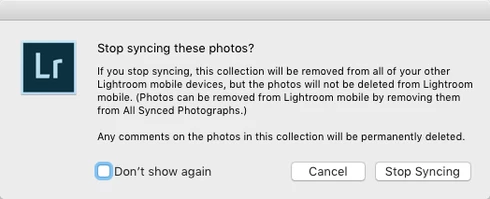


(Now you have to go and find those photos in that Collection from All Synced Photographs and remove them from there. Too many steps, too cumbersome and too easy to make a user error.)

There still is the requested option to remove photos at the same time when you delete a Synced Collection instead of just stopping it from syncing:
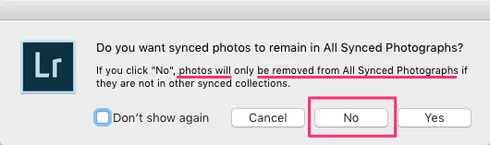


That same option should appear for just stopping the Collection being synced as well.

The first dialog for stopping a Collection from being synced is messy altogether as it asks if the user wants to "Stop syncing these photos?" but the button for doesn't actually stop syncing the photos and instead keeps those photos synced to LR Mobile and Web and just stops syncing the Collection name.

So at least more correct title could be "Stop syncing this Collection?" and that's not enough as there needs to be a way to stop syncing a Collection AND stop syncing photos in that Collection, in one step (unless they are part of another Synced Collection).

68 replies

rickm1970
Known Participant
March 31, 2017
The problem is when you have thousands of pics to edit and you use a mobile device as part of your workflow. I like to edit on my iPad while I am watching TV or out and about. However, memory on my iPad is limited and so when I am done editing a collection I just want them off my iPad. However, when I stop syncing they are still in all synced. To get rid of those, I have to stop syncing all my collections then delete all synced photos. If I do not then all my pictures in my synced collections get deleted out of those collections. The other option is to sort through and delete out of all synced but who has time for that. Anyway, please address this, I have been burned a few times by forgetting I have a collection synced. 
Participant
November 21, 2016
Arhhh, Why hasn't this been fixed yet, it's such a pain in the ......

Come on Adobe sort it out!
john beardsworth
Community Expert
Community Expert
November 21, 2016
>Er, and keywords don't sync anyway.

Trust me 😉 , they do. It's just that we don't normally see them anywhere in LrW or LrM.
Inspiring
November 21, 2016
> lost performance - yet tens of thousands of keyword metadata is probably less data than syncing one photo

I think you understood me wrong. When there's tens of thousands of unnecessary synced photos having any kind of edit that trickers the syncing, all of them are getting updated and uploaded. It's not about how much data gets synced, it's about the unnecessary updating of unnecessary synced photos happening to a lot of photos – and that syncing taking unnecessary performance.

Even if you disagree with any performance issues, unnecessary synced photos can have unnecessary sync errors.
Victoria Bampton LR Queen
Community Expert
Community Expert
November 21, 2016
> lost performance - yet tens of thousands of keyword metadata is probably less data than syncing one photo

Er, and keywords don't sync anyway.
Victoria - The Lightroom Queen
john beardsworth
Community Expert
Community Expert
November 21, 2016
  • lost storage - they aren't available for offline editing so they take negligible space on devices
  • lost money - as Victoria says
  • lost performance - yet tens of thousands of keyword metadata is probably less data than syncing one photo
  • lost time - it just happens in the background
So while I preferred the previous behaviour, I just keep coming back to my wanting to keep stuff tidy - and thinking is that all?
Inspiring
November 21, 2016
Thanks Victoria, I had it wrong, then.
Victoria Bampton LR Queen
Community Expert
Community Expert
November 21, 2016
> (I do pay for 20 GB, it's not unlimited space for syncing, unless I've understood it wrong)

Lightroom Sync doesn't not come out of the Creative Cloud sync space. Photos synced through Lightroom are unlimited, at least at this point in time.
Victoria - The Lightroom Queen
Inspiring
November 21, 2016
When there's tens of thousands of photos or more not meant to be synced, it's a significant problem.
  • lost storage (previews of tens of thousands of photos not meant to be synced take up lots of space on mobile, web and on desktop)
  • lost money (I do pay for 20 GB, it's not unlimited space for syncing, unless I've understood it wrong)
  • lost performance (when tens of thousands of unnecessary synced photos update their metadata because I add a keyword)
  • lost time (when unnecessary updating of unnecessary synced photos happens it affects performance which affects time)
When you look at it from a bunch of unnecessary photos being synced, it's maybe not a problem. But we're counting all our photos to be managed in Lightroom and it becomes significant problem when we don't have the ways to manage our synced photos (and we already did before LR CC 2015.7).
john beardsworth
Community Expert
Community Expert
November 21, 2016
Why is this a significant problem? I start out from what's probably a similar viewpoint, disliking these dialog boxes and not wanting the photos to remain in All Synced Photos when I stop syncing them in a collection. But frankly:
  • Why should I care if Adobe use web storage space for photos I no longer want to be synced? I don't pay any more, do I?
  • If I subsequently add those photos to another synced collection, the sync up is already done.
  • The photos no longer clutter up mobile device storage (if the synced collection's offline editing setting had been enabled).
  • Life's too short to try finding anything in All Photos on the device/web. I look for stuff in collections.
So why is this a big deal? Apart from a "tidy gene" that some of us may have.

John