


Inspiring
October 17, 2016
Open for Voting

P: Option to stop syncing photos in a Collection when that Collection is stopped from syncing

  • October 17, 2016
  • 68 replies
  • 2790 views

Bring back the possibility to stop a Collection from being synced AND stop photos in that Collection from being synced as well, in one-step.

Since LR CC 2015.7 this happens when you stop syncing a Collection (clicking the little sync icon or deselecting Sync with Lightroom Mobile via mouse contextual menu):
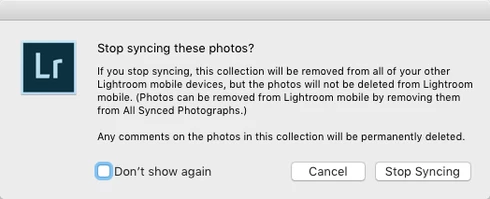


(Now you have to go and find those photos in that Collection from All Synced Photographs and remove them from there. Too many steps, too cumbersome and too easy to make a user error.)

There still is the requested option to remove photos at the same time when you delete a Synced Collection instead of just stopping it from syncing:
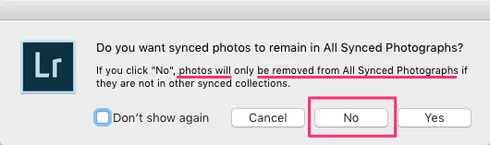


That same option should appear for just stopping the Collection being synced as well.

The first dialog for stopping a Collection from being synced is messy altogether as it asks if the user wants to "Stop syncing these photos?" but the button for doesn't actually stop syncing the photos and instead keeps those photos synced to LR Mobile and Web and just stops syncing the Collection name.

So at least more correct title could be "Stop syncing this Collection?" and that's not enough as there needs to be a way to stop syncing a Collection AND stop syncing photos in that Collection, in one step (unless they are part of another Synced Collection).

68 replies

Victoria Bampton LR Queen
Community Expert
Community Expert
April 10, 2017
Sorry for the delay replying - just back from vacation.

No, I agree 8.31GB is not very little. That amount of space sounds much higher than I'd expect for 2488 photos synced. I'd expect 1-2MB per photo for metadata, preview and smart preview. In Preferences, is it set to download full resolution? 

The difference in synced numbers between desktop and mobile could be down to videos. The difference between the total in collections and the Lightroom Photos total just means there's a photo synced that isn't in a collection.
Victoria - The Lightroom Queen
Inspiring
April 1, 2017
Clearing the cache took me from 8.56G to 8.31G. Still doesn't qualify as "very little." 2,488 photos synced, 148 (6% of the total) set for offline use.

The presence of a cache is an implementation detail. Users shouldn't have to screw with esoteric software twiddling. If the app sees that I'm running out of space on the device, it should be dumping older stuff out of the cache automatically. From a user standpoint, we should be managing our space by adding or removing photos from sync'd collections, but since unsyncing doesn't work the way people expect it to, it's a big hassle.

Also, oddities like LR Mobile shows 2,488 photos in the Lightroom Photos section at the top, but adding up the number of photos in the sync'd collections below shows 2,487, while the All Synced Photographs collection in LR Desktop shows 2,481 photos. Three different values doesn't inspire confidence.

And the really screwy one, if in LR Desktop you select a photo in the All Synced Photographs collection and delete it to unsync it, the photo also gets deleted from the original collection it was in when you first turned on syncing. Collections are supposed to be independent of each other. If a photo is in collections A and B, and I delete it from A, it still remains in B. Unless you're dealing with the All Synced Photographs collection. There's a behavioral mismatch between this one collection and every other collection. You spend all this time learning how collections work, and now out of the blue there's this new one that works differently.

The way syncing used to work made sense. Turn the checkbox on: it's synced. Turn it off: it's unsynced. The way it works now doesn't.
rickm1970
Known Participant
April 1, 2017
Hi Victoria, 
I am know they do not take up as much space as collections that are synced. I Just know I have had to clear all synced in order to download more. I can get the number over 10,000 in a few depending on how many teams I am shooting. Just seems like a house keeping issue from an IT/QA standpoint. 
Victoria Bampton LR Queen
Community Expert
Community Expert
March 31, 2017
You've just cleared cache, and you don't have the collections set for offline use? How many photos synced?

(Although I agree there should be a checkbox anyway.)
Victoria - The Lightroom Queen
Inspiring
March 31, 2017
>...photos in All Sync Photos take up very little space...

I don't consider 8.5 GB to be "very little." And LR Mobile is always telling me syncing is stopped because there's no space left. And if it was a design decision that made sense, we wouldn't all be in here complaining.
Participant
March 31, 2017
It's the fact that it has to upload a set of photos. In the commercial world we can have a set of photos with a couple thousand images in it. We sync it to the mobile so we can do a selection. We then want to unsync it so that we can edit the remaining images. When we do bulk edits and every change we make gets synced to the mobile device, not only does this slow everything down, it also slow the internet down. Now image a team of 10 in the same building doing the same thing, productivity goes out the window. It should be so easy to put to a tick box like before to remove from the mobile device.  I think Adobe want to take over the world and just cater to the consumer rather than the professional as if they wanted to be nice to professionals they would just include a simple tick box!

Rant over 😄
Victoria Bampton LR Queen
Community Expert
Community Expert
March 31, 2017
Just to make sure we're all clear, you do understand that photos in All Sync Photos take up very little space on your mobile devices? The photos are stored on the cloud, but they're only downloaded to your iPad when you need to view/edit them, and you can clear that cache of downloaded photos on your mobile devices to free up space without actually removing the photos from the cloud.
Victoria - The Lightroom Queen
Inspiring
March 31, 2017
Thanks Arjun, for explaining the design decision on this. It makes it easier to understand why sync behaves like it behaves.

But it's a BAD design as the syncing is on LR Desktop now built around the concept of adding a big, coherent group of photos (a Collection) to LR Mobile and Web at once via a Synced Collection, but now there's no way to stop syncing that big, coherent group of photos and instead you need to pick them ONE-BY-ONE from All Synced Photographs.

That's no good.

I'm learning to enjoy having a big set of photos to cull down on a mobile device (iPad mini and iPhone) and I can share them easily, too, to second pair of eyes. But now there's no easy way anymore to remove big, coherent group of photos at once.
arjunhaarith
Adobe Employee
Adobe Employee
March 31, 2017
Hi All,

Thanks for your concerns and we really appreciate your feedback.
However, this functionality is designed to match the behavior with other clients in the Lightroom ecosystem.
For eg : Even in Lightroom mobile, if you remove a collection or an image from a collection, the photos continue to remain synced (unless you delete the photo from 'Lightroom Photos' collection) 

Thanks,
Arjun
rickm1970
Known Participant
March 31, 2017
Please Adobe, please!