


Inspiring
January 3, 2014
Released

P: Wish for a "cancel" button on "Back Up Catalog" box

  • January 3, 2014
  • 61 replies
  • 1974 views

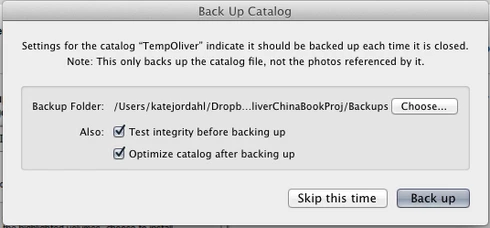
If I had only one wish for the next Lightroom update, it would be a cancel button on the last dialog when you close a catalog. I like the reminder to back up each time, but sometimes I click quit too soon or by accident. It would be great if the "Back Up Catalog" dialog included "cancel" next to "Skip this time" and "back up." Thanks.
61 replies

Rikk Flohr_Photography
Community Manager
Community Manager
August 30, 2023

@sidebead1  

You’ve posted to a very old thread. It is highly unlikely that the issue described in this thread, though not impossible, is the same issue which you are currently experiencing. Rather than resurrect an old thread that is seemingly similar, you are better posting to a new thread with fresh, complete information including system information, a complete description of the problem and step-by-step instructions for reproduction. 


In the unlikely event the issue is the same, we will merge you back into the appropriate location. 


Thank you!


Rikk Flohr: Adobe Photography Org
sidebead1
Participant
August 30, 2023

Ditto all of the above. This is stupid and should be easy to fix.

Participant
November 20, 2019
THANK YOU SO MUCH that worked!!!!  I don't believe I would have clicked don't show again as I definitely was very grateful to have it.  I will wait for the next upgrade and see whether it defaulted back to the legacy of not having the button.  If so, at least now I have a solution.  It took me awhile to find the reset all warnings - in windows, it is under preferences/general tab!  Thanks again for your help - you saved the day!!!!  
JohanElzenga
Community Expert
Community Expert
November 19, 2019
You may have clicked the “don’t show again” button last time. Reset all warnings in the preferences.
-- Johan W. Elzenga
Participant
November 19, 2019
I just updated to LR 9.0 and it is no longer there for me?  Any ideas? 
Bob Somrak
Legend
November 19, 2019
The cancel button is still in Lr 9.0
M4 Pro Mac Mini. 48GB
Participant
November 19, 2019
Ok, so last update LR ADDED the "are you sure you want to exit" feature and I was in heaven!  I close this darned software so many times and have to reload it over and over again.  Now the last update THEY TOOK IT AWAY!!! WTH????  Why would you do that?  If someone wants the Legacy of NOT having that button - PLEASE do that - don't frustrate those of us who have been waiting for over 5 yrs (or more) for this feature!!!!! 
Inspiring
September 11, 2019
Inspiring
July 11, 2019
Hey, it already exists, but it was not necessary to cancel this dialog, sorry my LR is in French!

So reset your preferences .... And if you work with older versions, then, pay the subscription and update!


Yves Crausaz, Suisse, retraité actif dans le monde de la photo et des arts graphiques.
Bob Somrak
Legend
July 11, 2019
There already is a cancel button.
M4 Pro Mac Mini. 48GB