


Inspiring
January 3, 2014
Released

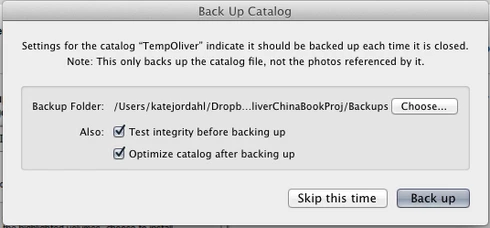
P: Wish for a "cancel" button on "Back Up Catalog" box

  • January 3, 2014
  • 61 replies
  • 1974 views

If I had only one wish for the next Lightroom update, it would be a cancel button on the last dialog when you close a catalog. I like the reminder to back up each time, but sometimes I click quit too soon or by accident. It would be great if the "Back Up Catalog" dialog included "cancel" next to "Skip this time" and "back up." Thanks.
61 replies

Inspiring
July 11, 2019
ditto! I (far too often) accidentally hit CMD Q instead of CMD A if you hands haven't been on the keyboard. Now I've got to wait for the app to quit, then launch again just so I can continue the task I was in the middle of. Glad I'm not the only one scratching my head on this one (for years!).
Inspiring
December 13, 2018
Adobe products are tools I make my living with.  My clients choose me based on can you do it, how novel and tight is your solution and how fast can you do it.  The solution they gave us to this shortcoming is not efficient.

Time is money, generally the longer it takes me to do something the less money I make.  And I have clients that often need something on a deadline.   I need solutions that always work.  The new Content Aware Fill tool in Ps is a classic example- it allows me to do better work faster, but it is very buggy and for now that is costing me more time and almost made me miss a deadline when it locked up  Ps. Not well done, it was launched before it was ready. I have figured out how to get around the bugs, but I am now back to waiting for a point release after upgrades, they bit me again.

My opinion on this fix, as a paying customer who uses this to make a living, is it's a joke.  That is my opinion.  You are entitled to yours also.  It may be fine for a hobbyist who is in the software infrequently.  I do not know Adobe's pro/hobbyist mix of customers, keeping them happy  may be all they care about. it may be other professionals are fine with it.  I am not. My customers are demanding,  so am I.

They fixed the server busy error, finally.  I won't ring the bell on that one either, it should have been done years ago.

JohanElzenga
Community Expert
Community Expert
December 13, 2018
"All I want is a cancel button that gives me the option of changing my mind a few seconds after I inadvertently click the close icon. Not once a week, but every gosh darn time I close Lr, at my whim."

So what's your point? You've got that now!
-- Johan W. Elzenga
Participating Frequently
December 13, 2018
The new EXIT/CANCEL EXIT mechanism in 8.1 solved my issue with the lack of a Cancel button. It allows me to cancel an exit -- which I couldn't do before -- invoked by CMD+Q when I intended CMD+TAB and that's all I need. In my professional life I spent a lot of time crafting and coding user interfaces. Adobe's solution is not the way I would have done it but I didn't do it.

But someone did, and I'm grateful for that. It works. Thank you, Adobe for fixing it. 

Koro 
Inspiring
December 13, 2018
July 1969, man lands on the Moon. This is done on a computer with less umph than a modern digital thermometer.

It’s nearly fifty years later. Cars drive themselves, doorbells are smart, heck now only little girls ride horses. All I want is a cancel button that gives me the option of changing my mind a few seconds after I inadvertently click the close icon. Not once a week, but every gosh darn time I close Lr, at my whim.

Reckless? Cavalier? Unreasonable? Hmmm. How hard can this be? Landing on the moon using rocket fuel, old aluminum cans, chewing gum and bailing wire hard? Me thinks not.

I remain respectfully not just unimpressed but not even less disatisfied.
JohanElzenga
Community Expert
Community Expert
December 12, 2018
See Ricks comment above. That ‘existing box’ you are talking about only exists if you set Lightroom to backup the catalog on each quit. You can also set it to other options, such as once a week. That means you would only be able to bail out of a quit once a week...

The other reason is a technical one. By the time you get the catalog backup dialog, Lightroom has already closed the database. That means that bailing out of a quit at that stage would hardly be different than restarting.
-- Johan W. Elzenga
Inspiring
December 12, 2018
What I don't like is having to click through two boxes when all Adobe had to do was add a Cancel button on the existing box.  How complicated was that?  We are not breaking new ground here. I suspect a feature like this was first done in the 1800s, maybe even before that?

If I check the never show again box that sort of, to me anyway,  defeats the purpose of having the Cancel option...

It is not the end of the world, but that said Adobe had a chance to hit a home run, they barely got to first base via a fielder's choice bunt.
Rikk Flohr_Photography
Community Manager
Community Manager
December 12, 2018
A Cancel button on the Backup dialog would only be always available to those who have set Lightroom to perform a back on each exit. If you, for example, set your backup to go weekly, you would only have one chance in a week to cancel an exit instead of being able to cancel any exit. 

If you don't like to click the extra time per exit, the dialog has a Do not show again option.
Rikk Flohr: Adobe Photography Org
Inspiring
December 12, 2018
Okay, I do see the new pop up warning box.  It is marginally better than a poke in the eye with a sharp stick, but only a tiny little bit better. 

What was so hard about simply adding a Cancel button on the existing dialog box? 

Now we have a way out but you demand more clicking, always more clicking... I'd give it two stars at most. Maybe one. 
Inspiring
December 11, 2018
I looked and am down a rev, I do not recall seeing a notice for an update and just a week or so ago updated Ae and Ps and Id.

I tried to upload the new version, it keeps stalling at 1%,  at some point I will get it on there.  I am on deadline today it will get a few more minutes to upload then I have to go back to work.  

But if it is not triggered by the red X no joy for me.  That is how I close files.