


Inspiring
January 3, 2014
Released

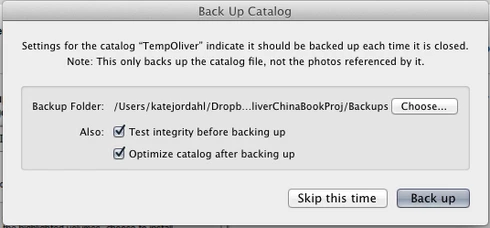
P: Wish for a "cancel" button on "Back Up Catalog" box

  • January 3, 2014
  • 61 replies
  • 1974 views

If I had only one wish for the next Lightroom update, it would be a cancel button on the last dialog when you close a catalog. I like the reminder to back up each time, but sometimes I click quit too soon or by accident. It would be great if the "Back Up Catalog" dialog included "cancel" next to "Skip this time" and "back up." Thanks.
61 replies

Inspiring
December 11, 2018
Wow.  I just tried it and lo and behold Adobe has indeed, FINALLY, added a cancel quit dialog.  As mentioned, it appears as a separate dialog box before the usual one, so it's not as convenient having a single dialog box with "cancel quit" along with "Backup" and "Skip"), but hey, it's still a big and long overdue improvement.
Rikk Flohr_Photography
Community Manager
Community Manager
December 11, 2018
I just tested on Windows with File>Quit and with clicking the tiny little red X up in the corner and got the Cancel dialog both times.  Please go to Help>System Info... and get us your installed Lightroom version and paste it into your reply. 
Rikk Flohr: Adobe Photography Org
Inspiring
December 11, 2018
Oh really???  I just (right now, in real time on a system that is fully up to date) quit Lr by clicking on the tiny little red X up in the corner.  I was not given a choice of cancel.  Fix that and I will be less dissatisfied.  I ain't buying anything less. We are the customers, please listen.  Do we have to draw a picture?

It is too easy to get stuck in the mode of closing images in Ps by clicking red Xs, then doing the same in Lr and having no option but to quit. It happens to me a few times a day, where I find myself closing Lr when I did not intend to. 

Someone finally fixed the Server Busy error, after a decade or so, that makes it a little less painful, but my gosh guys we are not asking for the moon here....
Rikk Flohr_Photography
Community Manager
Community Manager
December 11, 2018
A cancel quit dialog was implemented in Lightroom Classic CC 8.1. It is a separate dialog from the Backup dialog to allow its use by people who use backup infrequently.
Rikk Flohr: Adobe Photography Org
Participating Frequently
December 4, 2018
I have asked, on this forum, a couple of times for a Cancel on the exit dialog box. Tab and Q are adjacent to each other on both Mac and PC keyboards. It is too easy to hit CMD (ALT)-Q when you intend CMD (ALT)-TAB. Instead of swapping applications you suddenly find yourself being forced to shutdown LR. A Cancel button would be very helpful.

Thanks
Inspiring
December 3, 2018


In the event that I accidentally hit a button to close Lightroom I would like to see a way to escape from closing the program. Also, I would like to be able to delete a photo from disk from a collection but get a dialog telling me that I am trying to delete just in case I made a mistake. Just like from a folder. Thanks!
Known Participant
September 22, 2018
Exactly!
TheDigitalDog
Inspiring
September 22, 2018
The solution is rather easy: stop expecting LR to do the backup, it's half baked at best and far from an adequate backup schema. Turn this silly option OFF. Use a product designed to backup everything you can't afford to lose!
Author “Color Management for Photographers" & "Photoshop CC Color Management/pluralsight"
Known Participant
September 22, 2018
Given my experience with relational database systems, I think the reason Adobe has not offered a solution is because they cannot—not as long as LR is based upon SQL-lite.  It's not a true relational database with fourth- or even third-level integrity, much less full referential integrity, so when it starts to parse the database it is committed to the bloody end.

If Adobe switched to MS SQL or Oracle, this would not be a problem, except their profits would decrease (or our costs would increase).

So we have to figure out a workaround.  I have one which works for me.  Others will find their mileage will vary.
Known Participant
September 22, 2018
We've been waiting for over six years.  The point of that is Adobe is NOT listening.  Therefore, we have to come up with other options.  I simply proposed one—that was my point.  Please feel free to come up with your own alternative or keep waiting on Adobe, but don't hold your breath.