


Inspiring
January 3, 2014
Released

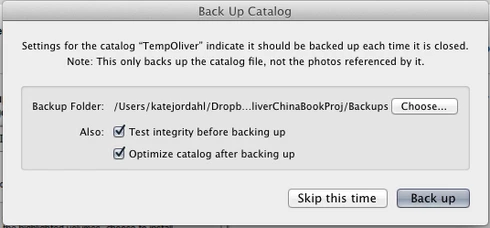
P: Wish for a "cancel" button on "Back Up Catalog" box

  • January 3, 2014
  • 61 replies
  • 1974 views

If I had only one wish for the next Lightroom update, it would be a cancel button on the last dialog when you close a catalog. I like the reminder to back up each time, but sometimes I click quit too soon or by accident. It would be great if the "Back Up Catalog" dialog included "cancel" next to "Skip this time" and "back up." Thanks.
61 replies

JohanElzenga
Community Expert
Community Expert
May 3, 2017
LR5 is no longer updated, so this won't happen for you, Koro. I do agree that it should happen in LR CC though.
-- Johan W. Elzenga
Participating Frequently
May 3, 2017


I'm using LR5 on a Mac, OSX 10.11.5: Please please please please PLEASE put a Cancel button on the exit dialog box.

Then alter the behaviour of keyword list so that it doesn't go back to the top of the list after adding/altering/deleting a key word.  

Apart from a few irritating things like these LR is a fantastic app. It's very much my primary app and otherwise I have no real complaints.

 Thanks.
Inspiring
May 3, 2017


Is it possible to design Lightroom such that when you click on the "Close" X in the top right hand corner, it provides an option NOT to close. I find myself clicking on it by mistake, say, when I am in Survey mode instead of typing "G", and have to close and reopen LR.
Inspiring
May 3, 2017


It'd be good to have a way to cancel accidentally quitting LR. Sometimes I accidently hit the Comm. + Q and LR quits (without giving the option to cancel the action). An "Are you sure you want to quit LR?" warning would be helpful.
Participant
May 3, 2017


Not infrequently I accidentally hit Cmd-Q instead of Cmd-Tab (to change applications). This brings up the Backup Catalog Before Exit dialogue box and I'm then stuck quitting LR and having to restart it. Hitting Esc does not abort the exit process.

Please ask Adobe to include a Cancel option in that diagoue box so I can just return to LR without quitting.
Participant
May 3, 2017


When you accidentally click command-W instead of command-E, you get the close dialogue box to either check the database or not. But there's no "cancel" option. That would be helpful.
Inspiring
May 3, 2017


Wish that when you quit Lightroom and the backup window comes up, you could cancel quitting as well as backing up or not backing up. Working fast, "command-q" happens accidentally sometimes and I would love to have the choice to not quit. Thanks.
Participant
December 13, 2016


When exiting lightroom the dialog window asks if you want to back up the catalog and you can or simply skip this time but clicking the x to close the dialog window simply exits the program. If you want to change your mind and not exit you still have to exit. If you select exit and then decide not to you are forced to exit.
Inspiring
December 10, 2016
Same here... it is very strange and sometimes frustrating behav.
Inspiring
September 20, 2016


Once you do File -> Exit you are committed to exit.  There's no turning back!  The exit dialog needs a Cancel button.  If you "x" the dialog, Lightroom will exit anyway, which is unexpected behavior (in my experience, killing a dialog is equivalent to cancelling it).  

What's with the emoticons?  They're so juvenile.