


Inspiring
January 3, 2014
Released

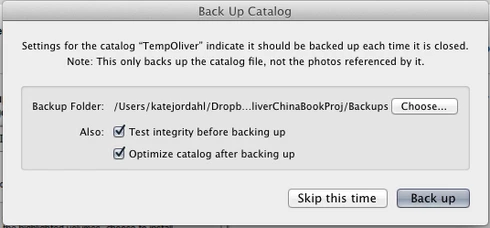
P: Wish for a "cancel" button on "Back Up Catalog" box

  • January 3, 2014
  • 61 replies
  • 1974 views

If I had only one wish for the next Lightroom update, it would be a cancel button on the last dialog when you close a catalog. I like the reminder to back up each time, but sometimes I click quit too soon or by accident. It would be great if the "Back Up Catalog" dialog included "cancel" next to "Skip this time" and "back up." Thanks.
61 replies

TheDigitalDog
Inspiring
June 8, 2018
What issue: Inability to type the correct key; seriously ?
Author “Color Management for Photographers" & "Photoshop CC Color Management/pluralsight"
Known Participant
June 8, 2018
The first post on this issue was three years ago. 
Is Adobe deaf?
Known Participant
June 8, 2018


THE W BUTTON IS NEXT TO THE E BUTTON ON A KEYBOARD. ACCIDENTALLY HITTING THE "W" BUTTON INVOKES THE THE CLOSE DIALOG THAT CANNOT BE CANCELED. PLEASE FIX THIS.
Inspiring
May 20, 2018
Ce que nous demandons simplement, c'est l'ajout d'un bouton 'Annuler' permettant le retour immédiat dans LR Classic.

What we are asking for is the addition of a 'Cancel' button for immediate return to LR Classic in the next version of LR Classic CC.

Thank's.
Yves Crausaz, Suisse, retraité actif dans le monde de la photo et des arts graphiques.
Inspiring
May 20, 2018


Golly guys, why is Lightroom the only program left on the planet that will not let you cancel shutting it down.  Sooooo often I hit the wrong button and find myself with the only choice being back up or no back up.   I want a Cancel button, is that too much to ask?  Even Microsoft does this.....

And while you are at it fix the damn server busy error, I have been living with that cursed piece of code for  years.  Grrrrrr.  Nothing fixes it. I have tried everything short of human sacrifice.
JohanElzenga
Community Expert
Community Expert
September 22, 2017
Well, I don't know about Windows, but on my Macintosh a database application like FileMaker does not have such an extra step (and I would find it irritating if it did). It just quits when I hit Cmd-Q. Same for my word processor (unless I have unsaved documents) and most other application I can think of.
-- Johan W. Elzenga
Inspiring
September 22, 2017
Why do people keep misinterpreting the issue being discussed here and in other forums - we must have trouble expressing ourselves? I did not say anything about wanting or not wanting a backup. The actual issue is exiting/quitting LR and wanting a Cancel option to prevent unwanted exits/quits. As some users have suggested, the Cancel button could be included on the Backup dialog (thus preventing a quit and a backup at that time and returning to work in the current LR database).
But it would be better to have a separate 'Do you really want to Quit?'. (thanks for suggesting a using a regular BU - I do this nightly).
JohanElzenga
Community Expert
Community Expert
September 22, 2017
Of course you don't have to let Lightroom make a catalog backup on quit. You can do it less regularly, or you can decide not do to it at all (at least not by Lightroom), but use a general backup package that makes regular backups of your entire disk, including the Lightroom catalog. In that case just do catalog optimize from time to time.
-- Johan W. Elzenga
Inspiring
September 22, 2017
The forced exit via the backup dialog when the Windows Close (X on the top left) is hit is the most frustrating issue I have in LR having used it since v2, and have read all the other requests for a fix here and on the forum for such a basic enhancement. I can't think of another Windows program that does not have an intermediate dialog to confirm your exit or allow a cancel back into where you were working. I hit Close regularly since the  photo viewer software I use simple closes that image and returns to the list of images - my brain is not good enough to keep in mind I'm in LR and not elsewhere.  Please add this feature. 
Inspiring
June 16, 2017
Absolutely amazing that Adobe hasn't addressed this longstanding issue.  For a while I'd found a solution to hitting "Comm + Q" accidently by changing the shortcut to Quit LR to "Comm + Option + Q."  But that went away when I just did the latest LR update and I can't figure out how I changed that in the first place.  Adobe support was of no help on this.  And even with the accidental quitting by hitting "Comm +Q" solved, the problem with accidentally hitting "Comm + W" remained, as I was unable to change the W shortcut.  
Allowing customizable shortcuts and/or providing a "cancel" button on quitting LR is such a no brainer, and this has gone on for so many years that I get to wonder what the hell is going on at Adobe.