Inspiring
October 22, 2017
In Development

P: Ability to create a Custom Crop Ratio preset

  • October 22, 2017
  • 174 replies
  • 7581 views

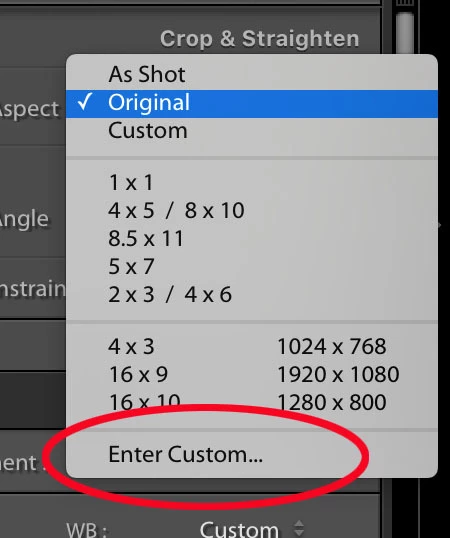
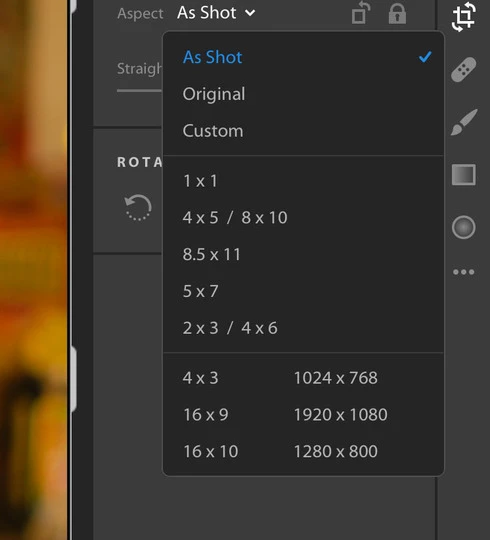
Where is the "Enter Custom..." option from the old Lightroom and how do we get it back (see attachments)? I like to make my photos 1080x1080 for Instagram and was able to do this in the LR Classic version.
 

174 replies

SamuelGillilan
Participating Frequently
May 1, 2021

Please add this feature to LR Mobile. 

Saving custom crop ratios for printing and other artistic methods would be ideal, as well as adding more options for crops out of the box. 

Participant
April 16, 2021

If all you ever want is the provided aspect ratios Lr does the job but there are some annoying aspects of it. First is the fact that when the aspect ratio is changed Lr does not update the meta data so the info button still reports the image size BEFORE the new crop. To get that data to update you have to leave the image and come back BUG/ERROR?  Second and foremost is the inability to create a custom aspect ratio and save it for re-use. Finally, if you can't give us anything else it should be easy and would be good to add a 3x1 ratio to support the photographic traditional panoramic image.  With large sensors these days a crop of 3x1 is a great way to improve the story some photos are trying to tell and it should be MUCH easier than it currently is in any version of Lightroom in the cloud.

Inspiring
March 30, 2021

After 3 years of people posting and wanting to see an Enter Custom crop option and still nothing??  What's up with this??  I often use different crops for pictures, especially in my landscapes.  Are they going to offer this feature or not??

Rick Spaulding -
Legend
March 8, 2021

I've changed your post to a feature request and merged it with an existing thread. 

The forum does not automatically apply a "vote" to your post so don't forget to click the green arrow in the upper left.

Inspiring
March 6, 2021

I want to use 2:39 : 1 or 65:24 ratio in Lightroom but only way to do this is to eye ball it using the custom window function. 

Are you serious?  How can a largest photo editing software not have custom aspect ratio tool? 

Please try to resolve this issue because I really enjoy the clean UI of cloud based lightroom over lightroom classic. 

It literally takes 5 lines of code. 

I beg you

Inspiring
February 19, 2021

Matt, this is exactly what I've been trying to understand (and trying to explain too!)and trying to research about how the copy/paste process of a crop within Lightroom Desktop works. Or essentially 'doesn't' work. It seemed to be relative to how much is cropped on the image you're copying from, and the result is variable. It is not a fixed aspect ratio it copies, which is exactly what I'm after. I have a set of precise image sizes I have to export for a client's website, and it's become a right pain to get these exports bang on the mark. I was also doing the copy/paste (simply of the crop) but recently discovered it is not doing what I want.

Really good to hear I can do this in Lightroom Mobile then. Is that right? Then I don't have to keep opening my LrC on my Laptop (I mostly work on my iMac).

Inspiring
February 19, 2021

Please fix this. I like the ability to switch between devices when editing but the lack of being able to input a custom ratio is super annoying and wastes time since I have to do it elsewhere.

Inspiring
February 17, 2021

I am still in desperate need for this feature. I've been attempting to copy/paste the exact aspect ratio crop from another photo and paste it onto the relevant photo, but for some reason, it just is not the same aspect ratio. It is essential I regularly export images (for a website) at 2000x783px. I can't keep booting up my Laptop (where I have LrC installed) and making the adjustment there.

Participant
December 2, 2020

Voting +1 for the feature: 

- Custom crop settings in Lightroom mobile 

Participating Frequently
November 21, 2020

Some of the features still missing from Lightroom (not Classic) are so basic, it is really frustrating. Especially when we have been discussing this just here for the last three years. 
Every time we create calendars for the holidays, I end up here, every time I end up exasperated that this still hasn’t been fixed. 
Just today I was thinking of fully moving from Lightroom Classic to Lightroom (because the former is so slow on my iMac while the latter is delightfully fast on my iPad), but once again I have see that right now this isn’t possible. 

Voted. Adobe, please get this done.