Inspiring
October 22, 2017
In Development

P: Ability to create a Custom Crop Ratio preset

  • October 22, 2017
  • 174 replies
  • 7581 views

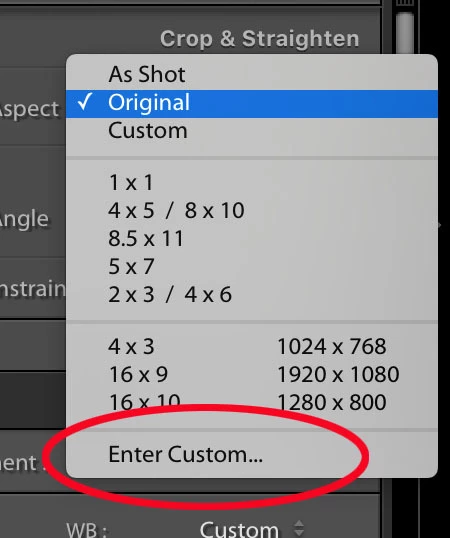
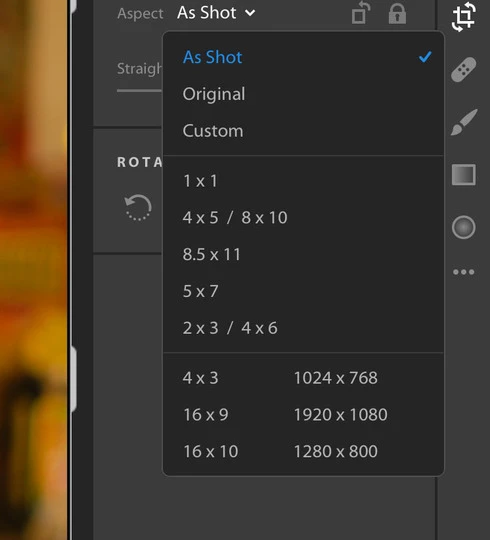
Where is the "Enter Custom..." option from the old Lightroom and how do we get it back (see attachments)? I like to make my photos 1080x1080 for Instagram and was able to do this in the LR Classic version.
 

174 replies

Victoria Bampton LR Queen
Community Expert
Community Expert
November 17, 2020

> Maybe [...] or @lightroomqueen have more chances to support us on getting this little feature. Or at least have another idea on whom we need to contact to get our "Enter Custom Crop Ratio" feature.

*sebastian_tho Apologies for the delay replying, I'm busy catching up with myself. The votes on these feature requests on this site feed right into the internal systems used by the managers when determining priorities, so the best any of us can do is get lots of people to vote. The more votes, the better its chances.

Victoria - The Lightroom Queen
Participant
November 2, 2020

In Lr CC I'd like the ability to enter custom crop ratios like it exists in LrC. It would be even better if I could then save this as a standard selection.

Participant
November 1, 2020

Would like to imput my costum aspect ratios with numbers just like in Classic. Based on Pixels is for me most important 😄

Siwuren
Participant
September 30, 2020

I don't know if this has already been requested, I didn't personally find it searching for it so apologies in advance if I missed it.
I know it's a minor thing but I use lightroom mobile on my Ipad and Samsung quite often, and I wish that there are other crop ratios besides 1:1, 3:2, 4:5, 4:3, and 16:9. I shoot a lot of stills on anamorphic lenses, and I often want to crop my 6x2 desqueezed photos down to 2.35:1, but these options doesn't exist in LR mobile.

What I would like to ask you of you guys is to let us define an aspect ratio by entering it in and saving as a custom crop preset. (So we don't have to enter it each and every time) Instead of "custom" being a drag selection without any way of knowing what the aspect ratio is, please make it a custom [ ]x[ ] box where we can enter our own. I often just export from lightroom as 6x2 original, and crop it in another software, it would be great if I can do it all in LR mobile.

Participant
October 5, 2022

This would be amazing and would really help in simplifying the process of editing anamorphic photos!

Inspiring
September 27, 2020

i'm in the boat with everyone else - is there an update on this feature??

PhotographyMD
Known Participant
September 24, 2020

Thanks Bill.


On what I said above, I discovered that only seems to work on LR Mobile CC. It will apply the correct crop just fine there. LR Desktop is only bringing in the crop equidistant from what the original crop was from on the original image only if I adjust the crop on the image. LR Mobile seems to not need any adjustments at all to work flawlessly. If the edge was brought in 40 px from the starting point in the original, copied, image then that is all it will be brought in on the pasted image. It is not changing the ratio at all.


For example, I started out with a weird sized jumbled up pano and copied the crop of a 3 x 1.5 blank image and pasted it on that pano it wouldn't change anything. If I made the crop slightly smaller with the original ratio on that 3 x 1.5 and copied it, all it would do on that pano is move the edges in the same amount the edges moved when I changed the crop on the blank image. The crop ratio on the piano would not change. Again, this is on LR Desktop. On LR Mobile this is not an issue. I can copy/paste and it will adjust the crop ratio just fine. Awesome /s


Participating Frequently
September 23, 2020

I created a new thread for continuing the "sync" discussion.


How do I edit a photo in LR Cloud (Desktop) with LR Classic and stay sync'ed?


I will copy / summarize some of the posts from here into that new thread.

PhotographyMD
Known Participant
September 23, 2020

My workaround right now is to make an album with various blank crop template images of sizes I use a lot. I will then go to whichever size I want, "Menu", "Copy Settings", check only "Tools" (uncheck everything else) then go under that sub menu, and select only "Crop". Back arrow, Check mark, then go to the picture I want the crop on, "Menu", "Paste Settings". Custom crop applied. Not ideal but it works. *


PhotographyMD
Known Participant
September 23, 2020

From what I read, Bill, it looks like you're talking about running two catalogs. Keep in mind you can only sync to the cloud from one LR Classic catalog at a time, even though you can have as many Classic catalogs as you want. If you've synced from any other catalogs you will get messages nagging at you about this and grinding sync to a halt. (Real fun trying to get that working again if you need to go to a backup catalog.) You will have to *turn off* sync each time you change catalogs to your "offline" Classic catalog to get around this problem. Ideally you should turn off sync before you even open the main catalog. Other than that, yeah, sounds like you got it. 


Unless you really need them separate, I do not recommend running two catalogs for this because of the incredible ease for sync issue headaches. I'm getting one just thinking about it. They have caused me many problems and I don't see Adobe having addressed them. It wouldn't be hard to keep Mobile cloud synced and Classic imported photos separated into two parent folders or parent drives along with parent Collection Sets in LR Classic. They are stupid easy to move around inside LR Classic. IMO, that is something that was done pretty well, even if it is sometimes a bit slow to move large chunks of photos.

Participating Frequently
September 23, 2020

For b_g...  been trying to minimize the tangent here.


But also trying to show Adobe the great lengths some of us have to go to get around the lack of basic functionality in LR Cloud.   And while a little convoluted, this approach looks like it’ll work as a long term “solution”, since I see little hope of a fix/feature coming.


‘For Adobe as well, the lack of functionality also caused me to step back from plans to up the cloud bae to 2TB.  Time to Find other places to store photos.


for Peter... thanks.   Ordered a new clean hard drive to sync to.  With 30k photos in the Cloud, I figure it’ll take days.   This year, I’ve got time to spare.   Will report back in a week...