


Inspiring
July 19, 2017
Open for Voting

P: Image too small when editing

  • July 19, 2017
  • 37 replies
  • 1477 views

New workspace not good. Whats with the new Lightroom mobile app?

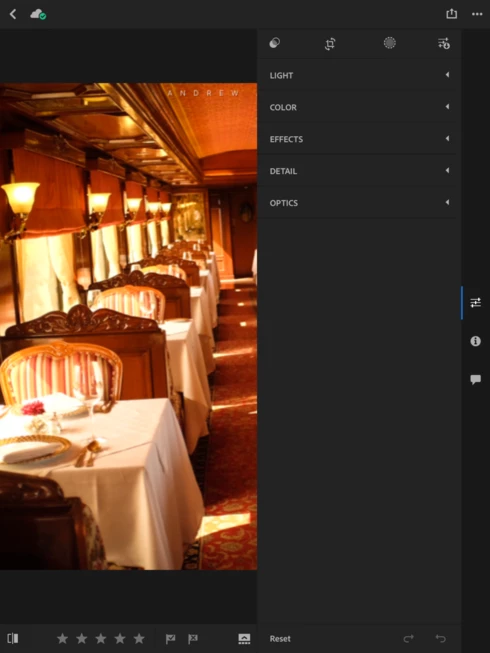
My tools window now take up 1/2 of the screen on my iPad Pro 10.5. It was much better before when it was down on the bottom and the tool bar disappeard to allow for the full screen image while doingedits. Not a good update!

It would also be nice if we had the option to export in more size options, instead of only 2048 and full res.
37 replies

cliffclof
Inspiring
February 19, 2018
This is a step back.  Interface is like giving a calculator to violinist and asking for a symphony.
fliplip1
Inspiring
October 19, 2017
I like how the sliders panel disappears when editing at anything over full image view, leaving only the current slider itself visible. Takes a bit of getting used to but nice improvement. The panels slider is also a bit narrower than before, and in my case the Blacks slider seems to more properly now.
Not keen about thei ‘Done’ button being right at the bottom of the screen. Means a bit more movement to jump between the different editing modes. Nothing I wont get used to quickly though.
Rick Baumhauer
Inspiring
October 19, 2017
I've given it a cursory first look, and it is improved. Specifically, the editing panel is now translucent, so the image doesn't shrink when you open the panel. Still not ideal, as the panel still covers enough of the image that it could be an issue, depending on where you want to be looking as you move a slider, but at least the image isn't immediately shrinking to a much smaller size.
Inspiring
October 19, 2017
Has anyone tried the new LR Mobile 3.0 on iPad? How has the interface changed? Is the image/editing space bigger now?
Inspiring
October 6, 2017
Full image is very different from full screen though.
Inspiring
October 5, 2017
100% agree!

I bought an iPad 10.5 pro mainly for editing pictures in Lightroom.
Now I don't use it at all... Please, please change it back!
Inspiring
October 3, 2017
Agree!
mrdavie99
Inspiring
September 28, 2017
Why haven't we heard from the developers?
September 28, 2017
I certainly agree.  Take us back to the old interface for the iPad Pro.
Rick Baumhauer
Inspiring
September 28, 2017
Even on my 10.5" iPad Pro, the new interface reduces image size dramatically over the previous version, and I wrote to Adobe to let them know that interface took up too much screen real estate (little did I know what was coming!). On Sebastian's 8" tablet, he's probably getting down to phone-size previews.

I realize that the new interface mimics the desktop, and some may like that, but I strongly believe that, on small-screen devices, anything that keeps an interface on-screen when it isn't actively being used is a waste of space. You can only move one slider at a time, so there is no reason for there to be six on screen at once, let alone all the other interface panels under them.

It seems pretty clear that somebody at Adobe thought that bringing the desktop paradigm over to the mobile product was a good idea, but there are a lot of people who very strongly disagree with that, and I hope Adobe listens. As I've said before, the fact that Adobe is still bringing out wholesale interface changes this far into LR Mobile's life makes me think that they really don't understand the role the product is playing, which is pretty stunning.