
Inspiring
July 19, 2017
Open for Voting

P: Image too small when editing

  • July 19, 2017
  • 37 replies
  • 1477 views

New workspace not good. Whats with the new Lightroom mobile app?

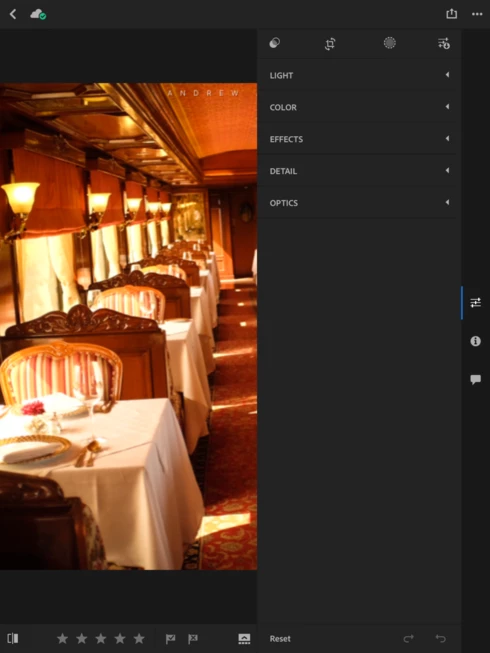
My tools window now take up 1/2 of the screen on my iPad Pro 10.5. It was much better before when it was down on the bottom and the tool bar disappeard to allow for the full screen image while doingedits. Not a good update!

It would also be nice if we had the option to export in more size options, instead of only 2048 and full res.
37 replies

fliplip1
Inspiring
September 28, 2017
Hmmm, i get the full image and multiple sliders all at the same time. Maybe my iPad Pro works differently to your tablet, but i like this layout over the old one slider at the bottom of the screen layout. It’s much closer to the desktop version.
Participant
September 28, 2017
I work for software development and understand perception changes after some time using a new/updated product. This is not the case with this update. I have almost stopped using lightroom mobile in favor to other mobile apps (such as snapseed) and desktop versions, I am even considering stopping my subscription if I manage to integrate these other tools in my workflow.
Since I am not a pro, most of my workflow is mobile. I am not saying everything is wrong with the update, but three things they changed broke it.
One: not being able to see the full picture and the slider at the same time adds one extra tap (I usually have to go back and forward). I have an 8 inch tablet, you would say I'd appreciate having the picture full size; well, I don't, I need the full picture.
The other two things they broke in my opinion is having to change the menu on the top left to be able to rate/flag a picture or edit or show info. Again, extra taps, in this case with no benefits. Against all usability treaties.
Third thing I don't like the small and not precise sliders, though they look much better, they are more difficult to use. I never had issues with the previous ones.
fliplip1
Inspiring
September 28, 2017
My initial reply was 2 months ago, do you not think it might change once i got used to the layout?
Ive also stated i use it almost every day, so it definitely works for some. Having the sliders easily accessible in one go, rather than having to open each one as it used to be has been a big time saver. Having less image space isn't ideal but the pro's that come with it are much better FOR ME.

I still think its ok, but not perfect, but i suspect if it was perfect for me it wouldn't be for everyone, so yeah, its 'ok'.

In life we have to accept a lot of things, its a case of take it or leave it. Can i ask what you use instead of LRM now?
Participant
September 28, 2017
Yet your initial message seems to imply because it's "okay" for you...then what we the majority of users here who do not like it should then accept it? The starting tone of this thread is on the negative impact of the newest update to users.  I am a consumer and I am talking for those who dislike it... A suggestion maybe for you to start another thread on what people do like, so the brand owners can compare side by side?
fliplip1
Inspiring
September 28, 2017
Step back only in the eyes of those that dont like it. I do now like it so where does that leave us?
You are not talking for everyone, and while i understand what you mean you need to be aware that not everyone will share your view so please, when you talk about the consumer make sure you include all of us.
Participant
September 28, 2017
As consumers why accept something that is a step backwards and sub-standard? I f we do so then the product makers are not compelled to change for the better. Not letting it bother you is fine, but the brand owner needs to understand consumer needs and concerns are not to be dismissed so easily...
fliplip1
Inspiring
September 28, 2017
I dont let it bother me now. The layout hasn’t stopped me using LRM any less, and the new features have made me use it even more than before. Yeah, its not perfect but nothing is. Still dont use it on my phone but my ipad gets used almost every day.
Participant
September 28, 2017
I went from using the mobile app on iPad nearly everyday, to having tried it twice since the update and not opening it since.

Using desktop exclusively now as the new mobile update is a substandard UX design and experience . Adobe seems to have put the C team on this update.
Inspiring
September 28, 2017
Totally agree with others on this. The other features with selective edits that have been added are most welcome (thank you) but why the full screen edit has been compromised in this way is a complete mystery.

At least if there was a way of dragging the panel sizes it would not be so bad - or better still, being able to select the tool/slider you want to use and then 'hiding' the tool bar in order to use the tool you've just selected and working full screen.. Zooming into 100% is not really a solution - The tool panel hogging such a large amount of screen real estate is simply bad design in my opinion and negates the new features that have been added, a very odd design decision Adobe. At least give us the option to resize or 'hide' the right hand tool panel. Thank you 🙂
Inspiring
September 11, 2017
I bought an iPad pro specifically for Lightroom so that I could edit my pictures while traveling.
The full screen editing was the MAIN reason for this. It made editing both fun, intuitive and fast.
PLEASE, PLEASE, bring it back. I can't understand why it was taken away!