
Inspiring
July 19, 2017
Open for Voting

P: Image too small when editing

  • July 19, 2017
  • 37 replies
  • 1478 views

New workspace not good. Whats with the new Lightroom mobile app?

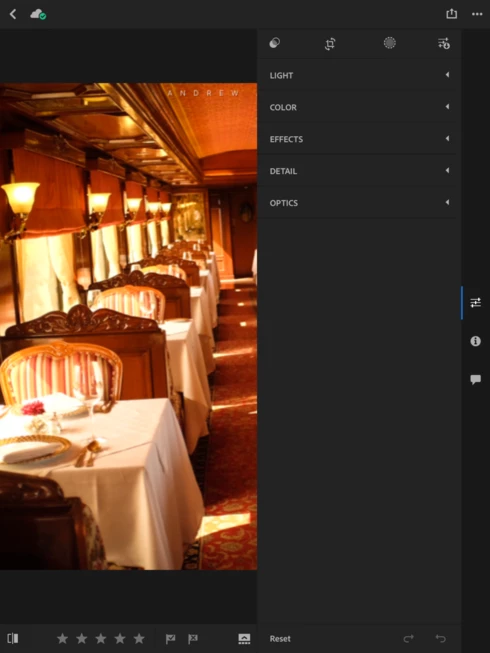
My tools window now take up 1/2 of the screen on my iPad Pro 10.5. It was much better before when it was down on the bottom and the tool bar disappeard to allow for the full screen image while doingedits. Not a good update!

It would also be nice if we had the option to export in more size options, instead of only 2048 and full res.
37 replies

mrdavie99
Inspiring
August 30, 2017
Hey Adobe Developers. I know your listening. Is it going to take an act of Congress to reverse this problem? No, that would really take too long. But this should have been fixed by now.
August 30, 2017
I've only just noticed a bunch of smaller, equally bad but less obvious issues. For example when you finishi changing the order of images in a set you have to counter intuitively press the 'back' button to get out of reorder mode. Considering that it has long become a standard that holding on an image or icon will cause the UI to make them 'jiggle' and allow you to rearrange, it's baffeling that you would choose such a counter productive method. What happened? How did Adobe drop the ball so bad?
Inspiring
August 29, 2017
Please change the layout to what it was before on the iPad. I do the majority of my post/correction on the iPad and now the image is considerably smaller. When working with a smaller screen, every inch counts and this update is killing LR for me.
fliplip1
Inspiring
August 20, 2017
The pre-sets are still there unless you are talking about something else.
Inspiring
August 20, 2017
Please put it back how it was, and bring back the presets there used to be as well. Surely an option to select what layout we want isn't to hard to do? There's so much wasted space like everyone has said
fliplip1
Inspiring
August 13, 2017
The prior version was rubbish when it came to using the masking brush 😉
mrdavie99
Inspiring
August 13, 2017
I think we can expect more from Adobe. "Usable most of the time" is not an acceptable status quo. The prior implementation was useful ALL of the time. Another option is PS Express, an Adobe photoshop tool for mobile devices. If you havent tried it, it's pretty cool. Tools are still along the bottom of the screen.
fliplip1
Inspiring
August 13, 2017
Cant you just edit at 100% or zoomed in? I’m with you on not liking the new layout but I’ve now got used to most of it and find it still just as usable most fo the time.
Inspiring
August 13, 2017
I completely agree because I'm already working on a smaller screen than I'd like to be (an ipad pro), so I want to be able to see as much of my picture as possible so I can better analyze the edits I'm making. It's so hard to gauge small details with this new update. For me it doesn't matter whether my screen is vertical or horizontal, both tilts are displaying my pictures at half my screen or less. Maybe some people prefer this, but I'd love to have the option to make the editing bar smaller (kind of like how you can in desktop), where I slide it to the side (ideally back to the size it was before). Thank you.
mrdavie99
Inspiring
August 7, 2017


Well, I prefer the editing tools in a ribbon along the bottom. This way the image is as large as possible and, for me, easier to edit. Is this an option? If not, why didn't some ask ME what I thought about the new format before making the change?