
Inspiring
July 19, 2017
Open for Voting

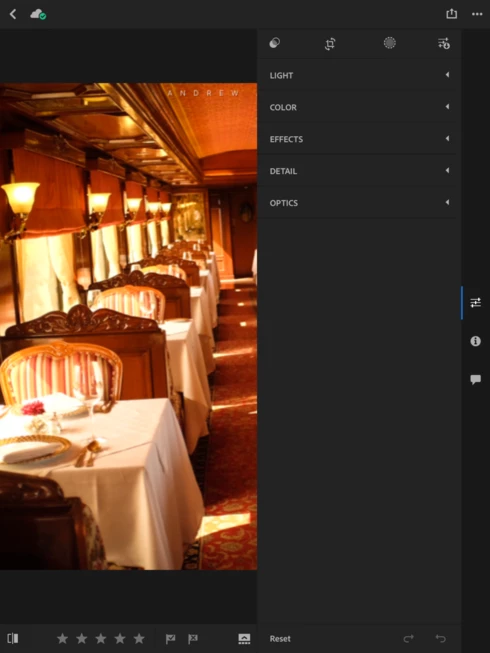
P: Image too small when editing

  • July 19, 2017
  • 37 replies
  • 1481 views

New workspace not good. Whats with the new Lightroom mobile app?

My tools window now take up 1/2 of the screen on my iPad Pro 10.5. It was much better before when it was down on the bottom and the tool bar disappeard to allow for the full screen image while doingedits. Not a good update!

It would also be nice if we had the option to export in more size options, instead of only 2048 and full res.
37 replies

August 2, 2017
I was trying to set the Black & White points with a two fingered touch. The histogram took up much of the top screen space. My two fingers on the slider took up much of the bottom of the space. So I could not see enough of the rest of the screen to find the Black & White points. Please take us back to the prior release (but leave the Adjustment Brush and the Apple Pen support.
Victoria Bampton LR Queen
Community Expert
Community Expert
August 2, 2017
August 2, 2017
If anyone knows how to roll back to 2.7, please leave a reply. Pic flick and the old interface had become a cornerstone of my editing process and I can't go back to the antiquated design.
August 2, 2017
The old functionality was fantastic. This new design has gone backward. It is unintuitive, a poor use of space and poor design. Is there a way that i can roll back to the older version?
Rick Baumhauer
Inspiring
July 22, 2017
Wholeheartedly agree - I can't believe 2.8 was actually released. The interface is a HUGE step backwards.
July 19, 2017
Agree
fliplip1
Inspiring
July 19, 2017
Agree, with all that, and yes, too much wasted space now. Then again, im more inclined to use LRM on my iPad in landscape mode so not quite as bad, but id still prefer to have the sliders at the bottom like it was before.